
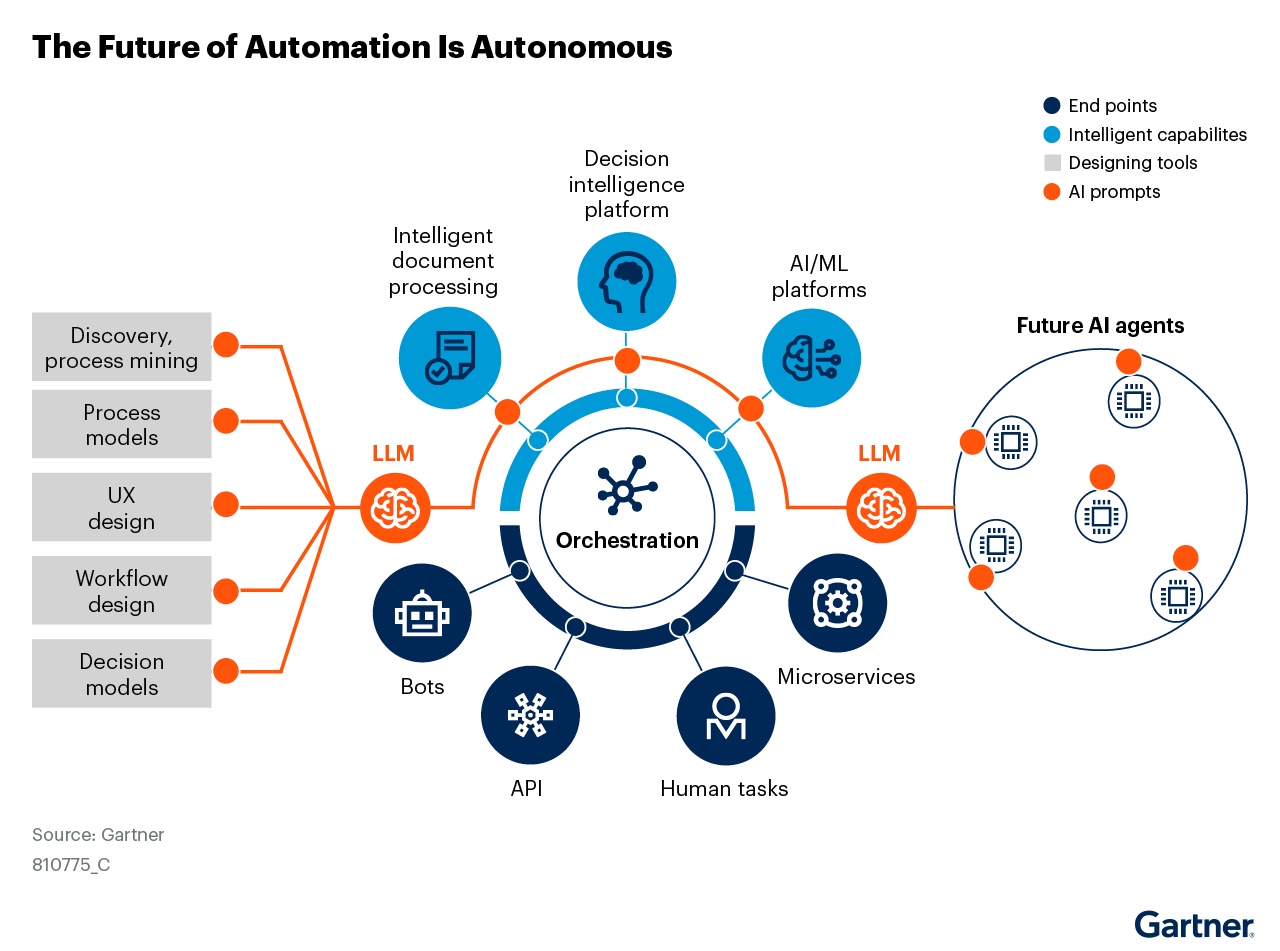
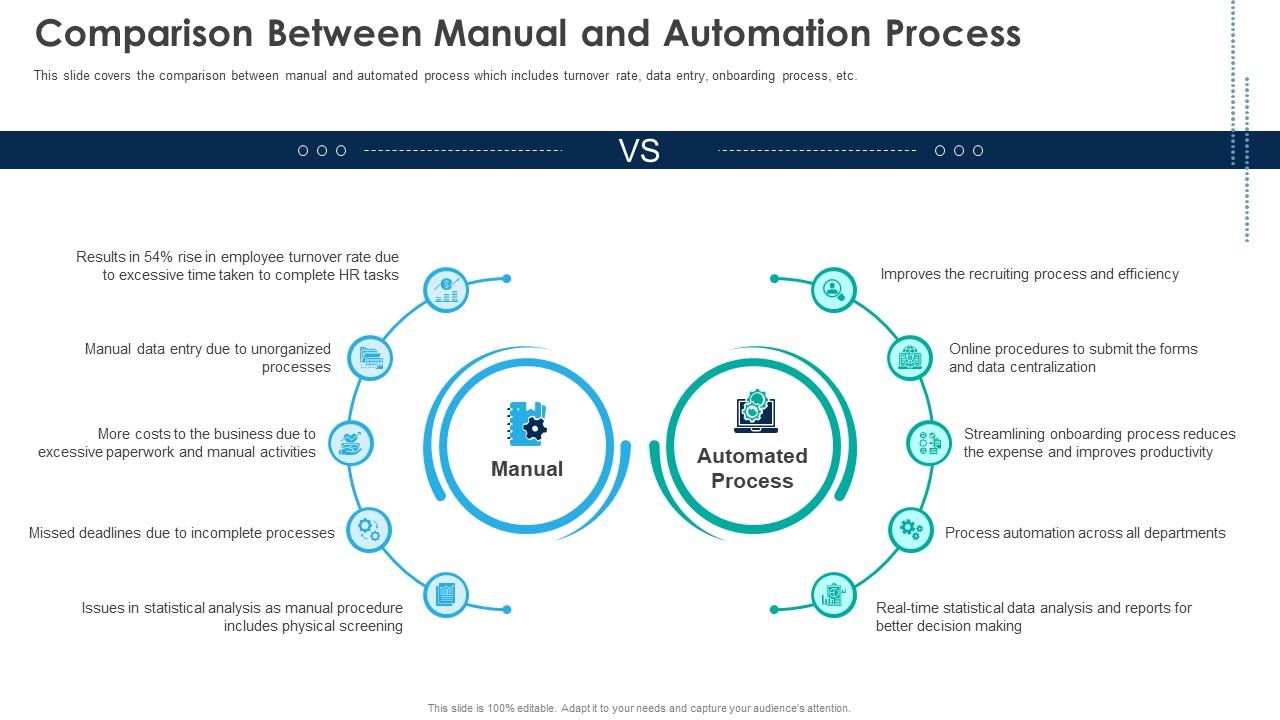

In today’s rapid business environment, automation isn’t just a tech-buzzword, it’s a strategic lever for growth, efficiency and operational excellence. For those of us in PeopleOps, bridging the gap between business strategy and operational agility means helping our organisations figure out what to automate, why, and how. In this blog we’ll walk through how your business can identify automation opportunities: the pain-points, the criteria, real-world scenarios, and how PeopleOps can drive the transformation.
Why it matters
Automation of business processes (often referred to as Business Process Automation, or BPA) can help companies:
- Reduce manual, repetitive work and free up human capacity for higher-value tasks. flowforma.com+1
- Improve accuracy and consistency in operations (less human error, more standardisation). solvexia.com+1
- Increase transparency and traceability of processes (important for audit/compliance, especially in HR, Finance, etc.). flowforma.com+1
- Enhance employee experience, removing “busy work” from talented people so they can focus on strategic, people-centred tasks.
- Ultimately, deliver cost savings, faster turnaround, and scalability.
For PeopleOps especially, automation is not just about tech, it’s about enabling your workforce, improving the employee lifecycle, making your systems work for you rather than the other way around.
The challenge: Knowing what to automate
One of the most common pain-points organisations face is that they don’t know which tasks/processes should be automated. They may have heard of “RPA”, “workflow automation”, “digital transformation”, but figuring out where to apply it can feel overwhelming.
Common symptoms:
- People in HR, Ops, Finance complaining they spend 50 %+ of their time on admin tasks.
- Many manual spreadsheet updates, email chains, approvals, and data duplication.
- High error rates in routine tasks (e.g., onboarding data entry mistakes).
- Lack of process documentation: you don’t even fully know how a process works today.
- Slow cycle times for simple things (e.g., leave approvals, expense reimbursements, supplier onboarding).
- Departments with “someone knows how this works” but it’s not documented, a risk.
When you see these symptoms, that’s a red flag that automation could help but you still need to prioritise.
Step-by-step: How to identify automation opportunities
Here is a structured approach, mixing business and technical lenses, suitable for PeopleOps and business stakeholders to collaborate together.
1. Process audit & mapping
Start by getting visibility into your processes. What workflows are happening today? Who owns them? How long do they take?
- Document high-volume, high-frequency tasks.
- Map the steps, decision points, hand-offs, approvals.
- Use tools like process mining or workflow logs if you have them, for example Microsoft Power Automate ’s “Process Advisor” feature surfaces automation opportunities by analysing actual activity. Microsoft Learn
- Engage stakeholders: ask the people doing the work where the pain is (manual, repetitive, error-prone steps).
- Clarify business goals tied to each process (e.g., reduce onboarding time from 10 days to 3 days).
2. Apply criteria: Is this process a good candidate?
Not every process is worth automating (at least not initially). You’ll want to evaluate using criteria. Some widely recommended criteria:
- Repetitiveness & volume: Tasks that happen many times, or will happen many times, have better ROI. Mulesoft+1
- Predictability & standardisation: If the process has well-defined rules and few exceptions, it’s a good fit. Reddit+1
- Stability: The process is stable (not changing every month) so the automation investment is justified. Reddit
- Data-driven / structured: Processes where tasks involve structured data, forms, systems instead of entirely human judgement. solvexia.com
- High error/human risk: If manual tasks lead to errors, compliance risks or key-person dependency, automation can mitigate that. solvexia.com
- Pain points & business value: Look for tasks where automation would relieve people, speed things up, reduce cost/risks. If you can articulate the ROI, good. Automaly
3. Prioritise and select your “quick wins”
After auditing and applying criteria, you’ll have a list of possible candidates. Now prioritise:
- Estimate impact: time saved, error reduction, cost savings, improved employee experience.
- Estimate effort: complexity of automation, system dependencies, exceptions, change management.
- Choose a few “low hanging fruits” (high impact, low effort) to demonstrate value quickly. This helps build momentum and buy-in.
- Example: An onboarding form that still uses Excel + email could be automated quickly vs a heavily customised legacy back-end process.
4. Pilot automation
Take one process, implement automation, monitor.
- Track metrics: before-vs-after time, error rate, employee satisfaction.
- Monitor for exceptions/adaptation (often real-world processes have edge cases).
- Adjust and refine.
5. Scale & institutionalise
Once you’ve had a successful pilot, you can scale:
- Create an automation pipeline or intake process for future automation requests.
- Build governance (PeopleOps + IT) — to evaluate, prioritise, and manage automation efforts.
- Encourage culture of continuous improvement: ask “what else can we automate?” regularly.
- Monitor ongoing value. Automation isn’t just “set & forget”, maintain, update, expand.
Real-world scenarios in PeopleOps context
Scenario 1: Employee Onboarding
In a mid-sized company, the PeopleOps team noticed that new hires were waiting 7–10 business days before all system access, IT provisioning, payroll setup and training were completed. The process involved multiple spreadsheets, email chains, manual hand-offs.
They audited the steps, mapped them and found: data entry duplication, manual manual approvals, variance in timelines, high risk of mis-keying information.
Using criteria: high volume (many hires per year), predictable (standard onboarding steps), high pain (wait time impacts new-hire experience) → good candidate.
They prioritised this, implemented workflow automation (forms + routing via workflow software) and reduced onboarding time to 2–3 days. New employees started delivering value sooner; PeopleOps time freed for strategic work (culture, retention).
Scenario 2: Leave-and-Absence Approvals
Another company’s HR team found employees used email to request leave, managers replied, HR team manually recorded in Excel, then payroll updated. Delays, confusion, manual errors were common.
Auditing showed: predictable process, structured data (dates, employee ID, type of leave), moderate volume, clear hand-offs.
They automated the workflow: employee self-service form → manager approval → HR update → payroll notification. Benefits: faster approvals, less manual tracking, better data for analytics.
This freed HR from chasing approvals, improved transparency.
Scenario 3: Supplier or Vendor Onboarding (Cross-functional)
In operations/finance, vendor onboarding involved collecting documentation, compliance checks, manual email follow-ups. Many exceptions, multiple spreadsheets and systems.
While this process had higher complexity (exceptions, contingencies), the volume and manual cost justified automation. The team applied process-mapping, identified repetitive steps (document collection, basic checks), automated those, leaving only exceptions for human review. Result: reduced onboarding time and cost, improved compliance audit trail.
These examples illustrate how PeopleOps (and adjacent functions) can partner with automation/IT to deliver real-business impact.
How PeopleOps can lead & partner in automation
As a PeopleOps writer, here are ways you can position and drive automation initiatives:
- Speak both business & tech language: Use keywords like “workflow automation”, “robotic process automation (RPA)”, “intelligent automation”, “process mining”, “employee experience” and connect to business outcomes (efficiency, scalability, engagement).
- Engage stakeholders early: Collaborate with HR, Finance, IT, Operations to map processes and pain-points. PeopleOps knows the people side, participation, adoption, change management.
- Frame automation as a people-enabler: Don’t just talk about cost savings, highlight how it frees PeopleOps or employees for more strategic, human work (learning & development, culture building, talent engagement).
- Governance & pipeline: Establish an intake mechanism for process improvement requests: “Which HR/people/ops process causes you the most delay/friction?” Prioritise together.
- Change management and training: Automation can change roles/tasks. Prepare your teams: communicate, train, manage transition. PeopleOps can lead adoption and reinforce the value.
- Measure & communicate success: After pilot automation, share results (time saved, error reduction, employee satisfaction improved) to build momentum.
- Scalability mindset: Once you have a few successes, encourage continuous improvement culture: “What else can we automate next?” Let PeopleOps be the champion of that.
Pitfalls to watch
- Automating a broken process doesn’t fix it, first model & optimise the process.
- Don’t jump to complex automation too soon, focusing on quick wins builds trust.
- Change management is crucial: employees may fear automation; framing it as an enabler helps.
- Maintenance: automation requires oversight (exception handling, updates), build that into your plan.
- Prioritisation: not every process will deliver ROI, be selective, measure carefully.
Final thoughts
Identifying what can be automated in your business is both a science and an art. It requires process-visibility, business insight, stakeholder collaboration and a clear focus on outcomes. For PeopleOps, this is a great opportunity to lead: helping your organisation unlock efficiency, improve employee experience and scale operations.
By following a methodical approach, audit processes, apply criteria, prioritise, pilot, measure and scale, you can turn automation from a technical project into a business enabler and a people enabler.
Leave a Reply