Introduction
In today’s fast-moving business environment, organisations often struggle because the operational processes they rely on are not fully visible, not well documented, or hidden in informal workarounds. This leads to inefficiencies, hidden costs, risk of non-compliance, and sub-optimal employee experience.
Enter process discovery, the practice of uncovering, mapping and understanding how work really happens (the “as-is” state) so that improvements, automation and transformation can be undertaken with real clarity. According to ABBYY, process discovery “is the analysis of operational activities to uncover how processes work across people, systems, and data to identify where to optimise and automate.” Automation Anywhere+2ABBYY+2
For PeopleOps teams, the ones balancing people-process‐technology—having the right tools and frameworks for process discovery is essential. You’re not just mapping processes for fun; you’re enabling better people experiences, reducing waste, improving compliance, and supporting business agility.
In this blog we’ll explore:
- What process discovery means today
- Typical pain points and why process discovery matters
- Key frameworks that guide how to do process discovery
- Leading tools (and how to choose them)
- A real-world scenario (PeopleOps flavour)
- How PeopleOps teams can get started
1. What is Process Discovery?
At its core, process discovery means:
- Identifying and capturing how processes actually operate (not just how they’re supposed to). Navvia
- Mapping flows: people, systems, data, hand-offs, decision points.
- Analysing the “as-is” to surface bottlenecks, redundancies, risks. ProcessMaker+1
- Creating a reliable foundation for process improvement, automation, standardisation and transformation.


Why it matters
- Without it, people often rely on “tribal knowledge” or undocumented processes → higher risk when teams change.
- It enables better decision-making (e.g., “which process should we automate next?”). As Navvia puts it: process discovery is “the first step in the Business Process Management cycle.” Navvia
- It supports transparency across people + systems: you see how work flows between teams, tools, data.
- Especially for PeopleOps: workforce processes (on-boarding, off-boarding, role changes, approvals) often span multiple systems and people, discovery helps build clarity.
Benefits (select)
- Better process visibility and documentation. ABBYY
- Identification of inefficiencies, bottlenecks, automation opportunities. Navvia+1
- Stronger alignment between business strategy and the actual operations.
- Improved change readiness, when you understand what is, you can design what could be.
2. Pain Points & Challenges (Why PeopleOps Should Care)
Let’s look at some typical pain points that drive the need for process discovery, especially relevant for PeopleOps and technical/business stakeholders alike.
Pain points
- Undocumented hand-offs / people dependencies: e.g., an HR workflow that passes between recruiter → hiring manager → HR operations → IT provisioning; some parts are in emails, some in spreadsheets.
- System complexity & silos: When multiple HR/IT/payroll systems exist, it’s hard to see how work actually flows across them.
- Manual effort and low automation: High manual tasks = higher cost, slower cycle, higher error risk.
- Poor visibility of real performance: We may know targets (e.g., “on-boarding in 5 days”) but not actually know how often we achieve them or where the delay occurs.
- Change risk: When you redesign a process or implement automation (RPA, low-code), if you don’t know the as-is, you run the risk of automating inefficiencies or breaking things.
- Compliance and audit risk: Especially with HR processes (data privacy, access provisioning, off-boarding), lack of clarity can expose risk.
Why this is a PeopleOps concern
PeopleOps is often at the crossroads of people, process and technology. When the process layer is opaque:
- You can’t deliver smooth employee experiences (on-boarding, role changes)
- You can’t measure or improve HR operations effectively
- You may implement automation/rpa that doesn’t deliver full benefit because underlying process isn’t optimised
- You may face audit/operational risk (e.g., stale access rights)
Thus, process discovery isn’t just “IT concern”, it’s central to how people processes are designed, delivered and improved.
3. Frameworks for Process Discovery
To make process discovery structured and repeatable, organisations lean on frameworks. A framework gives you a consistent approach to mapping, analysing and improving processes. Here are key ones relevant for PeopleOps.
3.1 APQC’s Process Classification Framework (PCF)
One of the widely-used frameworks is APQC’s PCF. According to APQC:
“APQC’s Process Classification Framework® (PCF) is an incredibly useful tool for jump-starting process discovery, developing a common language for processes, creating end-to-end process maps, and more.” APQC
What it provides:
- A standard taxonomy of business processes (e.g., HR, Supply Chain, Finance)
- A common language so that stakeholders across teams align on “what process” is being discussed.
- A starting point for mapping your organisation’s processes onto a known framework.
Use case for PeopleOps:
If you’re mapping HR operations (e.g., “talent acquisition”, “on-boarding”, “performance management”), you can use PCF to anchor your process maps in a standard structure, which helps cross-organisation clarity and benchmarking.
3.2 Process Discovery / Process Mining Framework
As described by ProcessMaker, you can think of process discovery using an “operating model” approach:
“It’s important to leverage a process discovery framework to clarify and communicate how process discovery serves as a launchpad for process optimisation and digital transformation.” ProcessMaker
Key elements of such a framework:
- Capture event data / process execution traces (if automated systems exist)
- Map and visualise the workflows (people, systems, data)
- Analyse: where are delays, deviations, rework loops
- Prioritise: which processes yield most value if improved/automated
- Optimise/automate and monitor.
Why this matters in practice:
You must not assume you know the process. Even if you have SOPs, the “actual” process may differ. A good framework keeps you disciplined: discover → visualise → analyse → improve.
3.3 Assessment-and-Maturity Frameworks (e.g., TIPA)
For organisations seeking to go beyond mapping into process maturity, frameworks like TIPA (Tudor IT Process Assessment) allow you to assess capability relative to recognised best-practice standards (e.g., ISO/IEC 15504) Wikipedia
While more common in IT/Service-Management domains, PeopleOps teams may use maturity frameworks to assess how “mature” their processes are (documented, measured, controlled, optimised).
Use case for PeopleOps:
You might assess your “role-to-pay” or “on-boarding” process maturity: are they ad-hoc → defined → measured → optimised? The answer helps sequence improvement efforts.
3.4 Visual Frameworks & Modelling Methods
Classic modelling tools such as process diagrams, swim-lanes, value-stream maps, and even root-cause analysis frameworks (e.g., fishbone diagrams) support discovery.
For example, the “fishbone” or Ishikawa diagram is used in root-cause analysis of issues within processes. Wikipedia
These help you visualise not just the flow but the causes of delays, rework, or variation.
4. Tools for Process Discovery
Having frameworks is great, but you’ll need tools to execute discovery efficiently—especially for mid-to-large organisations. Below are categories of tools + how PeopleOps can evaluate them.
4.1 Categories of Tools
- Process mapping / modelling tools: These help you visually map workflows, hand-offs, decision points. Example: IBM Blueworks Live which supports discovery maps, process diagrams and documentation. Wikipedia
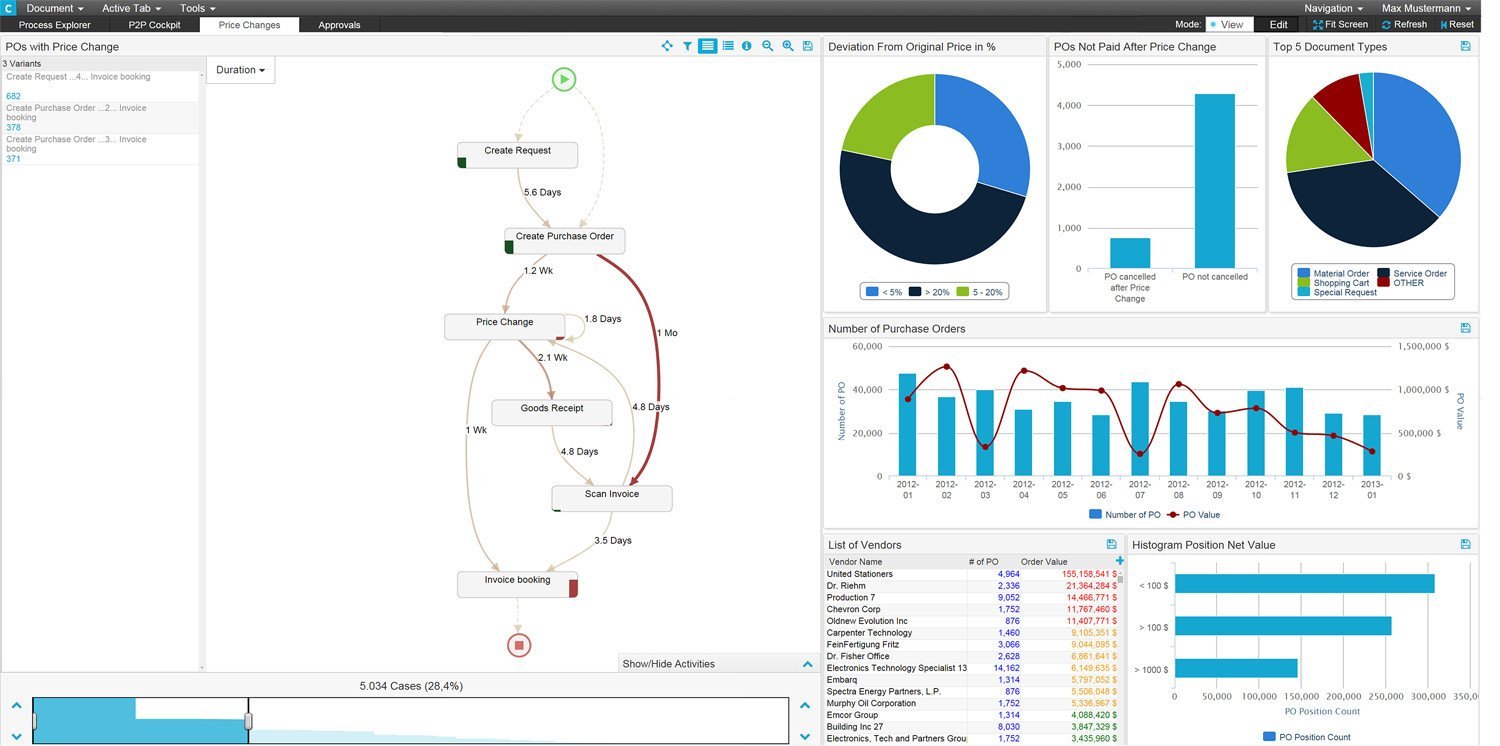
- Process mining / event-log analysis tools: These tools ingest system-event logs (ERP, HRIS, ITSM) and automatically generate models, identify bottlenecks, deviations. Example: the article by Navvia lists tools like Celonis, UiPath Process Mining, LANA Process Mining. Navvia
- Automated discovery / RPA-enabled discovery tools: These monitor user-activities (clicks, keystrokes, screen flows) to infer process steps. Example: Blue Prism’s article on process discovery for RPA. SS&C Blue Prism
- Hybrid tools / custom frameworks: Some tools allow combination of manual modelling + event-data mining. For example, research papers describe tools like Cortado that let users incrementally build process models from event data. arXiv
4.2 What to look for when selecting a tool
For PeopleOps / business-tech stakeholder teams, here are criteria you should evaluate:
- Ease of use (for process owners, not just technical teams): If HR/business users can map processes without heavy IT.
- Visibility across people + systems: The tool should show how work flows between people, systems, data.
- Support for event-data / mining: If you have logs (HRIS, ITSM, payroll), the tool should ingest them.
- Collaboration & documentation features: PeopleOps often needs to involve HR, IT, operations, compliance so collaboration and versioning matter.
- Analytics & insights: The tool should highlight bottlenecks, re-work loops, process variants.
- Integration & scalability: Especially in organisation with multiple systems/silos.
- Governance and compliance support: Ability to document process, controls, audit trails.
- Cost-benefit / ROI clarity: Especially when you’re making the business case for investment.
4.3 Tool Examples in Action
- Using IBM Blueworks Live: An HR team maps the on-boarding process across recruiter → hiring manager → HR ops → IT provisioning. They use the “discovery map” view (fast, broad) and then refine into a BPMN diagram for swim-lanes and decision logic.
- Using a process mining tool (e.g., Celonis): A payroll operations team looks at event logs from their payroll system and identifies that 30% of on-boarding new employees takes more than 7 days, with a high variation because of “data entry correction” loops. They then prioritise automation of that manual data correction step.
- Using RPA-enabled discovery: A PeopleOps function deploys a lightweight monitoring agent to capture how HR admin users navigate between systems for role changes; they discover that five different screens are used for a single role-change process, which offers a candidate process to streamline / automate.
5. Real-World Scenario: PeopleOps Use Case
Let’s walk through a realistic scenario in a mid-sized organisation (~1000+ employees) where PeopleOps uses process discovery to improve the role-change process (e.g., internal transfers, promotions).
Scenario
The PeopleOps team has noticed that internal transfers (changing role, manager, team) are taking too long and causing confusion: employee access lags, paperwork delayed, and managers complain. They decide to use process discovery.
Step 1: Discovery
- They interview stakeholders: PeopleOps, HR business partners, IT provisioning, team managers.
- They map the current process: request raised → HRBP approves → PeopleOps updates role in HRIS → IT gets ticket for access changes → manager confirms changes → manual spreadsheet to track.
- They overlay system logs: they look at ticket-system logs for IT and HRIS logs; identify the actual timeline and hand-offs (using a process mining tool).
- They find variants: sometimes manager sends email instead of ticket; sometimes HRBP forgets to update the spreadsheet; sometimes IT waits for PeopleOps-confirmation manually.
Step 2: Analysis
- They visualise the flow: swim-lane diagram shows delays between HRBP approval and PeopleOps update (avg 2 days), and delays between PeopleOps update and IT access change (avg 5 days).
- They highlight re-work: in 20% of cases IT re-opens the ticket because access request incomplete.
- They benchmark via PCF: role-change is mapped under “HR operations > employee life-cycle” and they compare to industry best-practice (target = access changed within 24 hours).
Step 3: Prioritisation & Improvement
- PeopleOps decides to prioritise: (a) automate the ticket creation from HRIS update to IT system (remove the manual spreadsheet), (b) standardise the request form so fewer errors.
- They also decide to monitor end-to-end cycle time going forward via a dashboard.
Step 4: Implementation & Monitoring
- They pilot the new flow for 50 internal transfers. The process mining tool shows the average time dropped from 7 days to 2 days.
- They document the improved process, update SOPs, train stakeholders.
- They have monthly reviews to ensure compliance and monitor any new variants creeping in.
Why this scenario matters for PeopleOps
- Demonstrates how process discovery crosses people, process and technology.
- Shows real-world value (reduced cycle time, improved experience).
- Illustrates how frameworks + tools combine to support a PeopleOps initiative.
- Highlights the role of PeopleOps as process-owner, not just HR administrator.
6. Getting Started: A PeopleOps Roadmap
If your PeopleOps team is ready to embark on process discovery, here’s a pragmatic roadmap:
Step 1: Scope & prioritise
- Select one process with high impact (e.g., on-boarding, role change, off-boarding).
- Involve key stakeholders (HR, IT, business managers).
- Define success metrics (cycle time, error rate, user satisfaction).
Step 2: Choose your framework
- Use PCF (or similar) to map where this process sits in your organisation.
- Adopt a process discovery framework: e.g., capture → visualise → analyse → improve.
- Decide if you’ll assess maturity (optional at early stage).
Step 3: Select your toolset
- For simpler processes: a mapping tool (e.g., Blueworks Live) may suffice.
- For data-rich/complex processes: consider process-mining/automated discovery.
- Ensure the tool meets PeopleOps needs: collaboration, dashboards, ease of use.
Step 4: Execute discovery
- Map the “as-is” workflow (interviews, documentation, workshops).
- If applicable, collect event logs/data from HRIS, systems.
- Visualise flows, variants, bottlenecks.
Step 5: Analyse & prioritise improvements
- Identify key delays, re-work loops, non-value activities.
- Prioritise based on effort vs impact (PeopleOps + business case).
Step 6: Implement & monitor
- Update process documentation, SOPs.
- Automate or streamline as agreed.
- Monitor using dashboards (cycle time, error rate, user feedback).
- Plan for continuous improvement: process discovery is not “once-and-done”.
Step 7: Communicate & embed
- Share results with senior leadership (impact: cost, speed, experience).
- Ensure process ownership & governance (PeopleOps owns process definition, system owners own execution).
- Foster culture of transparency and continuous improvement.
Conclusion
For PeopleOps teams, process discovery is a strategic capability not just a technical exercise. By leveraging the right frameworks and tools, you can uncover how work actually happens, expose hidden inefficiencies, and build the foundation for better employee experience, smoother operations and effective automation.
Key take-aways:
- Use frameworks (PCF, process mining models, maturity models) to give structure and language.
- Select tools that support both business and technical stakeholders.
- Focus on the human-process-technology interface, PeopleOps sits right at that intersection.
- Discover first, then improve. Skipping discovery risks automating inefficiency or missing real issues.
At the end, process discovery empowers PeopleOps to move from reactive “fire-fighting” to proactive “process optimisation” mode.
Leave a Reply