In today’s construction industry, where margins are tight, labour & material costs fluctuate constantly, and projects need real-time visibility, having the right financial and project-tracking software is critical. For many contractors and mid-sized construction firms, QuickBooks Desktop Enterprise (QB DE) – particularly its Contractor/Construction Edition – is a go-to solution.
In this blog we’ll explore:
- Why construction firms gravitate to QuickBooks Desktop Enterprise (its strengths)
- Where it truly adds value (real-world scenarios)
- What to watch out for – the limits and pain points
- How a PeopleOps partner-approach can help you implement it in a way that maximises value and minimises risk
Let’s dive in.
1. Why Construction Businesses Choose QuickBooks Desktop Enterprise
1.1 Construction-specific edition and job costing tools
QuickBooks Desktop Enterprise offers an edition tailored for contractors (often called “Contractor Edition” or “Construction & Contractors”). According to Intuit, the Contractor Edition “provides tools tailored for contractors to manage estimates, costs, and profitability.” QuickBooks+2Ace Cloud Hosting+2
Some specific strengths:
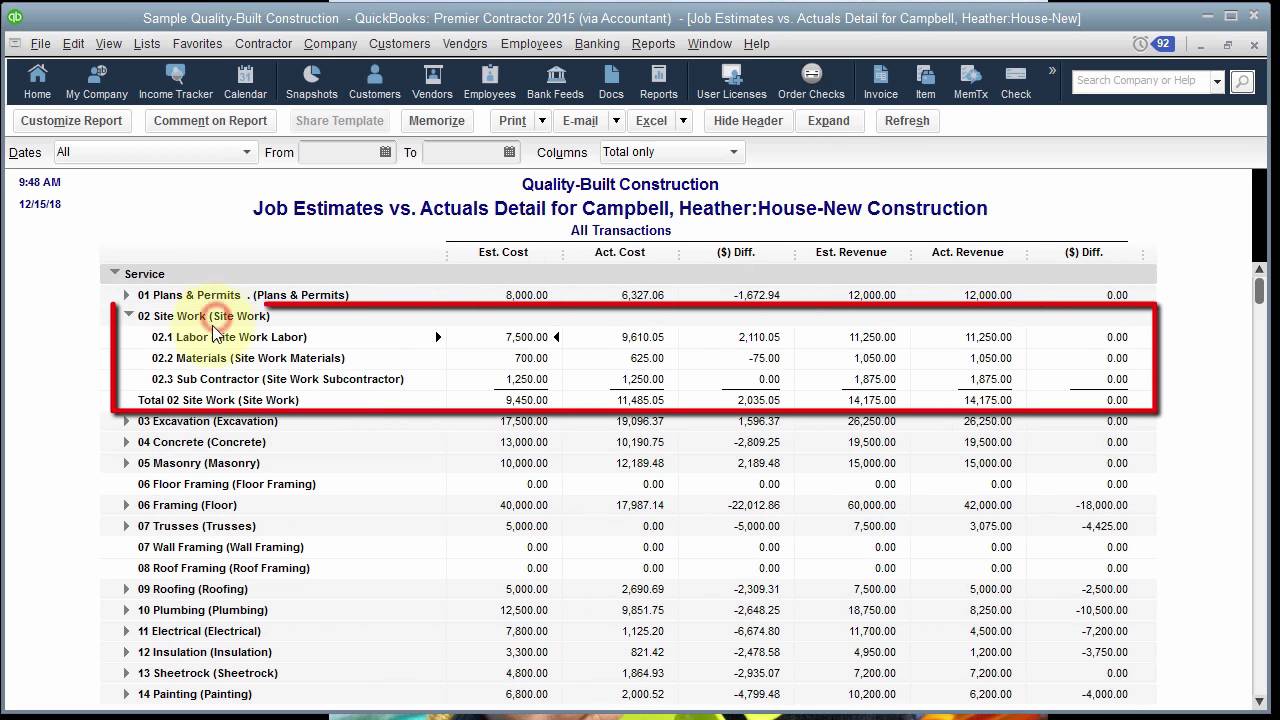
- You can create detailed job estimates, convert them into projects, issue purchase orders tied to jobs, track actuals vs budget. Ace Cloud Hosting+1
- You can track job costs by cost-code, phase, service item, labour vs material. For example, the AceCloudHosting blog says: “Track costs by job, phase, and cost code with unmatched depth compared to QBO.” Ace Cloud Hosting
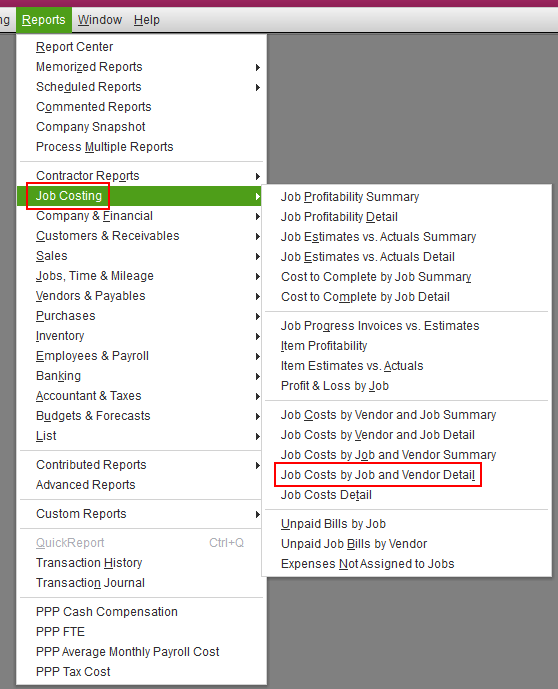
- Contractor-specific reports are built-in: e.g., Job Profitability, Committed Costs by Job, Estimates vs Actuals. Ace Cloud Hosting+1
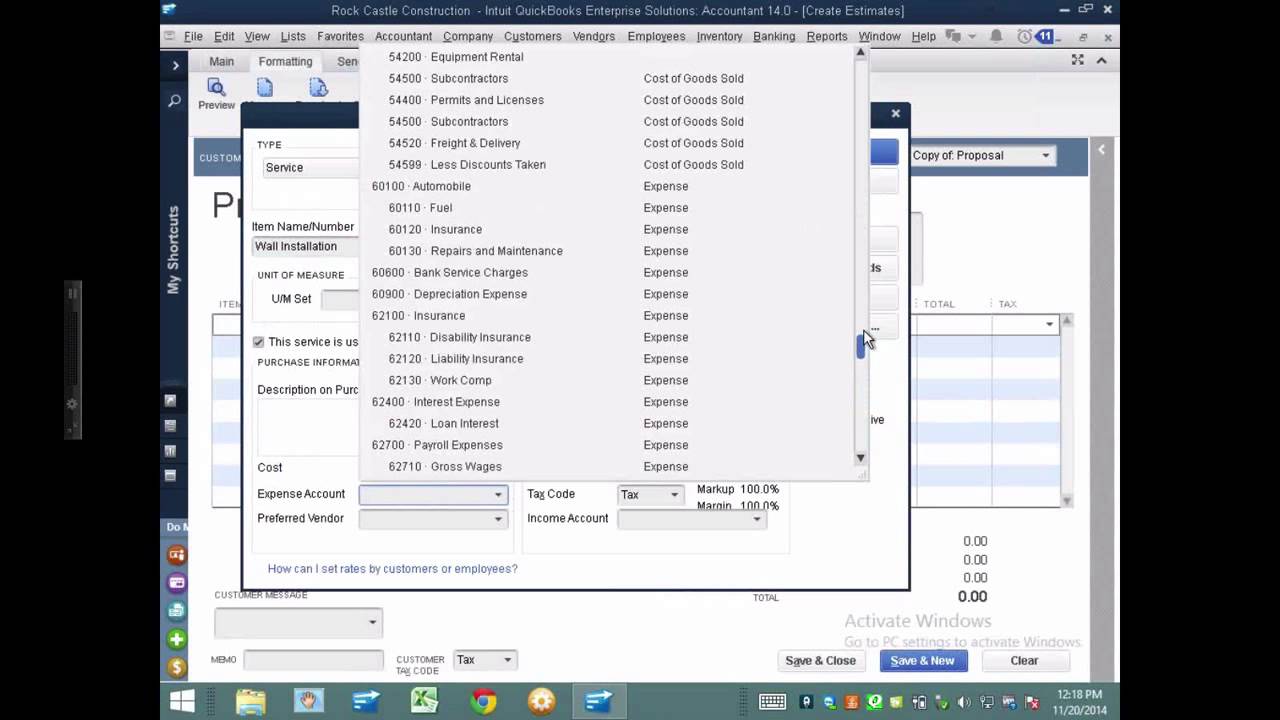
- The industry edition aligns chart of accounts, menu items and typical construction workflows. Intuit says the edition has “additional reports and tools … such as charts of accounts and menu items tailored to your business type.” QuickBooks
1.2 Scalability for growing firms
Construction firms often grow from small jobs to multiple simultaneous projects, multiple crews, multiple cost-centres. QuickBooks Desktop Enterprise supports a higher capacity than many “small business” accounting systems:
- It supports up to 40 simultaneous users (depending on licence) and advanced user-roles. Method+2Software Connect+2
- It supports very large lists: For example, Intuit notes in its “capacity limitations” article that QuickBooks Enterprise can track large volumes, though there are limits (we’ll cover later). QuickBooks+1
- Many mid‐sized construction firms find it a “light ERP” alternative: SoftwareConnect says it “functions as a light, affordable ERP system” for the right sized business. Software Connect
1.3 Integration with field-services / mobile time-tracking and remote access
Although it’s a desktop product, QuickBooks Desktop Enterprise offers add-on support for cloud hosting and field-service/time tracking integration:
- The Intuit site says you can work from anywhere via “cloud hosting” of the desktop version, and manage workers in the field with mobile time tracking. QuickBooks
- This is especially useful in construction: crews out on site, needing to log labour hours by job/phase, material receipts on-site, etc. Having that integration reduces manual data-entry and lag.
- For example, you might have a foreman capture time and material costs via a mobile app and sync into the job cost ledger in near real-time.
1.4 Familiar ecosystem, ease of adoption
For many construction firms the accounting team is already accustomed to the QuickBooks ecosystem (menus, reports, chart of accounts). Adopting Enterprise means less “from‐scratch” learning than switching to a totally different construction-ERP.
Also, the availability of many third-party add-ons / integrations in the QuickBooks ecosystem means you can extend functionality (e.g., for equipment tracking, subcontractor management, etc).
2. Real-World Scenario: How a Construction Firm Uses It
Let’s walk through a scenario to illustrate how QuickBooks Desktop Enterprise might be used in practice.
Scenario: “Mid-sized General Contractor 8 simultaneous jobs, 3 crews, multi-phase projects”
Company profile: A general contractor with 8 active projects, each project has multiple phases (demolition, framing, finishing), uses subcontractors for certain tasks, uses equipment rentals, tracks labour and materials separately, deals with change orders and retainage.
How QuickBooks Desktop Enterprise is used:
- At bid time, they create a detailed estimate in the Contractor Edition: line-items for each phase, materials, labour, subcontractor costs.
- When the job is awarded, the estimate becomes the baseline budget. They issue purchase orders directly from that job estimate: e.g., material PO for phase1.
- On site, foremen log labour hours via a mobile app (integrated or synced) and tag them to the specific job and phase. Material receipts and subcontractor invoices are entered and tagged similarly.
- The project manager monitors “Committed Costs” (purchase orders issued) vs actuals (invoices received) vs budget. They also run “Cost to Complete” and “Estimates vs Actuals” reports to monitor profitability by job.
- Because the firm has many jobs, they benefit from 40 user licences (office staff, project managers, crews) and multi-company or multi-job reporting. They can see aggregated profitability, or drill down to job-level.
- They host the software via cloud-hosting so that managers on site or remote can access the company file, making data more timely.
- As the firm grows, they avoid switching platforms (which would be costly) because QB Desktop Enterprise scales reasonably well for their size.
This workflow covers many of the “must-have” capabilities for construction accounting: job costing, labour tracking, purchase orders, estimate-to-actual comparisons, multi-phase tracking.
3. The Limits & Pain-Points to Watch Out For
No software is perfect. While QuickBooks Desktop Enterprise offers many strengths, construction firms should be aware of its limitations, especially as they scale or have specialised requirements.
3.1 File size / capacity / performance constraints
- According to Intuit’s own “Capacity Limitations” article: for QuickBooks Desktop Enterprise, the total number of customer, vendor, employee records (active + inactive) must be under 100 000 in one file. QuickBooks
- Reviewers say that once the data file gets large (lots of transactions, many years of history, large number of jobs) performance deteriorates, and some firms had to “shrink files” periodically. Software Connect
- If you have very large volumes of jobs, subcontractor transactions, equipment hours, multi-entity (multiple legal companies) needs, you may hit “outgrown” status.
3.2 Gaps in specialized construction features
- While the Contractor Edition adds many features, there remain industry-specific gaps: For example, handling AIA billing forms (G702/G703), retainage, WIP (work-in‐progress) schedules, cost-to-complete forecasting may require add-ons or manual spreadsheets. As the AceCloudHosting blog notes: “AIA Billing, like QBO, Enterprise doesn’t natively handle G702/G703 forms. Add-ons such as Sunburst CAPS or ConstructionOnline fill this gap.” Ace Cloud Hosting
- Some construction firms with very complex cost allocation needs (e.g., federal-contract certified-payroll with splits by cost code, fringe benefits, multi-cost‐pool allocations) find QB Desktop Enterprise limiting without heavy customization. One review states: “Our biggest issue is being able to split expense line items by percentage to allocate across several projects. … I have had to use Excel to track the expenses.” Software Connect
- If you have advanced BIM-integration, equipment maintenance scheduling, large fleet tracking, or need a full ERP module for subcontractor management, you may find limitations.
3.3 Desktop architecture / remote access challenges
- The “Desktop” in QuickBooks Desktop Enterprise means the core application runs on Windows; out-of-the-box remote access is not as seamless as cloud-native solutions. You’ll often require hosting/remote-desktop service to enable crews or remote site staff to access the software. The Intuit site says you can host via cloud but it adds complexity and cost. QuickBooks
- This means you may need to invest in IT infrastructure or third-party hosting, VPNs, remote-desktop licensing, etc. For companies who prioritise mobile/field access, this can become a friction point.
3.4 Cost / complexity of implementation
- QuickBooks Desktop Enterprise is more expensive than standard QuickBooks versions and has a steeper learning curve. SoftwareConnect reviews mention: “It’s the most expensive version of QuickBooks” and “complex implementation and onboarding.” Software Connect+1
- If your construction business has many cost codes, many job phases, multiple subcontractors, you’ll need disciplined setup (chart of accounts, job coding, cost-codes) and ongoing maintenance. Mistakes or poorly designed job costing setup can degrade usefulness (and lead to “hours analysing different accounts” as one user noted). Software Connect
3.5 Scaling beyond mid-sized construction / multi-entity limitations
- For very large contractors (hundreds of jobs, multi-states, complex compliance, equipment fleets, large ERP requirements), QB Desktop Enterprise may eventually become the limiting tool. Many users say “we’ve outgrown it” or “need something with a few more options.” Software Connect
- Multi-company consolidation, inter-company transactions, multi-currency, multi-legal entities may require separate company files or add-ons; this can increase complexity.
4. How PeopleOps Can Help You Get the Most from QuickBooks Desktop Enterprise
At PeopleOps (your partner in HR + ops + systems), our approach aims to bridge the gap between “accounting software” and “construction operations software.” Here’s how we help:
4.1 Requirements, driven selection & scoping
Before you deploy QuickBooks Desktop Enterprise, we work with your leadership, project-management team, cost-accounting team, and field crews to map your current workflows such as:
- Estimating → PO issuance → material receipt → labour hours → job cost tallying
- Subcontractor management, retainage, change orders, committed costs
- Reporting needs: job profitability, cost-to-complete, cash-flow by job, consolidated across company
- Field access / mobile logging, remote access needs
- Growth plan: how many projects/year, users, cost codes, equipment tracking
Based on this we advise: “Yes, QB DE is a fit” or “we need QB DE + add-on” or “we should consider a dedicated construction ERP”.
4.2 Proper setup and configuration
One of the major pain-points arises from poor setup (cost codes, chart of accounts, job phases, user roles). We help you:
- Design a chart of accounts and cost-code structure aligned with your project-tracking needs
- Set up job templates, phases, service items, material vs labour vs subcontractor cost buckets
- Configure user-roles and permissions (since QB DE supports many users)
- Define workflows: estimate → PO → receipt → invoice → cost to complete → report
- Integrate mobile/field time-tracking and material receipt workflows (so data flows in near-real time)
4.3 Integration planning & add-on selection
We assess gaps (for example, AIA billing forms, retainage, certified payroll, equipment fleet tracking) and help you choose the right add-ons or integrations (e.g., equipment tracking modules, subcontractor portals, mobile receipt capture). This helps you avoid “we’ll do it in Excel” band-aids that become manual burdens.
4.4 Training, adoption & continuous improvement
Even the best software is only as good as how well your team uses it. We support:
- Training project managers, site supervisors, accountants on the system’s job-costing workflows
- Ensuring discipline around coding, data entry, timely reconciliation
- Building dashboards and reports (job profitability, committed cost, cost to complete) so managers actually look at the data
- Periodic review of data-quality, file-size, performance metrics, to ensure you don’t hit scalability/performance issues unnoticed
4.5 Ongoing support & growth planning
As your construction business grows (new jobs, new regions, more users), we help you review whether your QB file size/performance is still okay, whether you need to archive old jobs, split company files, or even plan for a move to more robust ERP. That way you can maximise QB Desktop Enterprise while it fits, and plan ahead before you “outgrow” it.
5. Summary: Is QuickBooks Desktop Enterprise Right for Your Construction Firm?
In short: Yes, for many mid-sized construction firms who need strong job costing, a familiar ecosystem, multi-user scalability, and contractor-specific reports, QuickBooks Desktop Enterprise (Contractor Edition) is a very viable choice. It delivers many must-have capabilities for construction accounting workflows.
However, it is essential to recognise the limits:
- If you have very large data volumes, many years of history, hundreds of jobs, you must monitor file-size and performance.
- If you require highly specialised workflows (AIA billing, complex cost allocations, certified payroll across states, heavy equipment maintenance tracking), you may need add-ons or even consider a dedicated construction ERP down the line.
- If field/mobile access and cloud-native workflows are top priority, the desktop-hosting approach may require extra investment.
- Implementation discipline matters: without proper setup (cost codes, job phases, training) you may under-leverage the software and not gain the full benefit.
From a PeopleOps perspective, our key message to construction firms is: “Don’t let the accounting software hold you back, let it drive project-visibility, cost control and profitability.” If you get the setup (people + process + technology) right, QuickBooks Desktop Enterprise can become a central part of your operational backbone not just the finance silo.
Key Take-aways
- Look for job costing, cost-to-complete, committed costs, labour/material tracking, these are construction-specific needs.
- Ensure your chart of accounts, job coding structure and workflows reflect your real field operations (not just generic accounting).
- Plan for growth: users, jobs, data, reports. Don’t assume “one-file fits forever”.
- Bridge the gap between the office and the field, capture data early and accurately.
- Use reporting as an operational tool (not just month-end fatigue): job profitability dashboards, job cash-flow, early alerts when costs run ahead of budget.
- Know where the software stops and add-ons begin. Budget for that if your firm has advanced requirements.
Leave a Reply