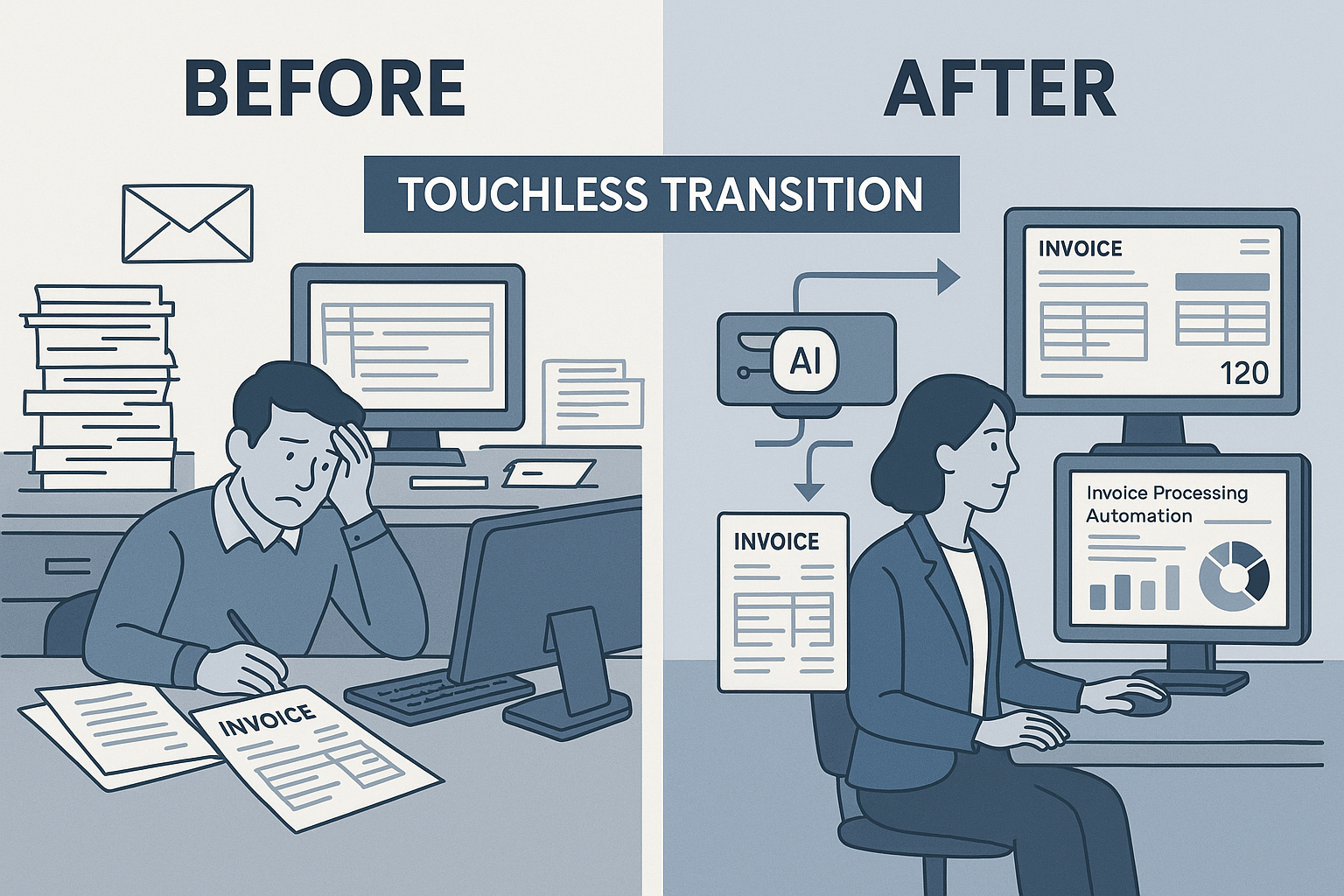
1. The Problem: Manual Invoice Journeys in AP
1.1 Typical manual journey
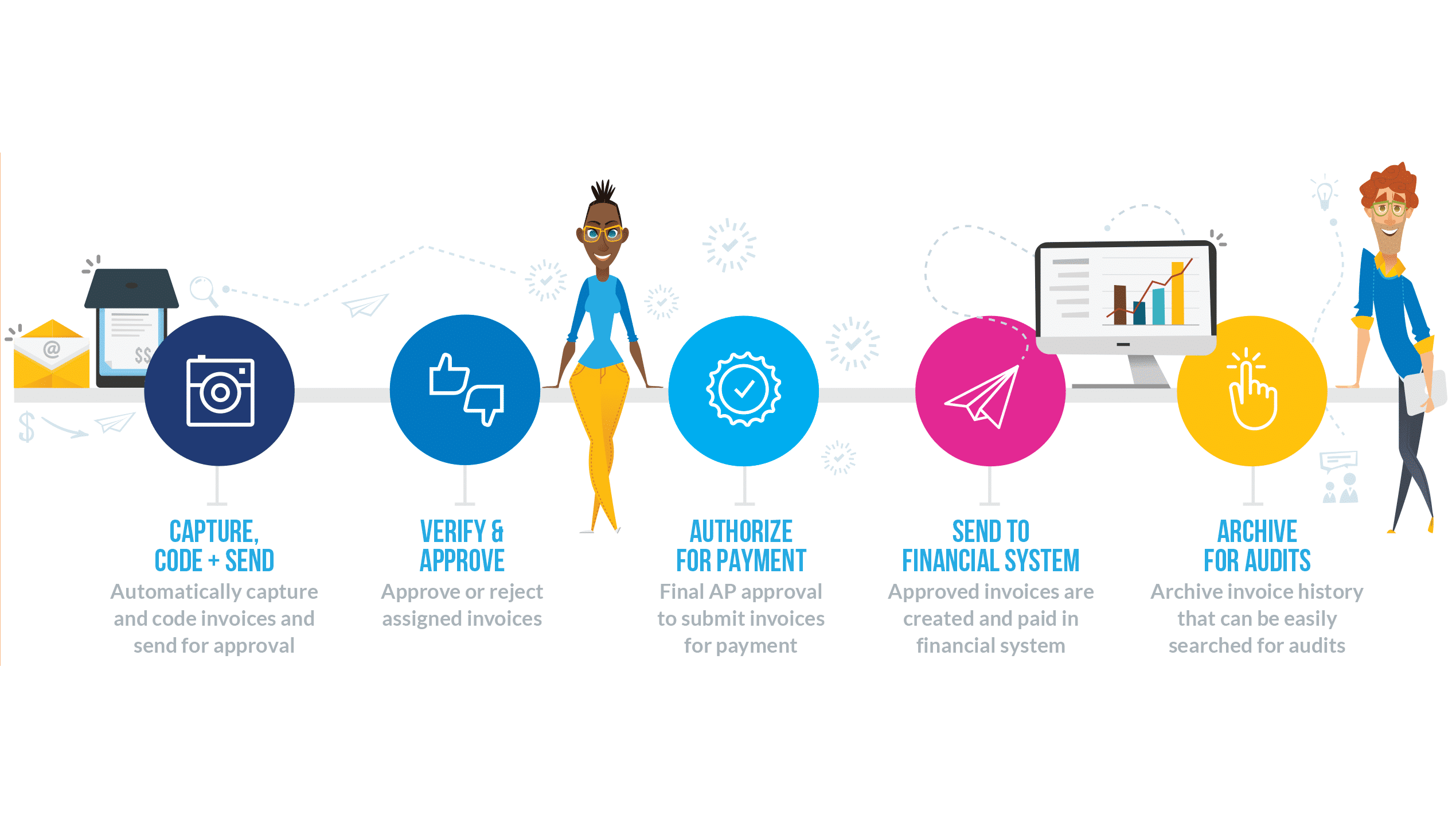
Here’s how a conventional invoice process tends to work in many organisations:
- Supplier sends an invoice (paper, PDF, email)
- AP or finance team manually enters data (vendor, invoice number, amounts) into ERP or accounting system
- Someone checks the invoice against a purchase order (PO) or goods receipt (GRN), often manually
- Invoice goes for approval (via email, print, or routing)
- Once approved, payment is scheduled, posted, and paid
- Archive the invoice, reconcile, handle queries and exceptions


1.2 Pain-points for PeopleOps & finance teams
- High manual effort & cost: Manual entry, routing, approvals consume time and head-count. Some sources claim a touchless process can reduce cost per invoice by over 80 % compared to manual. Basware+2Rossum.ai+2
- Error-prone and compliance risk: Mistyped amounts, duplicate invoices, missing approvals, poor audit trail. Volopay+1
- Slow cycle times: Invoices might languish in queues, causing late payments, lost early-payment discounts, vendor dissatisfaction. medius.com+1
- Limited visibility: Finance and business leaders get delayed or fragmented insights into cash outflows, vendor liabilities, processing bottlenecks. Rossum.ai
- Scaling challenge: As supplier base or transaction volume grows (especially for global/remote operations), manual processes don’t scale efficiently. Rossum.ai+1
- PeopleOps angle: Talent in AP may be frustrated by repetitive tasks; automation offers redeployment to more strategic roles (vendor-relations, analytics) and reduces burnout. Remitra –
Real-world example for context
Imagine a mid-size manufacturing firm with ~10,000 invoices per year across 5 locations. Their AP team is processing invoices via email, paper, and even fax. Data entry errors are frequent; one quarter they had 5 % duplicate payments and missed 3 % of early payment discounts because invoices sat in queues. The head of finance asked the PeopleOps lead: “Can we scale this process without hiring more people?”
They realised the manual journey was limiting: time, cost, errors, and poor insight. That’s when they considered a storyboarded “Before” vs “After” journey.
2. The Vision: No-Touch / Touchless Invoice Journey
2.1 What is “touchless invoice processing”?
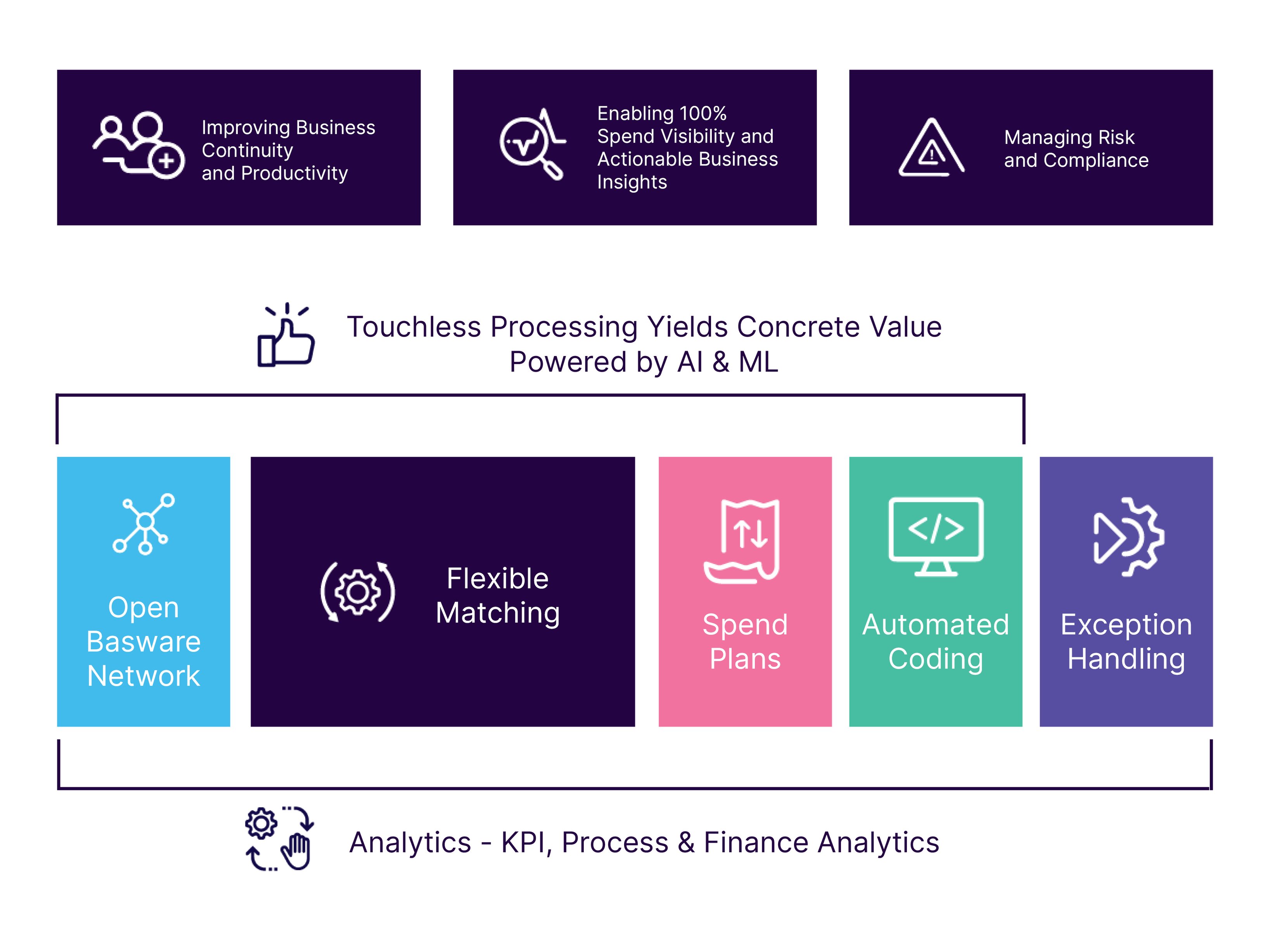
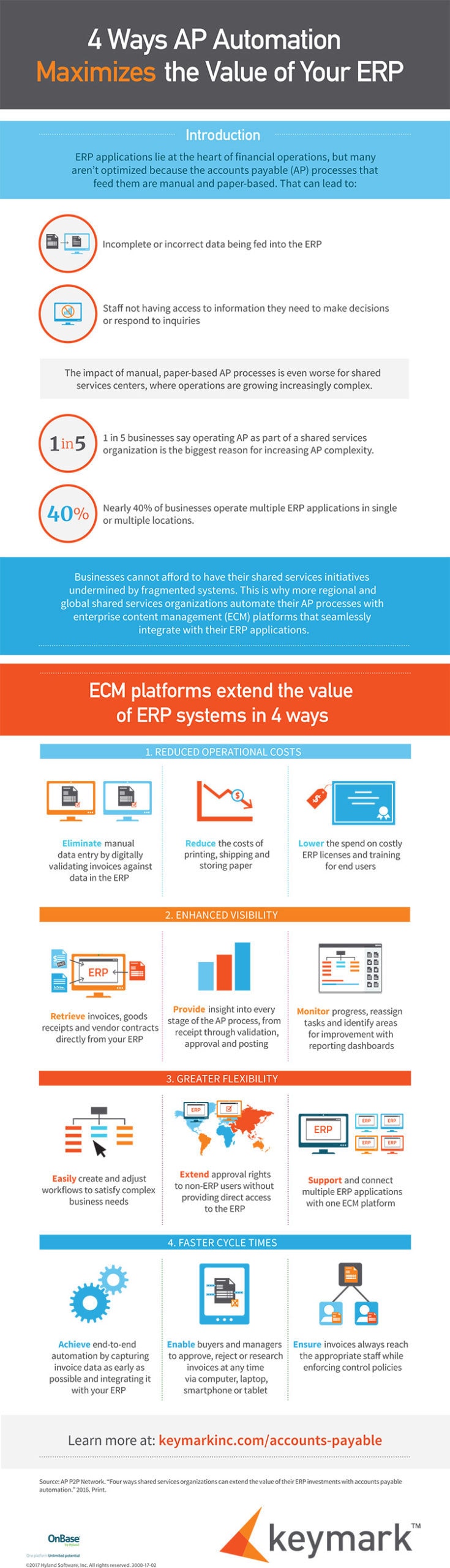
The term refers to “fully automated handling of invoices with minimal to zero human intervention” using technologies like OCR (optical character recognition), AI/ML, workflow automation, and integration with ERP systems. Rossum.ai+1
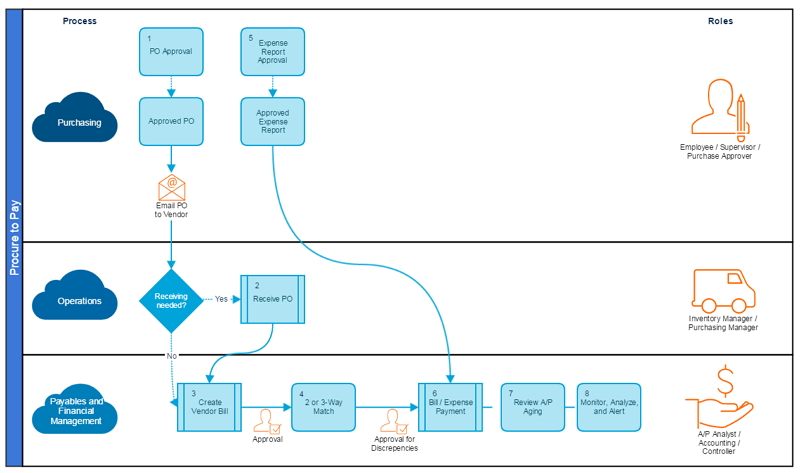
In effect: invoice arrives → data captured automatically → validated & matched → approvals triggered automatically → payment scheduled → ERP posting done with only exceptions going to humans.
2.2 Key benefits
- Efficiency & cost savings: Faster processing, fewer people required, fewer manual touches. Rossum.ai+1
- Improved accuracy & compliance: Reduced data-entry errors, full audit trail, fewer duplicates/frauds. Volopay+1
- Better cash-flow & vendor relationships: On-time payments, early discount capture, happier suppliers. medius.com
- Scalability and flexibility: Can handle increased volume, remote AP teams, global vendor bases. Rossum.ai+1
- Strategic value for PeopleOps: Freed up human capital moves from data-entry to value-added work (supplier analytics, process improvement), boosting employee engagement and career growth.
2.3 The “After” storyboard, visualised
Here’s how the journey looks when you adopt touchless processing:
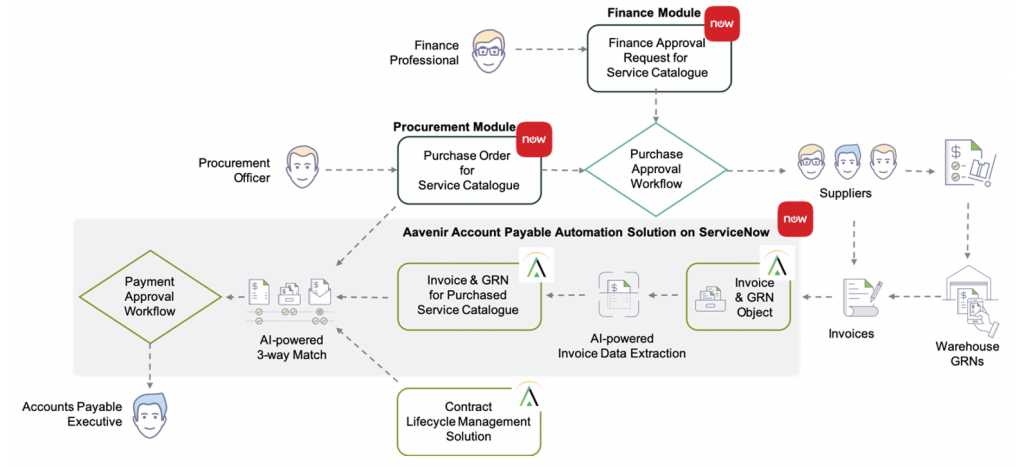
- Invoice arrives via email, e-invoice, EDI or scanned paper → system captures automatically.
- AI/OCR extracts vendor name, invoice number, date, line items, amount.
- System matches invoice with PO and GRN (3-way match) or applies rules for non-PO invoices. ProcureDesk+1
- If everything is within tolerance, system routes to automatic approval or auto-posts payment. Exceptions get flagged and human review is triggered.
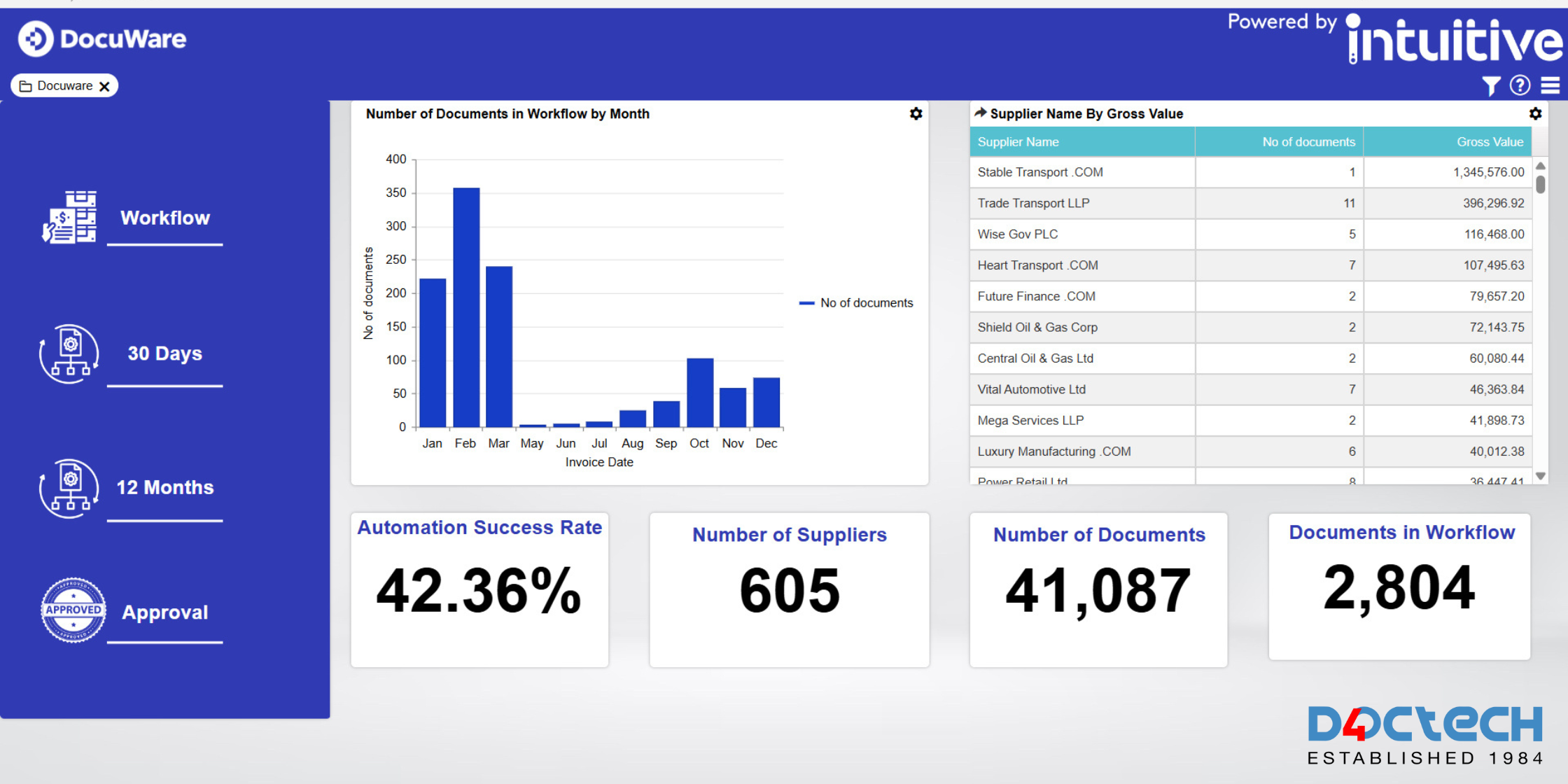
- ERP & accounting systems are updated in real time; dashboards show invoice status, pending approvals, cash impact.
- Analytics show cycle time, exception rates, vendor performance. Dashboards accessible by finance and PeopleOps.
3. Before & After Side-by-Side Comparison
| Stage | Manual Journey (Before) | Touchless Journey (After) |
|---|---|---|
| Invoice receipt | Multiple channels (paper, email, fax). Manual sorting. | Standardised digital intake (e-invoice, email, portal). Automatic ingestion. |
| Data extraction | Manual data entry into system spreadsheets/ERP. High error risk. | AI/OCR extracts data automatically; vendor master lookup. |
| Validation & matching | Manual PO/GRN match, manual review of discrepancies. | Automated 2- or 3-way matching; rules engine handles standard invoices; flags exceptions only. |
| Approval routing | Email/print queues, delays, lost approvals. | Workflow engine routes automatically based on rules and thresholds. |
| Posting & payment | Manual entry into ERP; manual scheduling; report generation delayed. | Seamless integration with ERP; payments scheduled automatically; real-time posting and dashboards. |
| Visibility & analytics | Limited visibility, delays, spreadsheets, reactive. | Real-time dashboards, bottleneck alerts, strategic insights. |
| People/talent impact | High repetitive labour, risk of turnover, low strategic work. | AP team moves to exception handling, process improvement, vendor analytics – higher engagement. |
| Cost/time | High cost per invoice, long cycle time, risk of late payments. Basware+1 | Lower cost per invoice, shorter cycle time (weeks → hours/days) Rossum.ai |
4. How PeopleOps Plays a Role in This Transformation
4.1 Change management & talent strategy
- Map current AP roles: Identify tasks that will be automated vs tasks requiring human judgement.
- Communicate the “why”: Show AP and finance team how touchless processing frees them to focus on higher-value work (supplier strategy, analytics, cost optimisation).
- Training: Ensure AP staff are trained on new tools (workflow dashboards, exception-handling).
- Career path: With routine tasks automated, PeopleOps can help define new roles (e.g., AP “exception specialist”, vendor performance analyst, PO/contract compliance lead).
- Culture shift: Encourage adoption and buy-in by emphasising improvement, not job loss.
4.2 Governance & process definition
- Define new roles and responsibilities: Who monitors exceptions, who approves, who analyzes dashboards.
- Update KPI framework: PeopleOps and finance should set new KPIs for AP (touchless rate, cycle time, exception rate).
- Monitor adoption: Use dashboards to track change in workflow, identify bottlenecks and training needs.
4.3 Supplier & stakeholder engagement
- Engage vendor community: Communicate new invoice submission methods (portal, e-invoice) so vendors align. ProcureDesk
- Collaborate across functions: Procurement, finance, IT and PeopleOps must coordinate to ensure vendor compliance, technical integration, and workforce readiness.
5. Implementation: Storyboarding the Journey
5.1 Build your “Before” storyboard
- Map the current invoice journey end-to-end: from invoice receipt to payment and archiving.
- Identify touchpoints: data entry, validation, routing, manual approvals, exceptions.
- Quantify pain: average cycle time, cost per invoice, error rate, backlog volume.
- Visualise: Create storyboard panels or flow diagrams, e.g., Monday: 700 invoices arrive, data entry backlog, 50 errors, 10 late payments.
5.2 Design the “After” storyboard
- Map the ideal touchless journey with minimal human-touch.
- Include metrics: target fewer than X touches per invoice, cycle time < Y hours, exception rate < Z %.
- Add decision points: automatic approval thresholds, exception routing.
- Show dashboard snapshots for AP leads, PeopleOps, finance team.

5.3 Key success factors
- Start with a pilot: Pick a supplier segment or invoice category that’s high-volume, standardised for early wins.
- Clean vendor & master data: Automation can only work if vendor records, PO/GRN data and invoice formats are consistent.
- Integration is critical: ERP, procurement, vendor portal must all tie together. Rossum.ai+1
- Define exception workflow: Even in touchless, some invoices will require human review, clearly define routing and SLA.
- Monitor KPIs & iterate: Use dashboards to track cycle time, touchless rate, exception rate, vendor query volume; continuously improve.
- Change management: Address people concerns, shift roles from data-entry to strategic, provide training and communication.
6. Real-World Scenario (Hypothetical for PeopleOps to Share)
Company: Global retail chain with ~20,000 invoices/month across Asia, Europe and Americas.
Challenge: AP team overwhelmed, manual processing leading to 7 % late payments, cost per invoice ~$15, error rate 4 %. Vendors complaining. PeopleOps found high turnover in AP staff due to repetitive tasks.
Solution: Deploy AP automation platform, pilot on standard PO-based invoices (~10,000/month). Clean vendor master, define rules, integrate with ERP. Create storyboard “Before” showing data entry → backlog → approvals → payment delays. Then storyboard “After” showing system ingestion → auto-match → approval or exception → payment and dashboard visibility.
Results (after 6 months):
- Touchless rate increased to ~80 % for pilot category.
- Cycle time reduced from 5 days average to 24 hours.
- Cost per invoice dropped to ~$4.
- Late payments dropped to 1 %.
- AP team headcount reduced by 20 %; remaining staff re-skilled to Vendor Analytics role. PeopleOps redeployed two former AP data-entry staff into that role with training, higher engagement.
PeopleOps story: Presented this as an opportunity for AP team career growth: less manual grunt work, more strategic analysis, vendor relationships, cash-flow insights. Employee satisfaction scores in the AP team improved.
7. Key Takeaways for PeopleOps & Finance Teams
- Don’t treat invoice automation as just a tech project, see it as a people + process + technology change.
- Storyboarding Before/After helps align both technical and business audiences: visualising journey resonates across functions.
- For PeopleOps: emphasise talent evolution, how roles change, skills shift, and employee value improves.
- Clear metrics matter: define what “touchless” means (e.g., >90% invoices processed without human intervention), track cycle times, cost per invoice, error/exception rate.
- Engage vendors early: their behaviour (invoice format, submission channel) affects success.
- Start small, scale fast: pilot high-volume standard invoices, learn, expand into complex or non-PO invoices.
- Governance & change management are critical: define new workflows, approval rules, exceptions, and communicate widely.
8. Closing Thoughts
Creating a storyboard of the invoice process, before and after, offers two powerful benefits:
- It provides clarity across functions (finance, procurement, IT, PeopleOps) about where we are and where we want to go.
- It highlights the human dimension: it’s not simply about automation, it’s about freeing people to do more meaningful work, improving morale, scaling without hiring.
By adopting a touchless invoice journey, organisations can transform their AP from a cost-centre burden into a strategic function, supported by PeopleOps, empowered by automation, and visible to business leaders.
Leave a Reply