
Introduction
In today’s construction, remodeling, and project-based services sectors, the margin for error is razor-thin. One of the biggest pain points: change orders (COs) and budget overruns derailing estimates, operations, and ultimately the bottom line. On the accounting side, if your financial system (for example QuickBooks) isn’t aligned with your estimating and budget workflows, you get double-entry, reconciliation headaches, and blind spots in profitability.
This blog will walk you through how having proper budget templates and change-order templates that are designed to sync with QuickBooks can become a powerful part of your Estimator’s Toolkit, reducing risk, improving clarity, and enabling better PeopleOps alignment between project/operations teams and finance/HR.
Why It Matters: Common Pain Points
1. Disconnect between estimating, budget, and accounting
- Many firms create an estimate in Excel or specialized estimating software, but then manually transfer costs into QuickBooks (or worse: don’t transfer all cost codes).
- According to industry research: for contractors using QuickBooks, job-costing and budget/forecasting are core needs, yet QuickBooks alone lacks deep construction-specific workflows. Planyard+1
- Without templates aligned to cost-codes, you wind up with mismatches: “we budgeted for labour A but QuickBooks shows under labour code B”, making variance tracking harder.
2. Change orders as a risk vector
- A project is estimated, a budget approved, but then a change happens: scope expands, materials cost more, schedule shifts. That change needs a formal change order (CO) so the estimate + budget stay relevant.
- If COs are informal or unmanaged, you get cost creep, unhappy clients, and untracked extra labour/mat cost.
- QuickBooks does let you create “Add Change Order” entries (for example, modifying an Estimate). QuickBooks+1
- But without a standard template and integration into your estimating/budget workflow, COs become ad-hoc, inconsistent, and un-visible to HR/PeopleOps (in terms of staffing adjustments, overtime, etc).
3. PeopleOps and staffing implications
- From a PeopleOps lens: when budgets shift (because of COs), staffing needs change: more OT, more subcontractors, perhaps shifting resource allocation.
- If the budget template doesn’t feed easily into payroll, resource planning, or the finance systems, you lose alignment between project delivery and the workforce strategy.
- For example: an unexpected CO adds 200 hours of labour. Without proper tracking, HR might still plan for “normal” staffing, leading to bottlenecks or overtime that eats margin.
What a Good Estimator’s Toolkit Includes
Here are the key components you want in your toolkit:
• Budget template built for job-costing
- A spreadsheet or form (Excel/Google Sheets) or built into your estimating software, which lists cost codes (labour, materials, subcontractors, equipment, contingencies) aligned to your Chart of Accounts.
- Templates should include: baseline estimate, approved budget, committed costs (POs/subcontracts), actuals to date, remaining budget → so you can track Estimate vs Budget vs Actual.
- Example: a remodeling job template may have labour line items (demo, framing, electrical), materials (drywall, finishes), subcontractors (plumbing, HVAC), equipment rental, contingency (5 %).
- The budget template must map these cost items to the same cost codes/names used in QuickBooks so the sync is seamless.
• Change Order (CO) template
- A standard CO template ensures any scope change is clearly documented (description, cost impact labour + materials + equipment + markup) and approved (client signature, stakeholder sign-off).
- The CO template then updates the budget: you add the CO value into the approved budget revision, and your budget tracking template updates accordingly.
- Important: the CO must also sync into QuickBooks as a transaction or adjustment so your accounting reflects the revision.
• Sync to QuickBooks
- Ensure that your budget template’s cost codes match the accounts/items in QuickBooks. This avoids manual reconciliation and ensures job costing is accurate.
- Many construction-centric estimating/project-management tools integrate directly with QuickBooks (for example: BuildBook “always-on budget tracking” integrates with QuickBooks Online. BuildBook
- According to research, software that integrates estimating + budgets + change orders into QuickBooks is a growing must-have. Ingenious Build+1
- In QuickBooks you can customise form templates (for invoices, estimates, etc) and duplicate/modify templates. QuickBooks+1
- Once integrated, you reduce double data-entry and improve visibility into project profitability and staffing implications for PeopleOps.
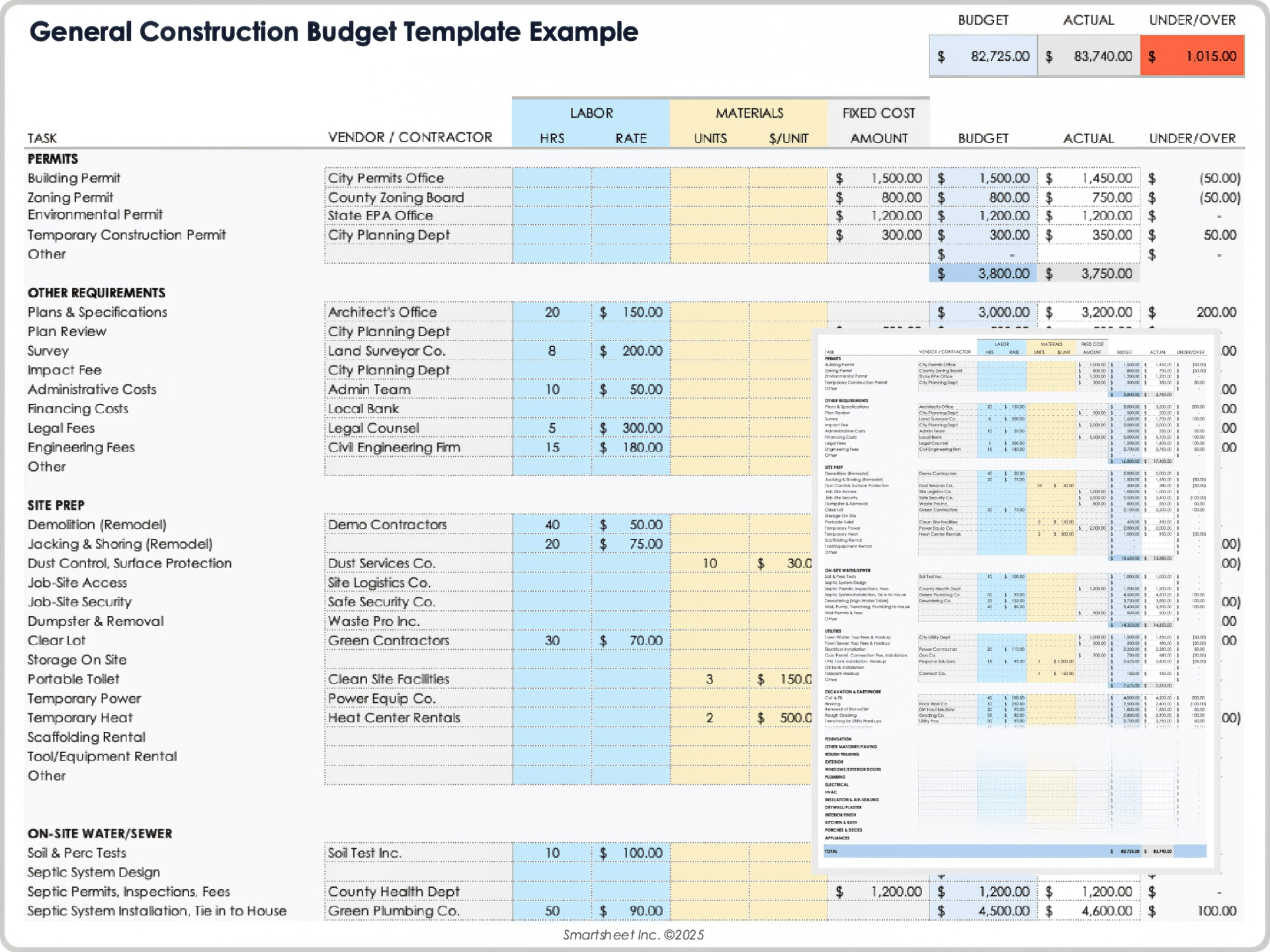


Image descriptions
- “Construction budget template Excel showing cost codes, baseline estimate, committed costs, actuals, remaining budget”
- “Change order template PDF form with client signature line and cost breakdown (labour, materials, equipment, markup)”
- “QuickBooks job costing dashboard screenshot for a construction business showing estimate vs actual and cost‐code breakdown”
Real-World Scenario: How It Works in Practice
Let’s walk through a typical scenario a PeopleOps/Operations leader might face, and how the toolkit removes friction.
Scenario: Mid-sized contractor expanding a commercial interior build-out
- The estimating team uses their budget template when they submit a proposal: they fill in baseline estimate with cost codes.
- The client approves the budget, and the budget template is locked in. The project is added into QuickBooks as a “job” or “sub-customer” under the main customer.
- During execution: some subcontractor (HVAC) encounters unanticipated work (old duct-work, inaccessible location). They submit a proposal for a CO of ₹5 lakh (or whichever currency).
- Using the CO template, the operations manager records the change: scope narrative, extra labour 150 hours at ₹x/hour, material cost ₹y, equipment hire ₹z, markup 10 %. The CO is signed off by client and internal stakeholder.
- The CO amount is added to the budget template: approved budget is revised from ₹X to ₹X + ₹5 lakh; remaining budget recalculated.
- In QuickBooks: the CO is recorded (either via a credit/invoice adjustment or custom form), cost codes are aligned so the project job in QuickBooks reflects the change. Because budget templates and codes are aligned, the finance team sees the updated project budget, the PeopleOps team sees the increased labour hours, and HR can plan for overtime/subcontracts accordingly.
- Mid-project, the budget template shows that actuals are creeping up: committed costs + actuals now track 60 % of budget with 50 % of schedule complete → indicating risk of overrun. The operations manager flags this to stakeholders, and PeopleOps may reallocate resources, hire contingency staff, or review productivity.
- On project close-out: the estimate vs final actual is compared via the budget template; because everything is coded and flowed into QuickBooks, the accounting team runs a job-costing report, detects which cost-codes caused variance (e.g., labour inefficiency, material inflation), and feeds that intelligence into next-job estimating. PeopleOps uses the variance data to refine staffing models for similar future projects.
Key benefits realised:
- Fewer manual reconciliations between estimating/spreadsheet and accounting system.
- Faster insight on when a CO hits budget and when staffing needs shift.
- Clear, document-driven CO management reduces client disputes and internal cost leak.
- Better alignment between PeopleOps (staffing/OT/subcontractor decisions), operations (budget/control), and finance (job-costing, profitability).
How PeopleOps Can Champion This Toolkit
As a PeopleOps professional (or championing PeopleOps/Operations alignment), here are specific actions you can take:
- Standardise cost-code taxonomy
- Work with finance and operations to ensure the cost codes in estimating/budget templates match the Chart of Accounts or Item list in QuickBooks.
- Train project managers and estimators on using the template (labour codes, material codes, equipment codes).
- Embed CO process into workflow
- Define when a change triggers the CO template (e.g., cost > X% of budget or scope change > Y hours).
- Establish approvals (client + internal) and ensure the signed CO is attached/recorded.
- Communicate to HR/PeopleOps when COs occur so staffing implications (e.g., extra hours, subcontractors) can be planned.
- Integrate tools and automation
- Explore software that integrates estimating/budgeting/CO with QuickBooks (as many construction-specialised tools do). For example, BuildBook states “Eliminate double entry … every Bill, Expense and Invoice … automatically sent to QuickBooks” for construction firms. BuildBook
- Ensure your QuickBooks system has the right job/project setup (e.g., sub-customer, cost-codes) and templates (invoice, CO) configured.
- Consider dashboards: show real-time budget vs actuals, flag cost overruns, link to staffing/PeopleOps metrics (hours used, overtime, subcontractor cost).
- Refine take-aways for staffing & operations
- Use the budget vs actuals variance data to inform staffing models: e.g., if labour for “demo” cost code consistently runs +10 % vs estimate, then next job you adjust your staffing/hours accordingly.
- Monitor change-order frequency/pattern: if many COs are coming from the same cost-code (say “site conditions”), you may need additional contingency labour budget or better pre-bid surveying.
- Align training and contractor/sub-contractor resources: if you see certain tasks causing overruns, PeopleOps can plan for training, resource swap, or alternate subcontractor.
Implementation Checklist for Your Company
| Step | Description | Who should own it |
|---|---|---|
| Define cost-codes mapping | Align estimating budget template cost codes with QuickBooks Items/accounts | Finance + Estimating lead |
| Create budget template version(s) | Develop a master template for typical job types (remodel, new build, commercial) | Operations + Estimating |
| Create CO template | Standardised CO form (scope, cost breakdown, approvals) | Operations + Legal/Finance |
| Configure QuickBooks templates | Customize forms (estimates, invoices, COs) and jobs/projects setup in QuickBooks. QuickBooks+1 | Finance/Accounting |
| Select or evaluate integration tool | If using estimating/project-management software, ensure sync with QuickBooks. Fit Small Business+1 | Operations + IT |
| Train staff & PeopleOps | Train estimators, project managers, finance and HR on new workflow, highlight staffing/OT impacts | PeopleOps + Project Ops |
| Monitor & iterate | After first few projects, review variance, CO frequency, staffing impacts, refine templates | PeopleOps + Finance + Ops |
Final Thoughts
In short, for firms operating job-based, project-centric services (construction, manufacturing, engineering, etc.), an Estimator’s Toolkit that includes budget templates and change-order templates, aligned with cost codes and integrated into your accounting system like QuickBooks, is no longer a “nice to have”. It’s a strategic necessity.
From the PeopleOps perspective: aligning staffing, budget, and operations becomes far smoother when you have a clear workflow and integration. It reduces risk, improves transparency, and helps your workforce strategy scale with your project demands.
If your organisation still treats change orders and budget tracking as “spreadsheet stuff” disconnected from accounting and HR, it’s time to rethink the toolkit—and PeopleOps can lead this transformation.
Leave a Reply