
Introduction
In today’s fast-moving services and product firms, every minute counts, and every manual handoff adds risk. Whether you’re managing change orders, securing client approvals, or posting data into your accounting system, inefficiencies cost time, money, and clarity.
This blog explores three integrated workflow elements:
- Change Order Intake – capturing modifications after a contract or estimate.
- Client E-Signature – getting fast, compliant approval from the customer.
- Auto-Sync to QuickBooks – automatically pushing the approved change order into your accounting/bookkeeping system.
We’ll talk about the problems, real-world pain points, how PeopleOps (or your internal ops/process team) can help implement and optimize this, and best practices for doing it right.
1. Why change orders matter, and why they’re often a mess
What is a change order?
In many project-based or services businesses, you start with an estimate or contract (scope, timeline, cost). Over time, the client (or you) may request changes: additional features, scope shifts, timeline adjustments. That’s your change order. In systems like QuickBooks, you often treat this as an amendment to an estimate or as a new line of business. QuickBooks
Common pain points
- Scope creep without documentation: Changes get verbally agreed or via email threads, but not formally captured → financial leakage, disputes.
- Manual intake process: Excel sheets, emails, PDFs, leading to manual data entry, version control issues, and lost approvals.
- Delayed billing or invoicing: Until the change order is signed off, you may not bill for extra work → cash-flow hit.
- Disconnected systems: Sales, project management, finance each have their own tools; change orders may exist only in one silo.
- Audit/tracking holes: When change orders are separate from core documentation, you lack one source of truth for approvals, signatures, cost impact.
Real-world scenario
Imagine a mid-sized digital-agency working on a 6-month website build. At month 2, the client wants to add an eCommerce module and a blog. That means extra design, development time, additional cost. Because the agency’s process uses email for requesting changes, there’s no formal document. The project manager verbally gets approval, the devs proceed, and the extra hours are just logged, but the finance team never sees an estimate amendment. At month-5, the client questions the amount invoiced. Dispute arises. Worse, the agency has done extra work and never billed properly.
How PeopleOps can help
- Define a standardized “Change Order Intake” form (digital) that captures scope change, cost impact, timeline shift, approval fields, client signature.
- Link the intake form to your project management tool so that when a change is approved, the project plan (tasks/hours) is automatically updated.
- Create a workflow that flags when change orders are pending for signature, and sends automated reminders.
- Ensure each change order is version‐controlled, tied to original contract/estimate, and stored in a central repository.
Key keywords to include
Change order management, scope change, estimate amendment, change request workflow, project scope control, service operations.
2. Client E-Signature: From fax/email to digital speed
Why e-sign matters
Once you’ve captured the change order details, the next step is getting the client’s approval. Traditional methods (print–sign–scan, mailing PDFs, chasing signatures) are slow, error-prone, and so yesterday. Digital signature adoption is now critical to accelerate quote-to-cash workflows. For example, integrations between QuickBooks and e-signature tools like DocuSign increase speed of approvals by up to 80%. DocuSign
Pain points
- Delays waiting for signatures → project kickoff or extra work delayed → revenue impact.
- Emails with attachments back and forth → version confusion (“which estimate did you sign?”).
- Disconnected from accounting/finance systems → after signature, someone must manually update the system.
- Audit/compliance risk → missing signature chain, no clear trace or timestamp.
How e-sign + QuickBooks interplay
Despite the power of QuickBooks, its native electronic‐signature capabilities are limited. One blog notes: “QuickBooks lets you add physical signatures to invoices using custom fields. However, QuickBooks does not offer an electronic signature option.” Method But by integrating with a tool like SignNow or DocuSign, you can send an estimate or change order for e-signature directly from within QuickBooks (or via the change-order module), track the status in real time, then automatically store the signed version. SignNow+1
Example scenario
In our digital-agency example, once the change request is logged in the system, the agency’s system triggers a DocuSign envelope with the change order. The client reviews, signs on a mobile device within hours. The signed document feeds back into project and finance systems, tasks marked as approved, billing schedule updated.
How PeopleOps helps
- Choose and configure an e-signature tool compatible with your tech stack (CRM, ERP, project management, QuickBooks).
- Map out the signature workflow: who approves (internal), who signs (client), reminders, escalation.
- Embed the signature step into your change-order intake form so approval can’t proceed without it.
- Ensure the signed document is automatically attached to the change order record in your central system and to the financial entry.
Keywords
e‐signature workflow, digital contract approval, quote-to-cash acceleration, client approval digital, document management.
3. Auto-Sync to QuickBooks: Closing the loop from change‐order to accounting
What does auto-sync mean?
Once a change order is approved (signed), your system should automatically post the financial transaction to QuickBooks (or your accounting/ERP system) without manual data entry. This includes updated estimate or invoice, updated cost, revenue recognition, maybe a new line item or amendment. Syncing means less manual work and fewer errors.
Why it’s vital
- Eliminates duplicate data entry (project team enters the change order; finance re-enters it).
- Reduces delay between approval and invoicing → improves cash flow.
- Keeps accounting data in sync with operational reality (scope changes, cost variances).
- Makes audits easier: the change order is linked to the financial entry.
Technical/Operational pain points
- Mapping of fields: change order may include many custom fields (hours, rates, timeline) that must align with QuickBooks chart of accounts.
- Timing issues: when do you sync, immediately after signature, or batch at day‐end?
- Data integrity: ensuring the synced record doesn’t duplicate or overwrite existing ones, proper version control.
- Integration complexity between the change-order system, e-signature tool, and accounting system.
Real-world integration insight
The partner system guidance from e-commerce/order apps shows that some sync tools limit number of orders per sync batch. For example: “Once the orders are selected, click the ‘Sync to QuickBooks’ button… The same 30-order sync limit applies so that the user can select up to 30 orders for sync at one time.” Agiliron Learning Center Also, a support doc shows how to configure QuickBooks Online integration: mapping chart of accounts, choosing start date, knowing what data is synced and what is not. Finale Inventory
Example scenario
In our digital-agency example:
- The change order is approved and signed.
- The system picks up the details (scope change: eCommerce module, extra 120 hours @ $80/h = $9,600).
- It auto-creates a new line in QuickBooks: Estimate amended, or new Invoice #1234 for $9,600, linked to Customer ABC.
- The project management system also updates resource scheduling, and finance sees the extra revenue forecast.
- Because the process is automated, there’s almost zero delay: the extra work is billable and booked immediately.
How PeopleOps facilitates this
- Collaborate with finance/IT to map your change‐order fields to QuickBooks fields (accounts receivable, revenue accounts, cost of goods sold, etc.).
- Define the “go live” start date for your integration and ensure all systems are clean (as the support doc emphasises: make sure you do a backup, ensure opening balances etc). Finale Inventory
- Determine sync triggers: e.g., “when document status = Signed”, or nightly batch, or manual “Approve and Sync” button.
- Monitor sync logs and errors: track failed syncs, duplicates, unmapped accounts, etc.
- Ensure governance: who reviews the synced entries? How are reversals handled if a change order is cancelled?
Keywords
QuickBooks integration, auto‐sync transactions, financial workflow automation, ERP sync, accounting workflow, change order to invoice, one source of truth.
4. Putting it all together: end-to-end workflow
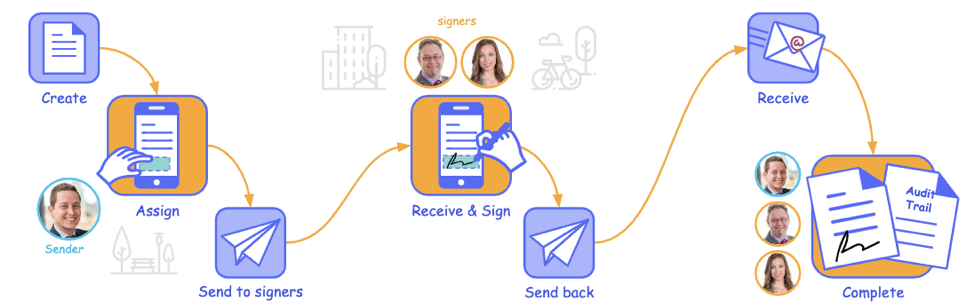
Here’s how the full workflow could look for a services company:
- Project team logs a Change Order Request in the system (scope, cost, timeline, reason) → assigns internal approver.
- Internal approver reviews; if OK → triggers Client E-Signature via embedded workflow (document auto‐populates with change details).
- Client signs on mobile or desktop → system updates the change order status to “Approved – Signed”.
- Immediately (or in the next run) the system Auto‐Syncs the financial details to QuickBooks: updates estimate/invoice, posts cost/revenue plan.
- Project schedule is updated, resources allocated for the change, billing department picks up the invoice, AR team monitors payment.
- Operations and finance dashboards show real-time view of approved change orders, extra revenue forecast, project impact. Audit logs tie change request → signature → accounting entry.
Visual Placeholder

Role of PeopleOps
PeopleOps acts as the bridge between operations, project teams, finance and tech:
- Designing the intake form and workflow.
- Facilitating tool selection (e-signature, integration, project system).
- Defining roles, responsibilities, approvals.
- Driving process adoption and training.
- Ensuring the data flows end-to-end with minimal friction and maximum visibility.
- Monitoring metrics: number of change orders, time to signature, delay to invoice, sync error rate, revenue captured vs leak.
5. Benefits & Metrics to track
Key benefits
- Faster time to revenue: fewer manual handoffs = quicker billing.
- Reduced errors and rework: less manual data entry.
- Better cash flow visibility: change orders captured and posted promptly.
- Improved project governance: scope changes documented, approved, and linked to cost.
- Stronger audit trail and compliance: e-signature logs, sync logs, linked transactions.
- Operational alignment: teams (sales, ops, finance) see the same data, reducing handoff friction.
Metrics you should monitor
- Average time from change request submission to client signature.
- Percentage of change orders that are signed vs lost/unsigned.
- Time from signature to accounting/invoicing.
- Number of sync errors into QuickBooks, and resolution time.
- Revenue captured via change orders vs estimated leakage.
- Percentage of projects where scope changes were approved and tracked (vs untracked).
6. Challenges and best practices
Common challenges
- Tool fragmentation: separate tools for intake, signature, project system, accounting → leads to duplication.
- Resistance to change: teams used to ad-hoc email/PDF workflows.
- Data mapping complexity: custom fields in change orders might not map neatly into accounting systems.
- Duplicate or inconsistent records: same customer or project may have multiple IDs across systems.
- Sync failures/unmapped accounts: if not set up carefully, you risk data anomalies.
- Governance & training: team must know when to use the process, and how to escalate exceptions.
Best practices
- Choose an integrated platform or ensure your tools talk to each other via APIs/connector.
- Start with a pilot: pick one service line or business unit, refine process, then scale.
- Maintain a single source of truth for change orders and approvals.
- Build in checkpoints: internal approval → client approval → sync. Don’t skip any.
- Use standard templates for change orders; pre‐fill data where possible to reduce friction.
- Map your chart of accounts early and align with your finance team. Backup your accounting system before integration launch. Finale Inventory
- Monitor dashboards and logs; hold regular reviews of sync errors and process bottlenecks.
- Train all stakeholders (project managers, sales, finance, PeopleOps) and communicate the value (faster invoicing, less disputes).
- Document policies: scope change only valid if signed, unapproved changes will not be billed, etc.
7. How PeopleOps can lead this transformation
As PeopleOps (or Operations Excellence) professionals, you’re uniquely positioned to shepherd this transformation:
- Define the process: Map current state (how change orders are handled today), identify pain points, design future state process flow.
- Tool evaluation & selection: Ease of use, integration capability (especially with QuickBooks), mobile access, audit features.
- Change management: Communicate why this is important, train teams, celebrate early wins.
- Cross-functional governance: Set up a working group (sales, project delivery, finance, PeopleOps) to review and refine the workflow.
- Metrics & continuous improvement: Build dashboards (time to sign, sync errors, revenue captured), and review monthly.
- Policy & compliance: Create guidelines around when change orders are required, escalation path, signature rules, approval limits.
- Documentation & audit readiness: Ensure all signed change orders, sync logs, financial entries are stored and can be retrieved easily for audits or client inquiries.
Conclusion
In the fast-paced world of services and projects, bringing together change-order intake, client e-signature, and automated sync into QuickBooks is more than just “nice to have”; it’s a business imperative. By doing so, you eliminate manual bottlenecks, improve cash flow, reduce risk, and create tighter alignment between operations and finance.
For PeopleOps teams, this is a chance to lead a visible, high-impact process improvement. It’s where process meets tech, and where you drive measurable results for your business.
Leave a Reply