


In the world of PeopleOps, payroll compliance isn’t just about paying people on time, it’s about being ready for audits, meeting government standards, and safeguarding your business reputation. In this article we’ll explore what “certified payroll” means, why it can become a pain point, and how modern systems can help you stay audit-ready with minimal drama.
What is Certified Payroll?
Let’s start with a clear definition.
Certified payroll refers to specialized payroll reporting required when contractors or subcontractors work on publicly funded or government contract projects, especially in construction or infrastructure. ebacon.com+3certifiedpayrollreporting.com+3ADP+3
Specifically:
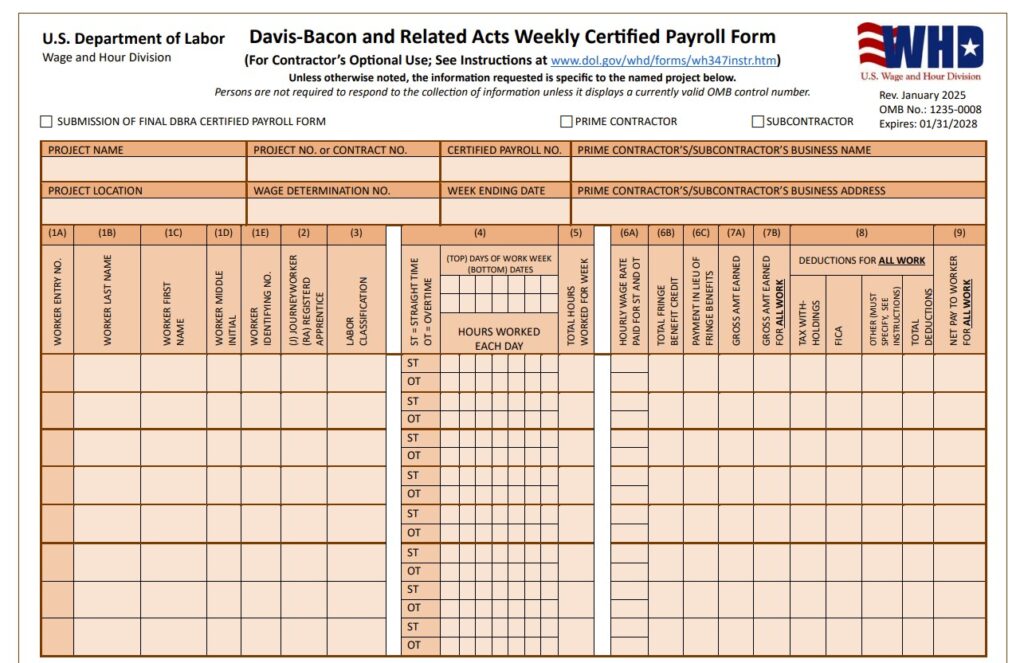
- The report shows worker names, classifications, hours (straight time & overtime), wage rate, gross wages, deductions, net wages, fringe benefits, all in a format approved by federal/state agencies. ADP+1
- Weekly reporting is typical (e.g., using form WH‑347 in the U.S.) even if work pauses. ADP+1
- It ensures compliance with laws like the Davis‑Bacon Act and related prevailing-wage regulations. B2Gnow+1
Why It Matters: The Stakes Are High
For PeopleOps teams, here’s why certified payroll is more than just a checkbox:
- Risk of non-compliance: If the employer fails to meet prevailing wage laws or submits incorrect reports, they may face penalties, withheld payments, or exclusion from future public contracts. blog.pivla.com+1
- Audit readiness: Government agencies (e.g., the U.S. Department of Labor and state labour departments) may audit certified payroll records. One mis‐classification or wrong wage rate can trigger issues. ebacon.com+1
- Operational cost: Manual systems, spreadsheets, mis-entries, delayed submission all cost time and money. One article calls certified payroll “a compliance minefield” if handled manually. Passport Workforce+1
- Reputation: If you’re in the public‐works space, being known for clean compliance can help you win more contracts. Messy records can damage trust.
Common Pain Points in Certified Payroll
Let’s walk through typical issues PeopleOps and payroll teams face:
- Manual data entry & spreadsheets: Hours from time-tracking systems have to be re-entered, classifications assigned manually, wage tables consulted. Mistakes creep in. Passport Workforce+1
- Wage classification errors: Workers mis-classified, wrong job titles, wrong prevailing wage rate applied. These are common audit red flags. Timeero+1
- Outdated wage tables: Prevailing wages change; if the system uses old tables you’re non-compliant. blog.pivla.com
- Fragmented systems: Time tracking, payroll, job cost, HR systems not integrated → data silos, delays, inconsistent data.
- Audit readiness & retrieval: If you’re asked for records from 3 months ago, and they’re scattered across files/spreadsheets, you spend valuable hours digging. ebacon.com
- Multiple jurisdictions: If you operate in multiple states (or countries) you might have different forms, different prevailing-wage rules. Complexity multiplies. B2Gnow
How Systems Can Solve It: Making Certified Payroll “Without Tears”
Here’s where smart systems and PeopleOps collaboration shine. A modern certified payroll system covers these key features:
1. Integration & Single Source of Truth
- Time & attendance data flows directly into payroll with job classifications mapped automatically.
- Wage tables (prevailing wages, fringe benefits, etc.) are built-in or update dynamically.
- Job cost/contract data (project code, contract type) links to payroll entries.
2. Automated Compliance & Reporting
- The system auto-generates compliant reports (e.g., WH-347 or state equivalents) with required fields: worker name, classification, hours, rate, gross, deductions, net. ADP+1
- Validation rules built in: alert on missing data, mismatched wage rate, strange overtime patterns. B2Gnow
- Submission tracking: have we submitted the weekly report? Was it accepted? Are there errors?
3. Audit-Ready Record-Keeping & Analytics
- Historical data retained, indexed, searchable.
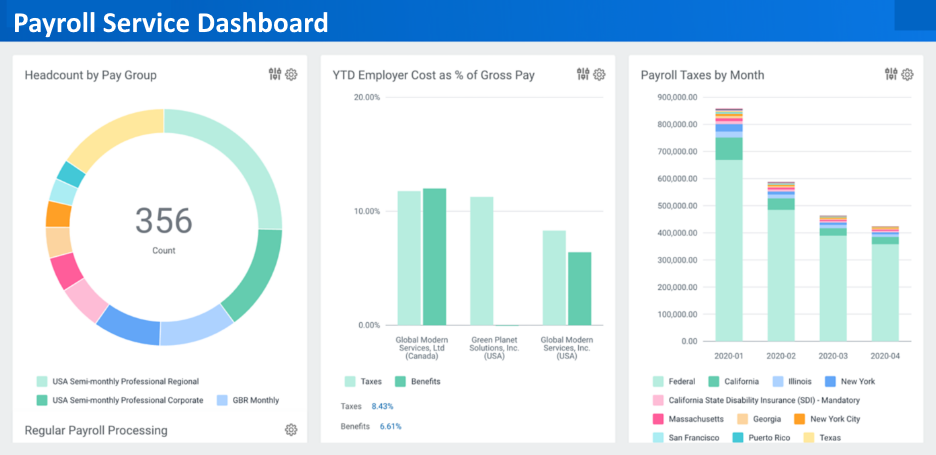
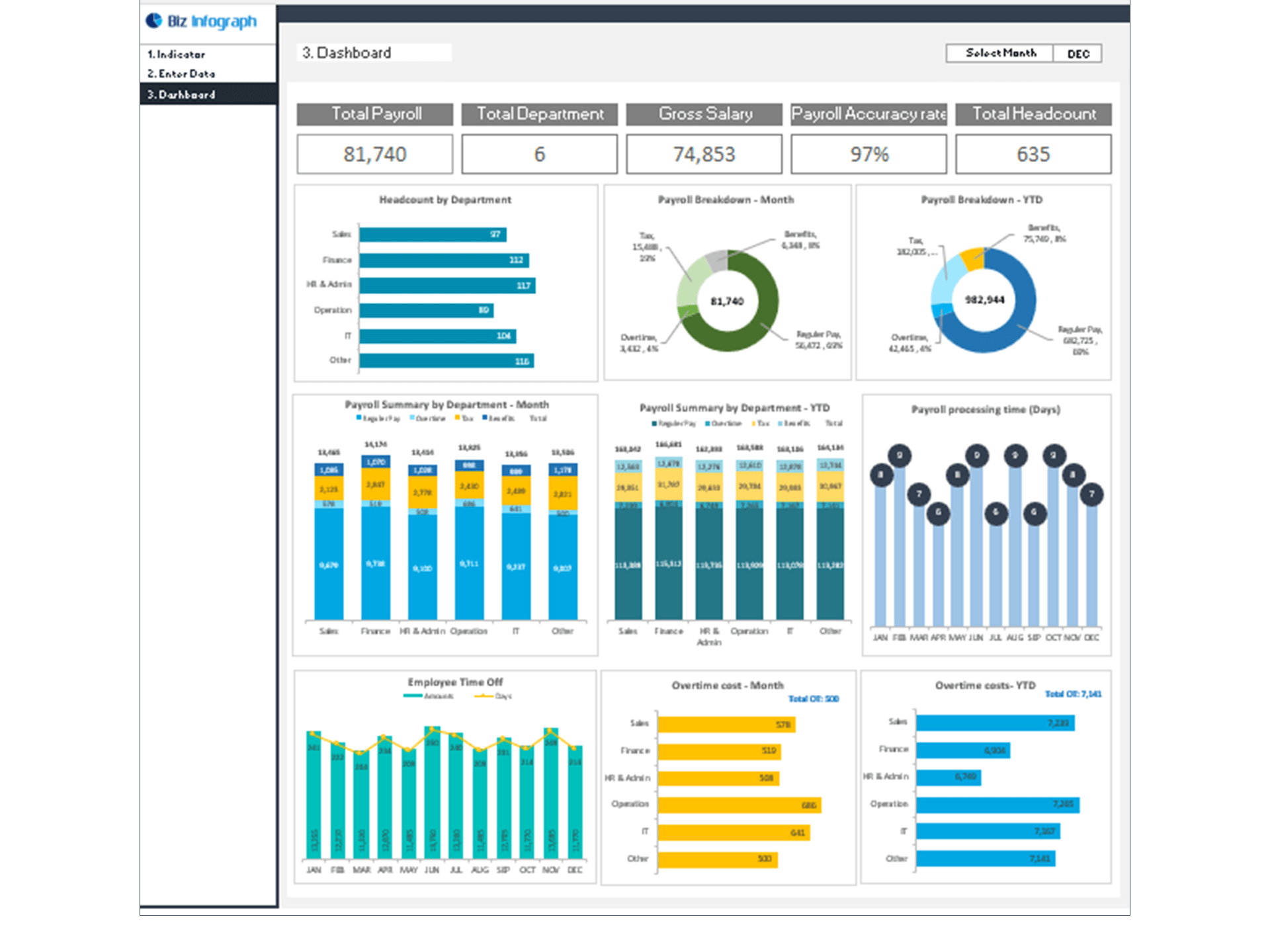
- Built-in dashboards for PeopleOps and payroll leaders to spot risk areas (for example: high overtime, frequent classification changes, late submissions).
- Automated logs of who changed what, when, helps when you need to prove internal controls.
4. Scalability & Multi-Jurisdiction Support
- Works across states, tracks state-specific forms and prevailing wage requirements.
- As your business grows or takes on more public-works contracts, you don’t create more spreadsheet chaos.
5. User Experience & Collaboration
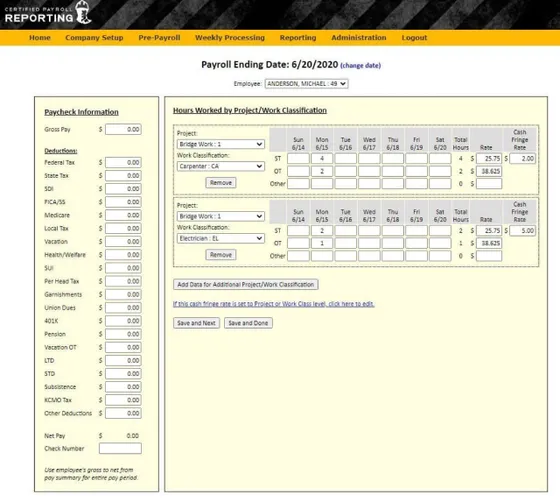
- Field staff (site supervisors) capture hours, classes via mobile apps.
- Payroll/PeopleOps dashboard shows exceptions needing review (e.g., unclassified hours, job code mismatch).
- Easy to train and deploy, so non‐payroll staff can participate but still maintain controls.
Real-World Scenario: How This Plays Out
Scenario
A mid-sized construction firm, “BuildCo”, wins three government contracts across two states. They must submit certified payroll weekly for each site.
Without a modern system
- Payroll gathers timesheets from site supervisors late Monday.
- They refer to manual prevailing-wage tables (in Excel) for each job classification and location.
- They fill out WH-347 forms manually or via PDF.
- On Wednesday an audit notice arrives from the DOL requesting substantiation of worker classifications and wage rates for the past 4 weeks.
- Payroll scrambles: spreadsheets everywhere, mismatched data, lost emails. They face delays, potential fines, and contract payment hold-ups.
With a modern certified-payroll system integrated with PeopleOps & job-costing
- Site hours get captured via mobile app tied to project/job code and classification.
- System applies correct prevailing wage rate for classification + location automatically.
- WH-347 reports auto-generated and submitted every Monday.
- Analytics dashboard highlights one worker flagged: classification changed from “Carpenter” to “Helper” last week but wage rate remained high. PeopleOps investigates and corrects before audit.
- When the audit notice arrives, BuildCo exports the requested data within minutes, attaches system logs proving changes and approvals. Audit completes cleanly, BuildCo retains contract status and builds reputation.
Practical Steps for PeopleOps to Get Started
Here’s a simple roadmap you can use at your organisation:
- Map your current process
- What systems do you use (time-tracking, HR, payroll, job costing)?
- Where are the manual steps? Where are errors recurring?
- Are you submitting certified payroll? For which contracts? What forms?
- Define your requirements
- Multi-state/jurisdiction support?
- Prevailing wage updates automatically?
- Integration with time tracking & job costing?
- Audit trails, dashboards, exception-handling?
- Evaluate vendors / solutions
- Look for payroll systems with certified-payroll modules built or add-ons.
- Check for features like automated report generation, validation rules, analytics.
- Consider user experience (site supervisors are often not payroll experts).
- Clean up data & standardise classifications
- Ensure job classifications are accurate, mapped to prevailing wage tables.
- Standardise project codes, job codes, classifications across sites.
- Ensure timesheet capture aligns with job, classification, location.
- Implement with training
- Train site supervisors to capture hours correctly.
- Train payroll/PeopleOps on exception review, dashboards.
- Set regular reviews: weekly checks, monthly audits of the system itself.
- Monitor & improve
- Use dashboards to spot anomalies: e.g., workers with frequent classification changes, overtime spikes, missing submissions.
- Conduct internal audits regularly (quarterly) to keep ahead of external ones.
- Update wage tables, system rules as laws change.
Key Benefits You’ll See
- Reduced risk: fewer manual errors, greater confidence in compliance.
- Time savings: automated reports free up payroll/PeopleOps for value-added work.
- Audit resilience: ready-to-produce records, logs, reports for external auditors.
- Competitive advantage: more reliable contract delivery helps win future business.
- Operational clarity: dashboards give visibility into payroll risk, costs, labour usage.
Final Thoughts
If your organisation tackles government-funded work or any contract requiring certified payroll, then you can’t treat it like “regular payroll plus a few extra forms.” It deserves its own process, with systems built for accuracy, audit readiness, and ease.
For PeopleOps teams, that means stepping up from spreadsheets and manual fire-fighting into an integrated, smart system which handles the complexity while you focus on people and strategy.
When done right, certified payroll becomes less of a headache and more of a differentiator: compliance done well = smoother payments, better reputation, less risk. And with the right system in place, you can approach it without breaking a sweat.
Leave a Reply