

Introduction
In the realm of People Operations (PeopleOps), automation isn’t just a buzz-word, it’s a strategic lever. Whether you’re automating onboarding workflows, scheduling, compliance checks or people analytics reports, understanding how automation has evolved helps you make better decisions about where to invest, which tools to adopt, and how to align with both business and technical audiences.
In this article we’ll walk through the evolution of automation, from simple macros, through rule-based scripts and robotic process automation (RPA), to today’s intelligent AI-powered agents. We’ll explore the problems and pain points at each stage, real-world scenarios relevant to PeopleOps, and how PeopleOps teams can leverage the latest automation paradigms to drive business value.
1. The Early Days: Macros and Scripted Automation
What were they?
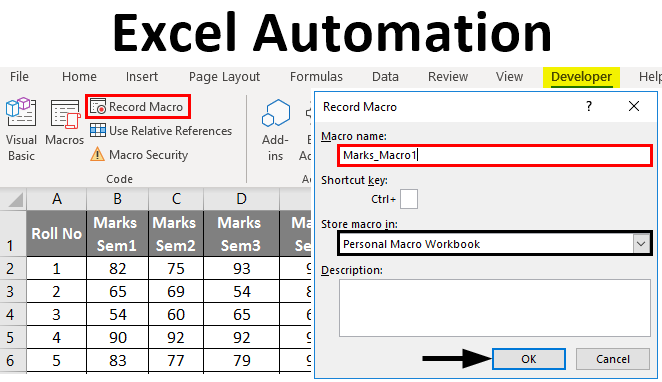
In the early days of office computing (1990s onwards) many automation efforts began as macros, small scripts embedded in spreadsheets (like Excel VBA) or simple trigger-action sequences (if X then Y). These were often built by power users or IT specialists to automate repetitive tasks.
Typical pain points in PeopleOps
- A PeopleOps team uses an Excel sheet to manage employee data: hours, leave, onboarding checklist. Someone writes a macro that formats columns, sends email reminders, updates statuses.
- As headcount grows, the macro breaks (new columns, renamed fields) or someone accidentally corrupts the template.
- The solution is brittle: only works for a specific version, single person knows how to maintain it, no logging, no enterprise-scale visibility.
Why this stage matters
- It represents the first step of automation: eliminate manual repetition.
- It makes the business side (PeopleOps) more efficient: fewer keystrokes, fewer copy-pastes, fewer human errors.
- But it also brings limits: lack of governance, scalability, error-handling, audit trails.
2. The Next Step: Workflow Automation & RPA (Rule-Based)
What changed
As organisations matured, they needed more robust solutions: workflows across systems, integrating HR systems, CSV imports, database triggers. The rise of RPA (Robotic Process Automation) and workflow automation platforms meant you could build automation that mimicked human operations (clicking, extracting, moving files) or orchestrated app-to-app integration. TechBullion+1
Common pain-points in PeopleOps
- Onboarding might involve: create user account in HRIS → generate equipment request → send welcome email → schedule training. Automating all this via RPA gave consistency.
- However, when systems change (UI updates, new HRIS version), RPA bots break, since they rely on fixed screen paths, selectors, etc.
- Governance becomes important: which bots run what, how to monitor failures, how to ensure audit compliance (critical for PeopleOps data: employee PII, training records).
- The business wants flexibility; technical team wants stability. The tension often surfaces when exceptions (edge-cases) occur: e.g., contractor vs full-timer, location compliance, QE vs QA.
What this stage brought to the table
- Deterministic automation: predictable tasks, high repeatability, clear ROI.
- Better cross-system integration: HRIS, payroll, learning management systems (LMS) workflows could be automated.
- But: limited adaptability. The bots still follow “if-then” logic, fail on exceptions, require constant maintenance.
3. The Turning Point: AI-Enhanced Automation
What’s new
Around the 2020s organisations began to adopt AI/ML components into automation workflows. Instead of only following rigid rules, systems could understand unstructured data (e.g., resumes, emails), make recommendations, summarise, classify. For example, extracting data from candidate CVs, automatically classifying sentiment in employee surveys, summarising performance reviews, or even auto-scheduling based on patterns. Make+1
PeopleOps use-cases
- Recruitment: automatic parsing of resumes + matching to job requirements → flagging top candidates → scheduling interviews.
- Employee engagement: analysing open-ended survey responses for sentiment, flagging at-risk employees.
- Learning & development: recommending training modules based on performance data and skills gap analysis.
- Compliance & audit: scanning policy-acknowledgments, identifying missing items, automatically sending reminders.
Pain-points now
- Data quality: for AI to work you need clean, structured data, well-labelled training sets. Many PeopleOps systems still have siloed, messy data. Appian+1
- Explainability & governance: Business stakeholders often want to know why a recommendation was made (“why was this employee flagged?”).
- Change-management: Giving PeopleOps teams the right tools and training so they feel comfortable with AI components, rather than viewing them as “black boxes”.
4. The Current Frontier: Agentic Automation / AI Agents
What we mean by “AI agents”
An “agent” in this context is a software system that perceives its environment, decides, and acts—often with minimal human intervention. These are not just automation workflows, but systems capable of reasoning, planning, using tools, and adapting. World Wide Technology+1
Some characteristics:
- Autonomy: They can decide on next steps based on context, rather than only following a fixed flow.
- Adaptability: They learn or adjust to new conditions (exceptions, new inputs, unstructured data).
- Multi-tool use: They might combine API calls, RPA bots, human handoffs, AI modules.
- Goal-oriented: Instead of “run this workflow”, they know “achieve this business outcome” and orchestrate the steps.
Real-world PeopleOps scenario
Imagine a large organisation with 10,000+ employees across multiple countries. You want to onboard a new hire in India (Pune), and the process involves: background check, equipment provisioning, local statutory compliance (tax, PF), manager introduction, buddy assignment, training scheduling, payroll setup.
An AI agent could:
- Read the hire profile (role, location, type)
- Choose the right onboarding path based on the profile (full-time India, contractor US, etc)
- Trigger systems: send data to HRIS, order laptop, schedule training with local office, set up buddy assignment in Slack, send welcome message.
- Monitor progress: if any step is delayed (e.g., background check takes > X days), proactively escalate.
- Provide analytics dashboards: track average onboarding time, bottlenecks, improvements.
- Learn: if hires in the Pune office consistently miss step “local tax registration”, agent adds a pre-emptive reminder or modifies the path next time.
Why this stage matters
- It moves automation from efficiency to strategic value: agents can drive outcomes (employee experience, time-to-productivity, retention).
- It reduces reliance on rigid workflows; better handles exceptions, dynamic business context.
- It allows PeopleOps teams to focus on higher-value work (strategy, culture, employee experience) while “the agent” handles the orchestration.
Key considerations & pain-points
- Data & integration: Agents must access enterprise data, often from multiple systems/spreadsheets. The foundation must be strong. Appian
- Governance & oversight: Even agents need human in the loop for high-risk steps (employment contracts, termination actions, etc).
- Change management: PeopleOps teams must embrace the shift from transaction-automation to outcome-orchestration.
- Skillsets: The team may need new skills (data literacy, vendor oversight, agent-orchestration) rather than just “we built a macro”.
- Ethics & compliance: In PeopleOps, agents handling PII, performance data, diversity metrics must be designed with fairness, transparency, privacy in mind.
5. Why This Matters for PeopleOps: The Strategic Perspective
Business and technical readers both care about two things:
- Efficiency & cost reduction (business KPI)
- Scalability, reliability, adaptability (technical KPI)
By understanding this evolution, PeopleOps leaders can make informed decisions:
- When to invest in simple automation vs when to leap to agentic automation.
- How to build a roadmap: start small, build data foundation, deploy rule-based automation, then layer AI and agents.
- How to speak to stakeholders: For business readers → “reduce time-to-hire by X%, improve employee experience”; for technical readers → “modular architecture, low-code/AI integration, governance, data fabric”.
- How to avoid pitfalls: e.g., building actor-bots with no monitoring, skipping change management, failing to integrate with the business process.
Real-world example
One organisation used an AI-agent approach in its onboarding of contractors. According to a vendor case study, deployment of an agentic-process platform cut onboarding time by ~83%. Appian That’s a tangible business outcome, less time to productivity, less manual follow-up, improved compliance.
6. How PeopleOps Can Leverage the Latest Automation
Here’s a practical roadmap for a PeopleOps team:
Step 1. Audit current automation
- List all macros, RPA bots, workflows in your PeopleOps domain (onboarding, offboarding, performance review, learning).
- Identify which ones are brittle (often break), which ones have high manual exception handling, which ones impact business outcomes.
Step 2. Clean your data & define metrics
- Ensure your HRIS, LMS, ATS, etc are integrated or at least share clean data.
- Define your KPIs: time-to-hire, onboarding completion time, training uptake, engagement score, etc.
- Make sure you have visibility into bottlenecks and exceptions.
Step 3. Build rule-based automation where it makes sense
- For high-volume, repeatable tasks: sending welcome emails, provisioning equipment, registering for training.
- Use workflow automation tools or RPA where appropriate.
Step 4. Introduce AI-enhancements
- For tasks that involve unstructured data or decision-making: parsing resumes, analysing sentiment, recommending training, risk scoring.
- Choose tools that integrate with PeopleOps systems and provide explainability.
Step 5. Move toward agentic automation
- Identify “processes” not just tasks: e.g., “complete employee onboarding” rather than “send email”.
- Choose an agent-capable platform or toolset that supports autonomy, human-in-loop oversight, learning.
- Pilot with a well-scoped use-case (e.g., onboarding in one office, or contractor onboarding).
- Monitor results: cycle time reduction, exception rate, user satisfaction, cost savings.
- Gradually scale: integrate with more systems, expand to more business units, embed analytics & continuous improvement.
Step 6. Governance & change management
- Define guardrails: when the agent escalates, when humans intervene, how to audit decisions.
- Train PeopleOps team on the new roles: from operator to overseer, from building macros to designing agent-orchestration.
- Communicate with business stakeholders: what’s changing, what value they get, what risks are mitigated.
- Monitor ethical / privacy / bias considerations: ensure fairness, transparency, data governance.
7. Challenges & Future Outlook
Challenges to watch
- Not all automation needs to be “agentic”. Trying to apply high-end AI agents to very simple tasks may add complexity rather than value.
- Legacy systems and data silos: Many organisations struggle with fragmented HR systems or outdated data management, this hampers the effectiveness of advanced automation.
- Talent gap: Building and maintaining AI-agent infrastructure requires new skillsets (data science, integration, AI governance) which PeopleOps teams may need to invest in.
- Change resistance: PeopleOps staff may feel threatened (“automation will replace me”) or may not trust intelligent automation, addressing this cultural dimension is key.
Future trends
- According to analysts, by 2028 33% of enterprise software applications will include agentic AI. Appian+1
- The blending of low-code/no-code platforms with AI agents lowers the barrier to entry for PeopleOps teams to deploy automation.
- Multi-agent collaboration: agents working with each other (and humans) in workflows, handling increasingly complex processes. World Wide Technology+1
- Human-centric “intent-based” automation: you express a goal (“Onboard this hire in India by next Monday”), the system decomposes into tasks, executes, monitors outcome. arXiv
8. Conclusion
From the humble macro on a spreadsheet to fully-fledged AI agents orchestrating enterprise workflows, automation has come a long way and for PeopleOps teams, this evolution opens up powerful opportunities. It’s not just about saving a few hours of manual work; it’s about transforming how people operations deliver value: faster, smarter, more adaptive, and aligned with business outcomes.
For PeopleOps professionals, the key take-aways are:
- Understand where you currently are (macro, RPA, AI-enabled, agentic) and where you want to be.
- Build the foundation (data, integration, metrics, governance) before chasing bells and whistles.
- Focus on business outcomes (time-to-hire, employee productivity, retention, cost) as much as technical efficiency.
- Bring the entire ecosystem together: business stakeholders, IT/engineering, HRIS vendors, data teams.
- Embrace the shift from “automation as task-elimination” to “automation as outcome-orchestration”.
Leave a Reply