
Introduction
In today’s fast-moving organisations, teams are under pressure to automate repetitive tasks, improve efficiency, reduce cost, and scale operations. But one of the biggest mistakes we see in PeopleOps and in business/tech cross-functional projects is: starting automation before you properly map and analyse your processes.
When you skip this crucial step you risk automating inefficiencies, building brittle workflows, or failing to get adoption because your team doesn’t trust the process. As one blog puts it:
“Jumping into automation without mapping your processes first puts you at risk of amplifying inefficiencies, wasting resources, and magnifying change-fatigue.” Simplifying Processes
In this article we will walk you through:
- Why mapping and analysing processes is essential before automation
- How to structure the process-mapping and analysis effort (step-by-step)
- What pain points to watch out for (especially from a PeopleOps / business/tech lens)
- How a PeopleOps team can lead or support this work
- Real-world scenarios to bring it alive
This is written for both business leaders (PeopleOps, operations, HR, finance) and the technical folks (IT, automation, RPA/devops) so we keep it simple but include the right keywords: process mapping, as-is, to-be, business process automation (BPA), robotic process automation (RPA), bottlenecks, swimlane, metrics, stakeholder alignment.
Let’s dive in.
Why Map & Analyse Before Automating?
1. Clarity & shared understanding
Mapping gives you a visual, shared representation of how work gets done. According to Atlassian:
“Process mapping allows teams to visualise workflows, coordinate inputs and decision-points, and improve productivity.” Atlassian
When you map out the process, business and tech stakeholders can align on who does what, when, with what inputs, what decisions, and what outputs. Which reduces ambiguity and the “oh we didn’t know that step” surprises during automation.
2. Identify inefficiencies, bottlenecks, and manual pain-points
If you automate blindly you might simply speed up a broken process. But mapping allows you to spot:
- Duplicate or unnecessary steps
- Manual hand-offs (which often introduce delays/errors)
- Decision points that cause rework
- Variants or exceptions that create complexity
For example, one guide notes process mapping “helps identify inefficiencies and bottlenecks” before automation. strms.io+1
3. Establish baseline & measure outcomes
Mapping your “as-is” process allows you to later compare to your “to-be” (post-automation) and measure the benefit. From Velocity IT:
“Process maps serve as a baseline, enabling businesses to measure the impact of automation…” velocity-it.com
Without this you cannot convincingly show ROI, or learn if the automation improved wait-times, error-rate, cost, or staff experience.
4. Design a proper “to-be” before you build
You don’t simply map and then click “automate”. Instead mapping helps you envision: “what should the process look like after automation?” That is often called a “to-be” process map. From a guide:
“It’s a good idea to map out the ideal process before starting on a project.” Agility System
When the future‐state is defined, you can build automation that supports it, rather than retrofitting automation into a messy current‐state.
5. Avoid change fatigue and costly rework
If you automate without mapping, users may resist the automation (because it doesn’t reflect how they really work). Or you end up doing rework when the automation fails to cover variants. One blog warns:
“Mapping is upstream from automation … helps you amplify efficiencies, maximise resources, and eliminate change fatigue.” Simplifying Processes
6. Enable scaling & continuous improvement
When you have documented, mapped processes that are understood, you create a reusable asset. Mapping supports governance, continuous improvement, and scaling of automation. From the benefits list:
“Once you capture your process maps … you will improve them incrementally to ensure you maximise the advantages your process maps can give you.” Camunda
How to Map & Analyse Processes: Step by Step
Here is a structured approach that PeopleOps (and their tech/automation partners) can use to map and analyse processes before automation.
Step 1: Define the scope and objectives
- Pick which process you’ll map (e.g., “Employee On-boarding”, “Purchase Order approval”, “Invoice reconciliation”).
- Set clear objectives: Why are we considering automation? What business pain are we solving? (e.g., reduce manual hours, cut error rate, speed up cycle time).
- Define start and end points of the process. Clear boundaries help avoid scope creep. According to a process-mapping guide:
“Set the scope. Define the start and end points so your map includes only what’s necessary.” Asana
- Identify stakeholders/roles: who participates in the process (people, teams, systems).
Step 2: Map the “As-Is” process (current state)
- Interview process owners and participants (PeopleOps, finance, IT, etc).
- Gather data: how many steps, how often the process runs, what inputs are used, what decisions/approvals exist, what systems are used.
- Create a visual map (flowchart, swimlane diagram) of the current state. Example:
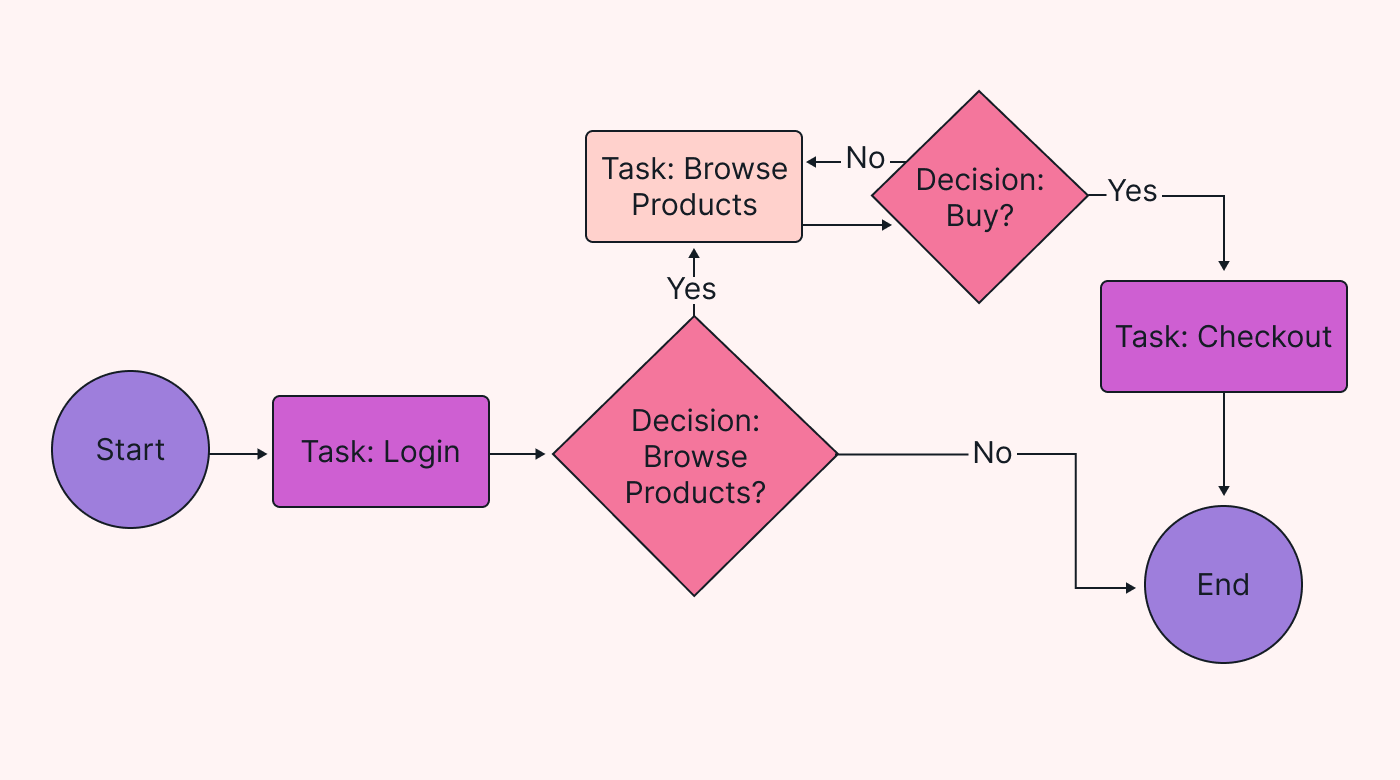


- Use standardized symbols (decision diamonds, process rectangles, etc) so both business and tech teams understand. Wikipedia
- Pay attention to variants/exceptions: often automation fails because the process has many branches not captured.
- Validate the map with stakeholders: ensure accuracy. As one source says, review & validate is critical. velocity-it.com+1
Step 3: Analyse the current state
With the “as-is” map ready, carry out analysis:
- Identify bottlenecks: steps where things queue up, delays occur, many hand-offs.
- Identify manual work, repeated activity, error-prone steps: these are good automation candidates.
- Identify decision points and exceptions: some may still require human judgement, maybe not automatable.
- Quantify metrics where possible: cycle time, manual hours, cost, error rate, resources consumed.
- Identify duplication or waste: redundant approvals, rework loops, waiting time.
- Engage PeopleOps: ask whether humans are doing the work in the way the map shows; whether the process is seen as friction or value.
- Document “pain‐points” from the business/users: e.g., “We wait 3 days for purchase approval because manager is on leave.”
Step 4: Design the “To-Be” process (future state)
- With inputs from mapping & analysis, sketch what the ideal process should look like before you automate. It may include simplification, elimination of unnecessary steps, redefining roles, clarifying approvals. From a guide:
“TO BE process maps help you see the big picture … identify opportunities for automation.” Agility System
- Decide which steps will be automated, which will remain manual, and how systems will interact.
- Ensure the to-be process aligns with business goals, user experience, PeopleOps requirements (e.g., compliance, user-friendliness, transparency).
- Visualise the to-be with a process map. Example:
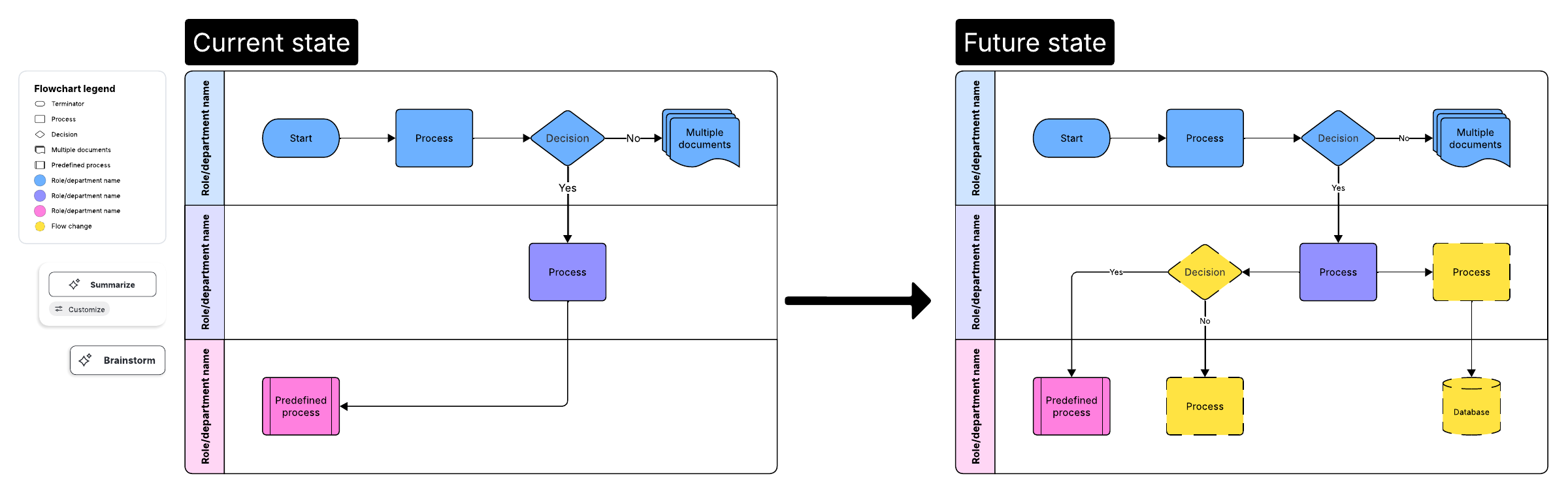
- Review the to-be with stakeholders (business, PeopleOps, IT) and get buy-in.
Step 5: Identify Automation Opportunities & Prioritise
- From the analysis and to-be design, list tasks suitable for automation. Criteria: high volume, repetitive, rule-based, prone to error, high cost/time.
- Use the mapping to show where automation makes sense (and where it doesn’t).
- Prioritise: which automation projects deliver the greatest business value (cost/time savings, risk reduction, user experience improvement) vs technical feasibility.
- Engage PeopleOps early: they bring understanding of human side (change management, adoption, training).
- Tie the selected automation to measurable KPIs (cycle time reduction, # errors, manual hours saved).
- Document the baseline metrics so you can measure post-automation improvement.
Step 6: Prepare Implementation (People, Process & Tech)
- Ensure change management: PeopleOps plays a crucial role in communicating the change, training users, managing roles.
- Ensure supporting systems and data are in place: process maps help identify needed integrations, data flows, hand-offs.
- Before coding or configuring automation (RPA bots, workflow engines, etc), have the documented process, the map, and stakeholder agreement.
- Consider exceptions and variant paths: automation should handle standard cases, and manual fall-backs should be clear.
- Build monitoring & control mechanisms: capture data to compare before vs after.
Step 7: Monitor, Measure & Iterate
- Once automation is live, use the documented baseline (from the process map data) to measure outcomes. Did cycle-time reduce? Did error rate drop? Are hand-offs fewer?
- Use process maps and dashboards to visualise the new process and identify further optimization opportunities. As one source states:
“You will improve them incrementally to ensure you maximise the advantages your process maps can give you.” Camunda
- Conduct periodic reviews with PeopleOps and tech teams: processes evolve, variants creep in, so maps must be kept up-to-date.
- Maintain the process map as a governance artefact: future automation, new hires, training all benefit from a clear, current map.
Summary Flow
Here’s a quick summary:
- Define scope & objectives
- Map as-is
- Analyse current state
- Design to-be
- Identify & prioritise automation opportunities
- Prepare implementation (people, process, tech)
- Monitor, measure & iterate
Pain Points & How PeopleOps Can Help
As a PeopleOps team, you are uniquely positioned to bridge business and tech in this effort. Here are common pain points and how you can act:
- Pain Point: Stakeholders don’t agree on how the process works (everyone does it “a bit differently”).
How PeopleOps helps: Facilitate cross-functional workshops (with HR, finance, IT, operations) to document roles and hand-offs; host interviews and clarify responsibilities. - Pain Point: Process mapping gets bogged down in overly complex diagrams; team loses engagement.
How PeopleOps helps: Keep it simple, use swimlane diagrams focusing on key steps and roles; communicate why mapping matters (avoid automating chaos). - Pain Point: Resistance to automation because “this is how we always do it”.
How PeopleOps helps: Lead change management: talk about benefits (less manual grunt, faster approvals), highlight how automation frees people for higher-value work, involve users early. - Pain Point: After automation, users don’t adopt because the new process feels awkward.
How PeopleOps helps: Use the to-be map with users, test with pilot groups, gather feedback, train users, adjust process as needed before full rollout. - Pain Point: No baseline metrics, so it’s impossible to measure impact.
How PeopleOps helps: With mapping, capture current time/cost data, manual hours, error counts, hand-offs. Then align on KPIs with automation. - Pain Point: Process changes a few months later, automation is brittle.
How PeopleOps helps: Maintain the process maps, schedule periodic review sessions, ensure process documentation remains living, not stale.
Real-World Scenario
Scenario: On-boarding New Employees in a Tech Firm
Current state (“as-is”):
- Hiring manager initiates a spreadsheet request → HR triggers IT to set up account → IT waits for manager’s email approval → IT manually creates credentials → HR sends orientation email.
- The process has many hand-offs, delays (waiting for email approvals), manual work.
- Time taken: ~5 working days. Several errors: wrong permissions granted, missing orientation invites.
Process mapping step:
- PeopleOps and IT map the as-is workflow, capture decision points (e.g., “Is role = manager? yes/no”), hand-offs between manager, HR, IT.
- They identify bottlenecks: manual approvals, email delays, spreadsheets, manual credentials creation.
- They quantify: 20 new hires/month, ~3 hours of manual IT time per hire, ~10% error rate.
To-be design:
- Simplify process: manager approves via workflow form, HR trigger auto-provisioning request.
- Use automation: system creates credentials, assigns role-based permissions, sends orientation invite automatically.
- New process time: target = 1 working day. Error rate target < 2%.
- Map the to-be workflow with roles, systems, automation steps clearly shown.
Implementation & monitoring:
- PeopleOps lead the communication: “You will receive your access within a day instead of multiple days.”
- Train hiring managers and HR on the new workflow form.
- Post-automation, monitor: number of new-hires processed, manual hours saved, access-setup errors.
- Use the original as-is map as baseline; compare to actual results.
Outcome:
- Time to access reduced from 5 days to 1 day.
- Manual IT hours reduced by ~80%.
- Error rate dropped.
- Onboarding experience improves, new-hires feel productive faster → better employee satisfaction.
- Process map becomes asset for future scaling (e.g., international hiring, remote onboarding).
Tips & Best Practices for PeopleOps
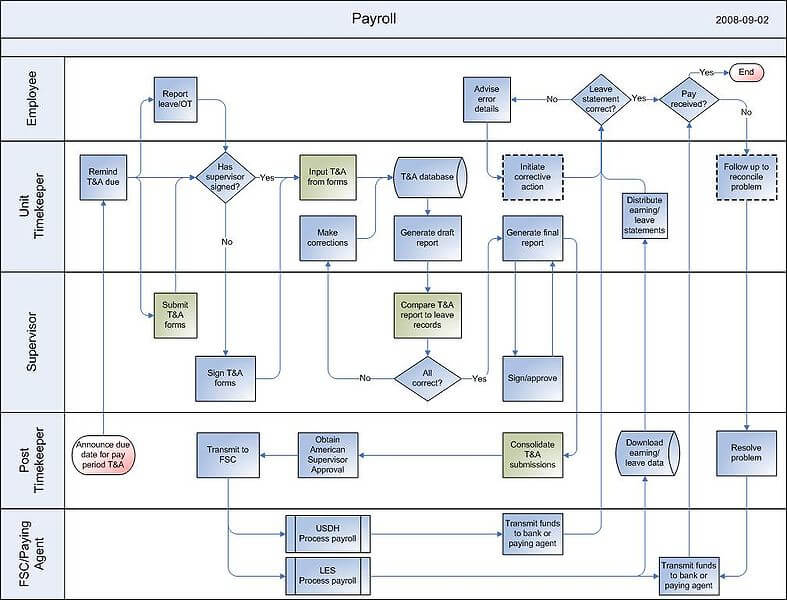
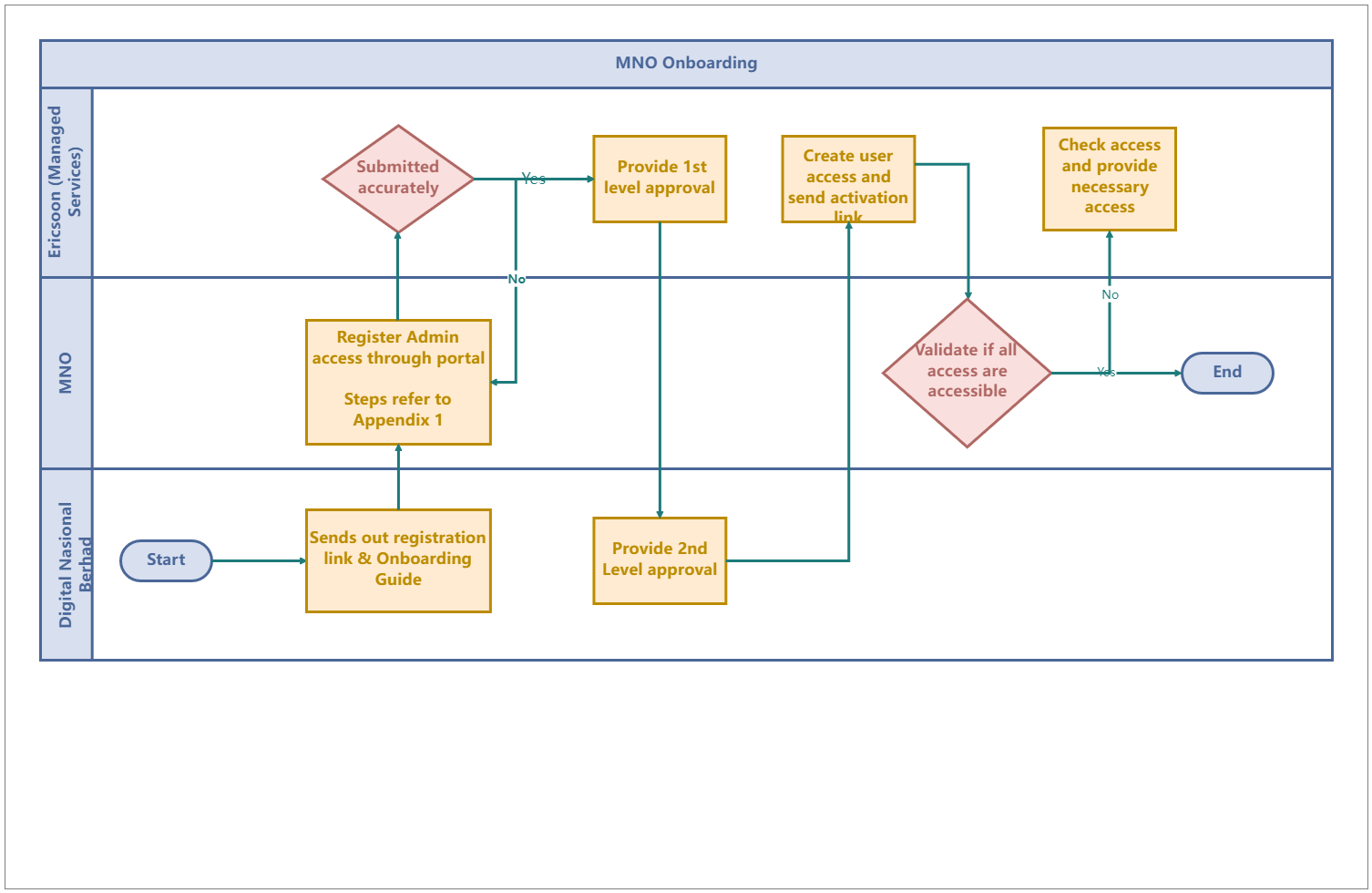
- Use swimlane diagrams (showing roles across lanes) to clarify which team/role does a step. Example visualisation:

- Start with high-level mapping, don’t get bogged down in every micro-detail. You can drill down later.
- Involve subject-matter experts early: the people doing the work know the exceptions and variants.
- Capture metrics at mapping time: time, cost, error, manual hours. Without them automation ROI is hard to demonstrate.
- Make sure the process map is accessible: stored in a central repository, clearly labelled, versions managed.
- Communicate the “why”: Help business stakeholders understand that mapping is not just “documentation work” but the foundation of effective automation.
- Make the process map living: After automation, schedule quarterly or twice-yearly reviews to adjust to changes.
- Align mapping with change management: PeopleOps should coordinate training, user-feedback loops, process adoption.
- Use a standard set of symbols/notation so both business and tech speak the same language. Reference guides like BPMN or simple flowchart conventions help. Asana
- Be realistic about exceptions: Some processes are too variable for full automation, map those exceptions and plan for human-in-loop steps.
- Prioritise automation candidates: focus on high-volume, rule-based, error-prone steps first.
Conclusion
Before you dive head-first into automation projects, spend the time to map and analyse your processes. It’s the difference between automating chaos and automating streamlined, aligned, measurable workflows.
For PeopleOps, this is not a side project, it’s a strategic enabler. By leading the process-mapping effort, you help the organisation:
- Get clarity on how work really happens
- Identify the real pain points (manual, error-prone, slow)
- Design the future state the way people want to work
- Ensure automation delivers measurable business value
- Support the people side of change so adoption succeeds
As technology (RPA, workflow automation, intelligent automation) becomes ever more accessible, the human-and-process work becomes the differentiator. Mapping and analysing your processes before you automate isn’t just best practice, it’s essential.
Leave a Reply