

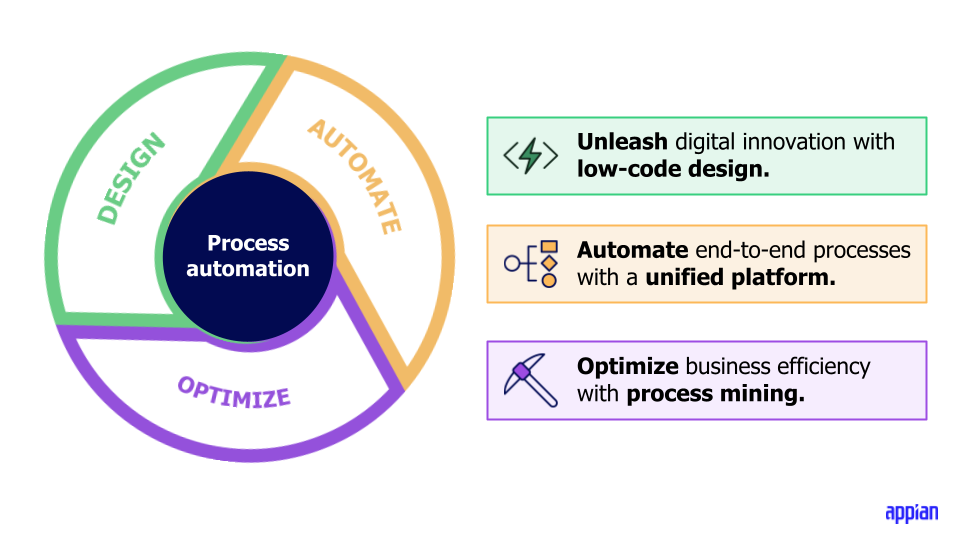
Automation is the dream: faster processes, fewer errors, scalability. But the truth is many automation initiatives, especially in HR/PeopleOps and business operations, don’t land as expected. As PeopleOps professionals, when we embark on a process automation or workflow automation project, we need to pay close attention to both the technical and the human/business sides. Below, I’ll walk through common pain-points, real-world lessons from failed automation projects, and how PeopleOps can play a pivotal role in making automation succeed.
1. The promise vs. the reality
When organisations launch automation initiatives (e.g., process automation, RPA, AI-driven decision systems), the promises are high: cost savings, rapid throughput, fewer manual errors, better user experience. But the reality often falls short. For example:
- Projects where integration with legacy systems (APIs, data flows) was underestimated and became major blockers. Medium+1
- Automation systems built to replace humans completely, but human oversight and contextual judgement turned out to matter a lot more than expected. Outsourcify+1
- Technical debt, lack of maintainability, or changing business requirements derailing the ROI. CodeStringers+1
As PeopleOps, we must recognise: automation isn’t a plug-and-play panacea. It’s a transformation, involving process, people, data, tech and change management.
2. Common root causes of automation failures
Here are some of the key causes we’ve seen, with implications for PeopleOps.
2.1 Unclear goals & scope
If the automation project lacks a clearly defined objective, metrics for success, or stakeholder alignment, trouble starts early. For example, a software project post-mortem found that “uncertainty around goals and requirements is one of the major risk factors”. CodeStringers+1
Pain point: PeopleOps may sign off on automation expecting “efficiency” or “cost reduction” but without specifying what that means (e.g., reduce HR ticket response time by 30%, headcount reduction by X).
Lesson: Define specific, measurable objectives, agree on what automation will do (and what it will not do). Document scope, boundaries, responsibilities.
2.2 Under-estimating complexity (process, tech & change)
Automation is rarely just “click a button”. It involves:
- Complex business processes that have evolved over decades.
- Data silos, legacy systems with poor APIs or undocumented dependencies. For example, one article states: “Your real blocker isn’t the dashboard, it’s the API.” Medium
- Human factors: change fatigue, training needs, end-user adoption.
Pain point: PeopleOps often focus on “let’s automate this process” without mapping out all the upstream/downstream impacts (roles, data, system handovers).
Lesson: Build a realistic picture of process complexity, involve process owners, map the current (“as-is”) state, quantify dependencies and risks.
2.3 Lack of stakeholder & end-user involvement
Automation fails when the people who live the process are not involved early enough. The research on automation systems emphasises that human factors, trust, transparency matter. sites.mitre.org
Pain point: HR admins, line managers or employees may resist or mis-use the automation if their voice wasn’t heard, or they don’t understand it.
Lesson: Involve the people doing the work, get their feedback, co-design the automation, run pilots, collect feedback. Change management is key.
2.4 Over-reliance on technical solution & ignoring human aspects
There is often a mindset of “we’ll just automate it and things will improve” but ignoring the human, cultural, governance aspects. For example: automation bias (humans over-trust automation) or Out-of-the-loop performance problems. Wikipedia+1
Pain point: The technology may work, but users don’t adopt it, or they bypass it, or unintended behaviours emerge.
Lesson: Automation should augment people, not simply replace them. Build training, monitoring, governance and continuous improvement.
2.5 Poor data & integration foundations
Automation typically requires clean data, stable integrations, clear rules. Failures occur when data quality is low, systems are fragmented, or integration effort is underestimated.
Pain point: PeopleOps may assume “we have this data” but in reality data is inconsistent, incomplete, or in silos.
Lesson: Invest time in data quality, system interoperability, error-handling, and robust integration design.
2.6 Scope creep & losing focus on value
Projects may drift: adding features, changing objectives, increasing complexity, which escalates risk, cost and delay. For example: a notable IT project “feature creep” contributed to collapse. Ratcliff IT+1
Pain point: PeopleOps may start with “automate onboarding” then drift into “automate performance management, learning, off-boarding” in the same initiative without sufficient resources.
Lesson: Keep the automation project focused on the highest-value use case first, establish MVP, iterate. Avoid “boil the ocean.”
2.7 Insufficient change management & continuous improvement
Even after go-live, automation projects need ongoing monitoring, maintenance, adaptation. If you ignore this, then what seemed like success turns into erosion. The research on automated test suites notes that “maintenance costs can still be considerable” and ROI can be delayed. arXiv
Pain point: “We launched the bot/rule engine and now we’re done” but business changes, new exceptions appear, process variance grows.
Lesson: Plan for governance, support, continuous improvement. Set metrics, monitor adoption, refine.
3. Real-World Scenario: A PeopleOps Automation Story
Let’s walk through a hypothetical scenario to illustrate how these issues surface and how PeopleOps can intervene.
Scenario: Automating HR Ticketing & Onboarding
A mid-size tech company wants to automate its HR service desk (ticketing) and onboarding process. The goal: reduce manual tasks, improve employee experience, and free up HRBP time.
What went wrong:
- They defined the goal vaguely as “improve onboarding speed” no baseline or target. (Unclear goals)
- They mapped only the ideal onboarding process, not the many real exceptions (contractors, interns, global hires) and so the automation did not handle many cases. (Under-estimating complexity)
- The HR operations team was told after the automation design was fixed, they weren’t involved in early design, so their tacit knowledge of exceptions wasn’t captured. (Lack of stakeholder involvement)
- The system had slick dashboards, but the underlying integration with the global payroll/benefits system had missing data and inconsistent fields, causing failures. (Poor data/integration)
- After go-live, the project team declared “done” but there was no governance or monitoring. Usage dropped as employees reverted to emailing HR. (Insufficient change management)
How PeopleOps could rescue/improve:
- At the outset, PeopleOps leads facilitated a workshop with HR operations, global HR, payroll, IT and line managers to capture all variants and pain-points.
- They defined KPIs: e.g., “Onboarding process tickets resolved within 24 hours”, “Employee satisfaction of onboarding process > 85%”, “HRBP time freed by 10 hours per week”.
- They prioritized the most common scenario (US full-time hires) as Phase 1, and planned Phase 2 for contractors/interns/global hires (avoiding scope creep).
- They arranged a pilot, collected feedback, iterated the automation and build in escalation paths for exceptions.
- They put in place dashboards/tracking (adoption, exceptions, time saved), scheduled monthly reviews, had a “process owner” in HR operations accountable for continuous improvement.
- They communicated widely to employees: “Here’s the new process”, training for HRBP and line managers, and captured usage insights for refinement.
Because of this disciplined approach, the automation succeeded not only technically but in adoption and value.
4. How PeopleOps Function Can Enable Automation Success
Here are specific ways your PeopleOps function can contribute:
- Process mapping & standardisation: Before automating, ensure the process is well-documented, standardised and optimised. Don’t automate chaos.
- Stakeholder alignment & change management: Engage HR operations, IT, line managers, affected employees early. Build adoption plans, training, communication.
- Governance & metrics: Define what success looks like (KPIs), track adoption, exceptions, errors, ROI. Have someone responsible for continuous improvement.
- Data readiness & system integration oversight: Ensure HRIS, ticketing, payroll, benefits systems are ready. Validate data quality, clarify integration points, escalate technical blockers early.
- Pilot and incremental roll-out: Start small (MVP), gather feedback, refine, then scale. This reduces risk and builds confidence.
- Human-in-the-loop mindset: Recognize that not all decisions should be automated; build appropriate human oversight, escalation, exception handling. Prevent automation bias and out-of‐loop issues.
- Continuous monitoring & maintenance: Set up support for model/rule maintenance, process changes, exception growth. Schedule periodic reviews.
5. Key Take-away Lessons for PeopleOps
- Don’t treat automation as a silver bullet — it’s a transformation requiring process, people, data and tech alignment.
- Start with the problem, not the technology — identify the process pain-point, map it, optimise before automating.
- Define success clearly & measure it — vague goals lead to vague outcomes.
- Involve the people doing the work and those impacted — their knowledge is critical for designing usable, effective automation.
- Expect and plan for exceptions — no process is completely standard, so build for variability.
- Keep humans in the loop — automation should augment, not blindly replace, and human oversight builds trust and resilience.
- Plan for the long term — after go-live the work continues. Set up governance, metrics, maintenance and continuous improvement.
- Use pilots and iterate — pilot small, learn, refine, then scale. Avoid trying to automate everything at once.
6. How PeopleOps + Technology Partners Can Work Together
- Define the business case together: PeopleOps sets the “why”, tech partner brings the “how”. Ensure both align on ROI, timeline, responsibilities.
- Shared ownership of process design: PeopleOps drives process mapping, user journeys, exception handling; tech partner builds automation with visibility into those inputs.
- Co-develop adoption and training plan: PeopleOps leads training and change communications; tech partner ensures the automation UI/UX is intuitive.
- Joint readiness for data & integration: Tech partner usually handles system integration; PeopleOps ensures data definitions, quality and stakeholder sign-off.
- Establish a governance forum: A joint steering committee (PeopleOps lead + tech lead + business owner) meets monthly post-go live to review metrics, issues, improvements.
- Govern scope and change: Together agree on MVP vs Phase 2, avoid scope creep, use change control for new features.
7. Conclusion
Automation holds tremendous potential for PeopleOps, freeing HR teams from repetitive work, improving employee experience, enabling data-driven decisions. Yet, as we’ve seen, many automation projects fail or under-deliver because of assumptions, missing pieces, or lack of human & process considerations.
As a PeopleOps writer and practitioner, the message is: focus on people + process + data + tech. Treat automation as a journey. Define clear goals, involve stakeholders early, pilot smartly, keep humans in the loop, measure continuously. When these elements align, automation becomes not just a tech initiative, but an enabler of better work, higher value and stronger organisational agility.
If your organisation is starting (or re-evaluating) a process automation initiative, PeopleOps can lead the charge not just as buyers of the tool, but as shapers of the success.
Leave a Reply