

Introduction
In the world of professional services, consulting, engineering, IT services, legal, etc, one of the greatest hidden drains on cash flow is slow invoicing. Delays in sending out invoices translate directly into delays in receiving payment. For companies operating on tight margins or scaling fast, that delay can seriously hamper growth.
This blog explores why “time-to-invoice” (the time from work performed to invoice sent) matters hugely in professional services, what the pain points are, and how automation of the invoicing cycle can accelerate cash, reduce leakage and improve operational efficiency. From a PeopleOps (people + operations) lens we’ll touch on both the technical (systems/processes) and business (cash, relationships, growth) perspectives.
Why Time-to-Invoice Matters in Professional Services
1. Cash flow is king
Professional services firms typically bill for work completed (time & materials), milestone deliverables, or fixed-fee engagements. If there’s a delay in generating the invoice, the firm is effectively funding the work until payment arrives. According to recent research, automated invoice processing helps reduce payment delays and gives Finance teams real-time visibility into cash-flow. Workday Blog+2WisePay+2
2. Revenue leakage and lost billing opportunities
When timesheets, expenses or project-work → billing aren’t tightly coupled, firms can lose billable hours, fail to invoice at the correct rate, or incur disputes over late / unclear invoices. As noted in the context of professional services automation (PSA) tools, slow billing cycles reduce utilization visibility and profitability. Wikipedia+1
3. Client experience & relationships
Late or inaccurate invoicing frustrates clients and may damage trust. A smooth, predictable invoicing process conveys professionalism and helps reduce disputes, which in turn reduces dunning costs (the cost of chasing payments). Automated workflows help ensure invoices are accurate and delivered on time. WisePay+1
4. Operational efficiency & scalability
Manual processes become bottlenecks as firms scale. Each additional project, consultant or service line increases the paperwork and potential delay. Automating the invoice‐workflow allows firms to scale billing without proportionally scaling staffing in Finance. SoftCo
Typical Pain Points in Time-to-Invoice for Professional Services
Here are some real-world scenarios that illustrate how things go wrong:
- Scenario A: A consulting firm delivers a milestone, but the consultant submits their timesheet late, the expense report is missing receipts, and the billing manager needs to manually consolidate these into an invoice. Meanwhile, days pass before the invoice is sent, delaying payment.
- Scenario B: An engineering firm uses a time & material contract. The delivery team tracks time in spreadsheets; the Finance team has to manually map that to the client contract, apply correct rates, add expenses, convert into invoice format, send and then monitor for payment. Errors creep in (wrong rate, missing expense), the finance team issues a correction invoice, further delay and cost.
- Scenario C: An IT services firm sends monthly invoices, but because of manual workflows they send some late, some with incomplete line-items, generating client queries and slowing collection. Meanwhile, the firm’s growth gets constrained by working capital tied up in unbilled work.
In each case, the issues include manual hand-offs, data silos (timesheet team, expense team, billing team), lack of real-time data, error-rates, and weak visibility.
How Automation of Time-to-Invoice Works (for Professional Services)
Here’s how firms can streamline the “work → invoice → cash” chain.
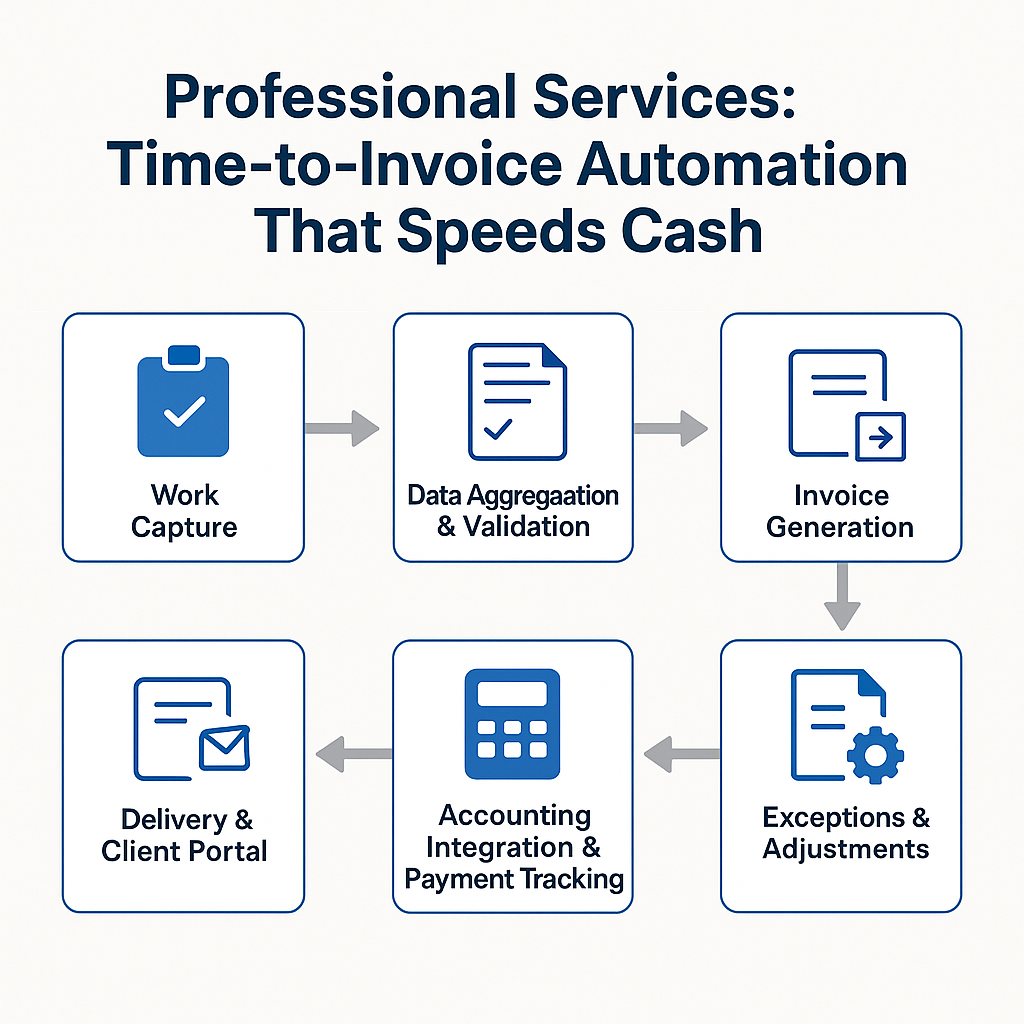
Step-by-Step Workflow
- Work capture: Consultants, engineers, service-staff record time (and expenses) in project/time-tracking tool. Integration with resource/project system ensures rates and contract-terms are already applied (rather than manual).
- Data aggregation & validation: The system pulls the time/expense data, applies contract rules (billing rates, expense policies, predefined milestones), checks for missing items or exceptions, and flags any with automated alerts.
- Invoice generation: Based on billable work and contract terms, the system auto-generates draft invoices (with correct line-items, taxes, formatting, branding). Approval workflow kicks in (automated route to billing manager or project lead).
- Delivery & client portal: Once approved, invoice is sent to client or made available in self-service portal; notifications are sent. Payment terms and options are clearly stated.
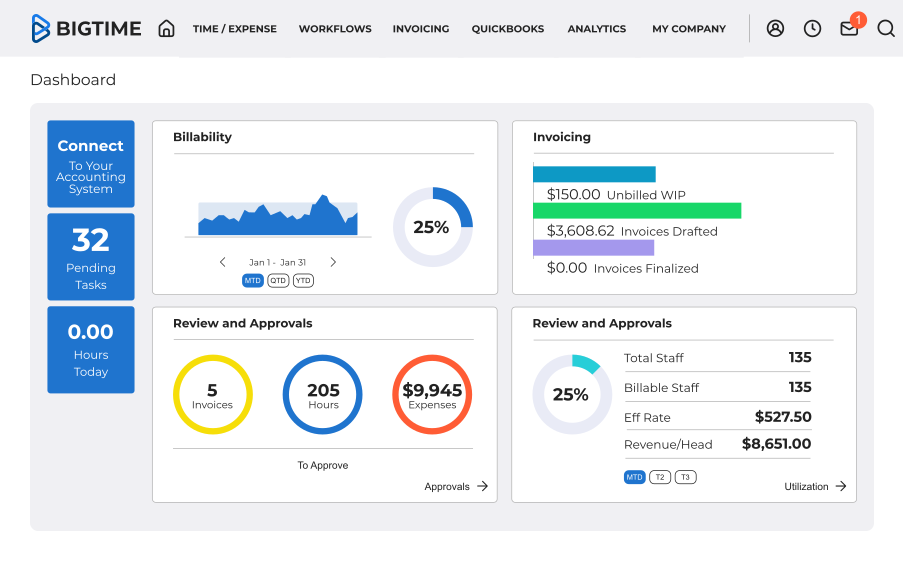
- Accounting integration & payment tracking: The invoice automatically posts to the accounting/ERP system; payment status is monitored; reminders are triggered for overdue items. Real-time dashboards show invoices sent, unpaid, aging, cash-due and forecasting.
- Exceptions & adjustments: The system handles rule-based exceptions (e.g., unexpected expense, out-of-scope hours) with automated escalation / approval. Reduces manual rework.
Why this matters for professional services
- The automation closes the gap from “work done” to “invoice sent”, reducing days of lag.
- It ensures accuracy, billing rates, contract terms, client details are consistently applied.
- It reduces manual churn, enabling billing/finance teams to focus on strategy rather than data entry.
- It improves visibility, project leads, finance, operations all see real-time status of invoicing and cash.
Technical capabilities enabling this include: OCR / document capture for expense receipts, workflow engines for approvals, integration between PSA tools and ERP/accounting, dashboards & analytics for billing KPIs. Tipalti+1
Key Benefits of Time-to-Invoice Automation
Here are the core benefits, with relevance to professional services firms:
- Accelerated cash flow: Faster invoicing = faster payments. One study lists accelerated cash-flow as a major benefit of automated invoicing. worldpay.com+1
- Reduced billing errors and disputes: Automation reduces manual mistakes (rate mismatches, missing line items, wrong formatting), leading to fewer client disputes and less rework. Tipalti
- Improved visibility and forecasting: Since invoicing data posts automatically and dashboards update in real time, firms can forecast receivables, monitor aging, identify bottlenecks and manage working capital more effectively. WisePay
- Better operational efficiency & scalability: Billing teams can handle higher volumes without proportional head-count growth. The system becomes a force-multiplier. SoftCo
- Improved client satisfaction & relationships: Timely, accurate invoices reflect well on the firm, supporting stronger client trust and may reduce payment delays or negotiation friction.
- Cost savings and reduced leakage: Fewer hours spent on manual billing tasks means less cost per invoice and less lost revenue from unbilled work. Ignition
Implementation, What PeopleOps Should Focus On
From a PeopleOps perspective, implementing time-to-invoice automation involves both process change and enabling the people/teams to adopt it. Below are key focus areas:
1. Process audit and mapping
- Map current workflow: how work is captured, timesheets submitted, billing rules applied, invoice created and sent.
- Identify bottlenecks: e.g., delays in timesheet submission, manual consolidation, approvals lag, invoice formatting issues, missing data.
- Define target throughput: what is acceptable “time-to-invoice” benchmark (for example: invoice must go out within X business days of milestone/completion).
2. Data discipline & input hygiene
As many articles emphasise, automation works well when input data is clean. In a professional services setting:
- Ensure consultants log time/expenses promptly. (E.g., automated reminders). BigTime Software
- Ensure contract terms, billing rates, client details, project codes are standardised and up-to-date.
- Ensure any exceptions (out-of-scope work, approvals needed) are captured in the system.
3. Tool selection & integration
- Choose a system (or integrate existing PSA + accounting system) that supports automation of invoice generation, approval workflows, client portal and payment tracking.
- Make sure it integrates with time-tracking, resource/project management and accounting/ERP systems.
- Ensure dashboards and analytics are built-in (or easily added) so finance and operations have visibility.
4. Change management & training
- PeopleOps should run training sessions for consultants, project leads and billing/finance staff on the new process, mindset and tools.
- Communicate benefits clearly: faster cash means more investment in people/projects, less time chasing invoices, less billing error-stress.
- Set up governance: who approves invoices, how exceptions are handled, what is acceptable delay threshold, how reminders work.
5. Metrics & continuous improvement
Track and monitor key KPIs such as:
- Time from work/completion to invoice sent
- Days Sales Outstanding (DSO) for professional services invoices
- Number of billing disputes / corrections per period
- Percentage of invoices generated automatically vs manually edited
- Utilisation of billing team / cost per invoice
Use these to benchmark and continuously refine the process.
A Typical Case Study (Fictional / Composite)
TechConsult Ltd – a mid-sized IT consulting firm with 120 consultants.
Problem: Their average time from project completion to invoice issuance was 12 days. Many invoices were corrected due to billing rate errors or missing expenses. Their DSO sat at 45 days, limiting cash for investment in new hires.
Solution: They implemented an automation workflow:
- Consultants required to submit timesheet/expenses via mobile app before Tuesday of each week (automated reminder).
- Integration between project tool, PSA system and accounting system so billing rules applied automatically.
- Invoice draft generated and auto-routed to billing manager within 1 day.
- Client portal enabled so invoices delivered electronically, payments tracked.
Result: Within 6 months: average time to invoice dropped to 3 days; billing‐errors down by 70 %; DSO reduced to 32 days; billing team headcount unchanged despite 20 % growth in project volume.
Business Impact: Freed up cash which was used to recruit 10 new consultants; improved client satisfaction; billing team shifted focus to value-add analytics rather than manual churn.
This kind of scenario is realistic and mirrors data from automation research.
Common Pitfalls and How to Avoid Them
| Pitfall | Why It Happens | How to Avoid |
|---|---|---|
| Rigid automation without exception handling | Systems try to auto-generate every invoice; exceptions (out-of-scope work, sudden rate changes) cause delays | Build workflows that allow human-in-the-loop for exceptions; set tolerance rules. |
| Input data is dirty / inconsistent | Consultants submit late, rates are outdated, project codes wrong | Enforce data discipline, reminders, standard templates, and audit data. |
| Tool-silos / lack of integration | Time tracking, PSA, accounting live in separate systems and manual hand-off remains | Select systems with API/integration or ensure robust connectors. |
| Lack of visibility into process | Finance cannot see where delays are occurring | Build dashboards that show aging invoices, bottlenecks, exception counts. |
| Under-estimating change management | Teams stick to old manual ways, or fear automation | Communicate benefits, train, highlight wins, set ownership. |
Why PeopleOps Should Care
- Talent and retention: Billing delays and manual churn are demotivating for finance and service delivery teams. Automation frees teams to focus on strategic work rather than data entry.
- Resource utilisation: As firms scale services, staffing the billing function should not scale linearly. Efficient processes allow headcounts to focus on growth, not just maintaining.
- Cash for growth: Faster invoicing drives faster cash, which means more funds available for hiring, training, tool investment, all important for PeopleOps strategy.
- Operational excellence: PeopleOps sits at the intersection of people, process and technology. Time-to-invoice automation is a clear process/tech initiative with strong people implications.
- Data-driven decision-making: With automated workflows, you capture clean data about projects, utilization, billing delays etc. That data supports workforce planning, capacity management and project staffing decisions.
Final Thoughts & Next Steps
In the professional services industry, the time between work done and invoice sent is a critical lever for improving cash flow, profitability and scalability. For PeopleOps teams looking to support sustainable growth, investing in time-to-invoice automation is not just a finance project but a people/process/technology initiative.
Next steps you might take:
- Conduct a baseline audit: measure current average time-to-invoice, error-rate, DSO, billing disputes.
- Identify the “highest friction” segment: e.g., one service line, one type of contract (time & materials vs fixed-fee) and pilot automation there.
- Select tools/integration: ensure your PSA/time tracking connects to billing & accounting and supports automation and dashboards.
- Train & change-manage: communicate value, set new expectations for timesheet/expense submission, build ownership for billing process.
- Monitor and iterate: set KPIs, review monthly, refine workflows, address exceptions, scale to other service lines.
By doing so, your firm will be better positioned to bill faster, collect sooner, reinvest in growth and keep both clients and employees happier.
Leave a Reply