
Introduction
In the world of projects, whether in software delivery, construction, or internal corporate initiatives, the relationship between estimate, change order (often abbreviated CO), and budget updates is crucial. This sequence keeps scope, cost, and financial tracking aligned. For People Operations (PeopleOps) teams, who liaise between business, finance, and delivery functions, mastering this sequence helps ensure that resource planning, headcount, contractor spend, and project budgets don’t spiral out of control.
In plain English: you estimate what you’ll do and how much it costs → you do a change order if the scope shifts → you update the budget so the books (finance) reflect the new reality. If you skip or mis-manage any of these steps, you’ll end up with scope creep, cost over-runs, mis-allocated budgets, or confused stakeholders.
In this article we’ll explore:
- What each component (Estimate → Change Order → Budget Update) means
- Typical problems and pain points
- Real-world scenarios
- How PeopleOps can play a central coordinating role to keep everything in sync
- Practical tips and best practices
1. What does each term mean?
Estimate
An estimate is the initial or updated prediction of what the project (or a scope of work) will cost. It’s based on defined scope, resource assumptions, material/labour costs, and timing. In project management terms it is similar to the concept of a “basis of estimate”. Wikipedia+1
From a PeopleOps lens, an estimate might include the number of headcount needed (internal staff, contractors), their rate or salary cost, tools/licenses, benefits, training, overheads, and the timeline for deliverables.
Change Order (CO)
A change order is a formal amendment to an existing plan/contract or budget because something changed: scope increased or decreased, schedule shifted, resources changed, etc. Hyperstart+2onindus.com+2
In many industries (especially construction) this is a well-known concept: you’ve signed a contract with a scope and budget, then you need to modify it. In internal corporate projects the same logic applies, even if people don’t call it a “change order”.
Budget Updates
Once an estimate has been modified (via a change order or otherwise), the official budget must be updated so that financial and accounting systems reflect the new reality. That means the books (cost centres, project budgets, allocations) stay accurate and aligned with operational execution.
In other words: Estimate → (if needed) Change Order → Budget Update. This ensures scope, cost and accounting are all aligned.

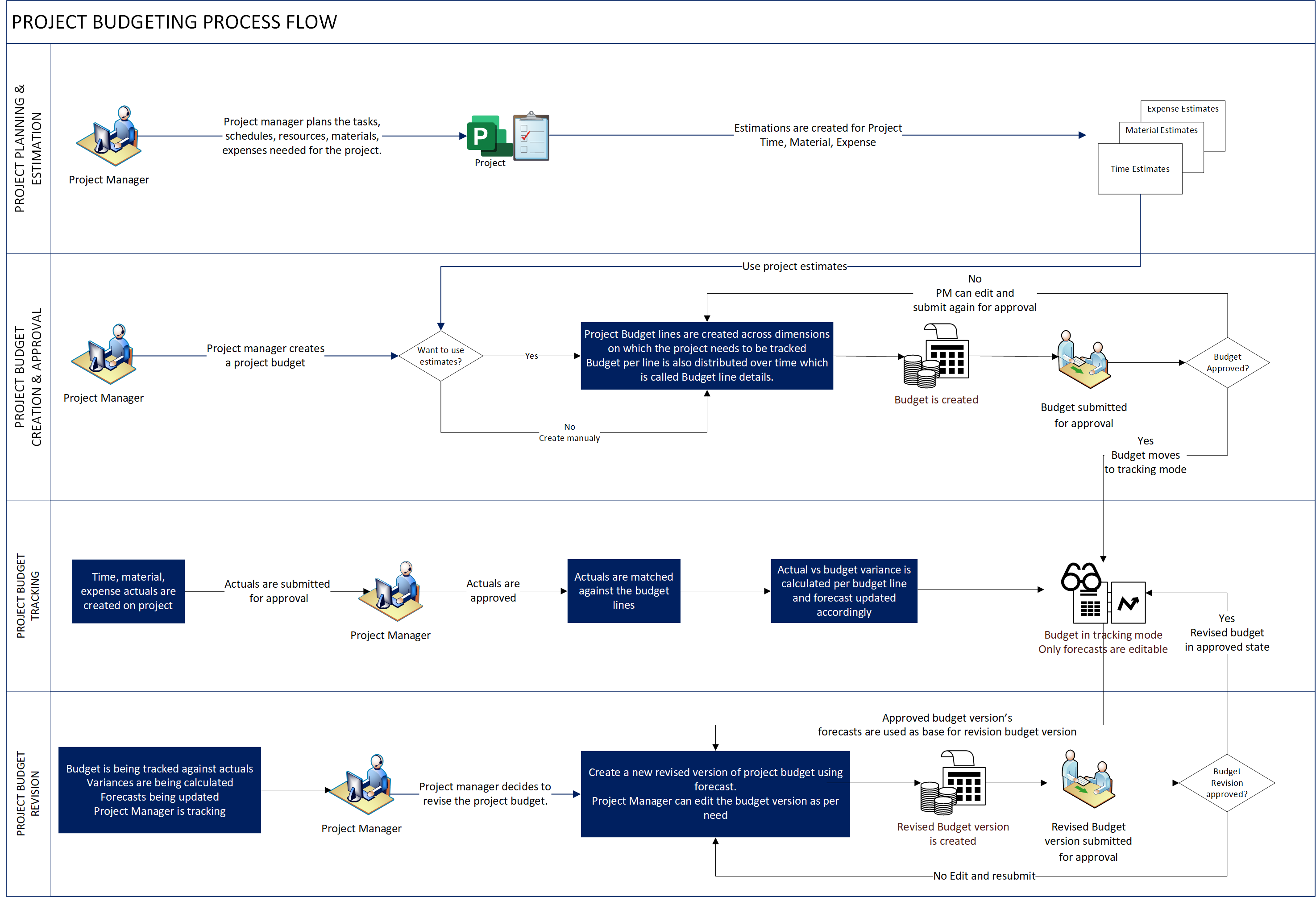
2. Why it matters: the pain points & root causes
Here are common problems when this sequence breaks down, and what causes them.
Pain Points
- Scope creep without budget adjustment: The team adds features, tasks or headcount, but the budget remains unchanged → cost overruns.
- Budget updated without updated scope or estimate: Finance sees the budget change, but delivery doesn’t know what new work is expected → misalignment and frustration.
- Change orders untracked or poorly documented: Leads to disputes about who approved what, difficulty explaining variance.
- Lack of transparency / delays in budget updates: Finance and PeopleOps can’t accurately forecast departmental spend, headcount needs or contractor costs.
- Resource planning based on old estimates: Hiring or contractor engagement decisions made on outdated assumptions → idle resources or undercapacity.
- Inconsistent reporting and analytics: Without a clear “what the estimate was” vs “what changed” vs “what the current budget is”, you lose the ability to learn and improve.
Root Causes
- Initial estimate too optimistic or incomplete: If the scope is not well defined, the estimate is shaky.
- Change management not formalised: informal changes happen without documentation → chaos.
- Silos between PeopleOps / Finance / Delivery: Each operates in its own bubble, not shared.
- Tools or processes lacking: No system to link estimate → change order → budget update (for example, no workflow, no alerting).
- Fast-moving business demands: Projects must pivot, so change becomes constant and the discipline doesn’t keep up.
One formal way to see this is the classic project management triangle, which states that scope, time, and budget (cost) are interlinked: changing one typically affects the others. Wikipedia+1
3. Real-world scenario (PeopleOps & project delivery)
Let’s walk through a hypothetical but realistic scenario from a PeopleOps perspective.
Scenario: Software Product Launch
Your organisation is launching a new product module in Q4. The PeopleOps and Delivery leadership agree:
- Scope: Build Module X, integrate with existing system, launch marketing campaign.
- Estimate: Based on internal staff + 2 contractors for 3 months, cost including licences/training is ₹ 30 lakhs.
- Budget: Approved budget from Finance is set at ₹ 30 lakhs and assigned to cost-centre / project code.
What happens next
- Week 2: The product owner requests an additional analytics dashboard (scope increase).
- Your PeopleOps team assesses: Additional contractor support needed + maybe an external analytics tool licence. Estimate increases by ₹ 8 lakhs.
- A formal change request is raised, evaluated, approved via PeopleOps & Finance (CO).
- Budget is updated: new budget total becomes ₹ 38 lakhs, the Finance system receives an updated cost-centre allocation.
- PeopleOps updates resource plan: contract extends by another month, hire sanctioned, tool licence procured.
- Delivery executes, monitors cost and progress.
- Without this change order & budget update, the extra work would proceed but the budget would remain ₹ 30 lakhs → over-run and lack of visibility.
Alternative (broken sequence)
If the scope change was verbally approved but the budget not updated:
- Finance still shows ₹ 30 lakhs.
- PeopleOps and Delivery work to ₹ 38 lakhs spend silently.
- At month‐end, variance shows ₹ 8 lakhs over budget → confusion, audit risk, blame games.
- Or worse: Delivery runs out of money mid-way, contractors idle, morale drops.
Why PeopleOps involvement is crucial
- PeopleOps connects resource planning (staff/contractors) to financial cost.
- They ensure that changes in scope (which often mean headcount or contractor extension/licence cost) are noticed and raised.
- They serve as bridge between Finance (budget holders) and Delivery (scope owners).
- They help embed process: “If you change scope → you must initiate CO → we update budget → we adjust resource plan”.
4. How PeopleOps can help keep scope and books in sync
Here are practical steps and best practices tailored for PeopleOps teams.
a. Define clear process and workflow
- Establish a Change Order request process for any scope/resource/time change.
- Use standard template: what changed, why, cost impact, timeline impact, resource impact.
- Document approvals by relevant stakeholders (Delivery Lead, Finance, PeopleOps).
- Ensure the budget update is triggered only after CO approval.
b. Link Estimate, CO and Budget with tools
- Maintain a baseline estimate for every project. This is the “what we expected” number.
- Track COs: each one records scope‐change, cost implication, resource implication.
- Budget updates: once CO is approved, update budget in financial ledger/cost centre, and notify PeopleOps and Delivery.
- Use dashboards or simple trackers to monitor: baseline estimate vs current approved budget vs actual spend.
c. Communicate clearly across functions
- PeopleOps should ensure transparency: inform the team, finance, leadership about budget changes, resource implications, timeline adjustments.
- Educate stakeholders: any change in scope must go through the CO process–even if “just adding one contractor”.
- Provide regular updates/reporting: e.g., “As of this month we have had 3 COs totalling ₹ X lakhs, budget now ₹ Y lakhs, actual spend ₹ Z lakhs”.
d. Monitor and control scope creep
- Use the estimate → CO → budget update chain as a gate to prevent uncontrolled scope creep. If someone asks for “just one more feature”, ask: “Is this within current scope/estimate? If not, we need a CO.”
- Periodically review: Are there multiple small changes happening informally? Better to bundle and formalise.
e. Leverage PeopleOps-specific lens
- Headcount/contractors: Changes in scope often mean changes in people cost. PeopleOps are uniquely positioned to spot when additional FTEs/contractors are being added without budget approval.
- Licensing/training/access: Tools and training often overlooked. PeopleOps can flag when new modules/features will require new licences or training cost.
- Change in delivery model: From internal to third‐party, or shifting from full-time to contracting – all have cost/budget implications.
f. Best practices & checklist
- Keep the original estimate documented. Without a baseline, it’s hard to know when a CO is needed.
- Each CO should include: description of change, reason, cost impact, resource impact, timeline impact. Long International+1
- Budget updates should reflect only approved COs. Pending change requests should not be in the budget until approved. 4castplus
- Maintain versioning of budgets: baseline, current approved, pending. This helps audit and reporting.
- Use alerts/triggers: For example, if actual spend is > 80% of approved budget and there are active scope changes pending – time to raise a flag.
- Conduct regular reviews: PeopleOps + Finance + Delivery should meet periodically to review budget vs scope vs spend vs resources.
5. Summary and Key Takeaways
- The sequence Estimate → Change Order → Budget Update is essential for keeping scope, resources and finances aligned.
- When this chain breaks, you get scope creep, cost overruns, mis-alignment between PeopleOps/Finance/Delivery.
- PeopleOps plays a central role: bridging resource planning (staff/contractors) with cost/budget and scope/delivery.
- Implementing a clear process, documentation, tool linkage, and regular communication helps.
- Always remember: any change in scope (features, resources, timeline) potentially drives a change order. That change order must trigger a budget update before work proceeds.
- Keeping the “books” (budget) in sync with the “books of work” (scope/estimate) avoids surprises and enables better decision-making.
Closing Thoughts
In today’s fast-moving business environment, projects rarely go exactly as planned. Scope changes are inevitable. What distinguishes successful organisations is how they manage these changes, how quickly they identify them, quantify them (estimate), approve them (change order), and reflect them in the budget (budget update).
For PeopleOps teams, this discipline is not just about numbers, it’s about enabling people, teams and leaders to work with clarity. When headcount, contractors, licences, training, tools and timelines move, the budget must reflect the new reality. When that happens, you reduce risk, build trust, and support agile yet disciplined project delivery.
Leave a Reply