
Introduction
In today’s world, organisations expect seamless data flow across systems, especially where time tracking, payroll and job costing overlap. When labour hours are captured by your people operations system, they should feed into payroll, and then ultimately into job cost – without manual re-entry, errors or delays.
This article explores how to build a “clean labour flow” every pay period: from time capture → payroll processing → job costing/project accounting, why it matters, what pain points typically pop up, and how People Ops teams can enable smoother operations.
Why this matters: The business case
Clean labour flows matter for both the HR/PeopleOps world and the finance/accounting side.
Here are some of the key reasons:
- Accuracy in labour costing & job costing: Labour is often the largest single cost in many project-based organisations (construction, professional services, manufacturing). If labour hours are mis-coded, mis-credited, or not tied to the right job code, your job costing suffers. TCP Software+2NetSuite+2
- Payroll compliance and correct pay: When time doesn’t flow correctly into payroll, you risk under- or over-paying people, incorrect overtime, missed cost allocations, or compliance issues.
- Real-time visibility & decision making: Modern job costing expects near-real-time or at least fast updates so that project managers and finance can respond quickly to cost overruns. According to one resource: “Each time payroll is processed, labour costs should automatically flow into project budgets and accounting records, without anyone re-keying numbers.” dapt.tech
- Better project profitability & quoting: With aggregated historical cost data (especially labour by job, by code), you can estimate future jobs better, bid more aggressively, and control margins. hh2.com+1
- Reduced manual work & fewer errors: Manual data re-entry or spreadsheets are risky and inefficient; automation improves both speed and reliability. Accounting Department+1
So from a PeopleOps perspective: you’re not just tracking people and pay, you’re a critical part of the cost-chain enabling the business to track, allocate and optimise labour resources.
What a “clean flow” looks like
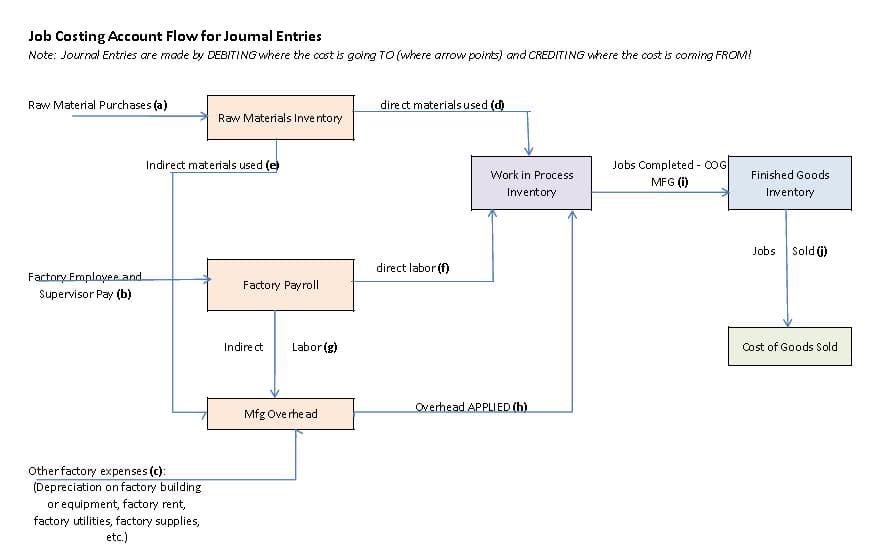
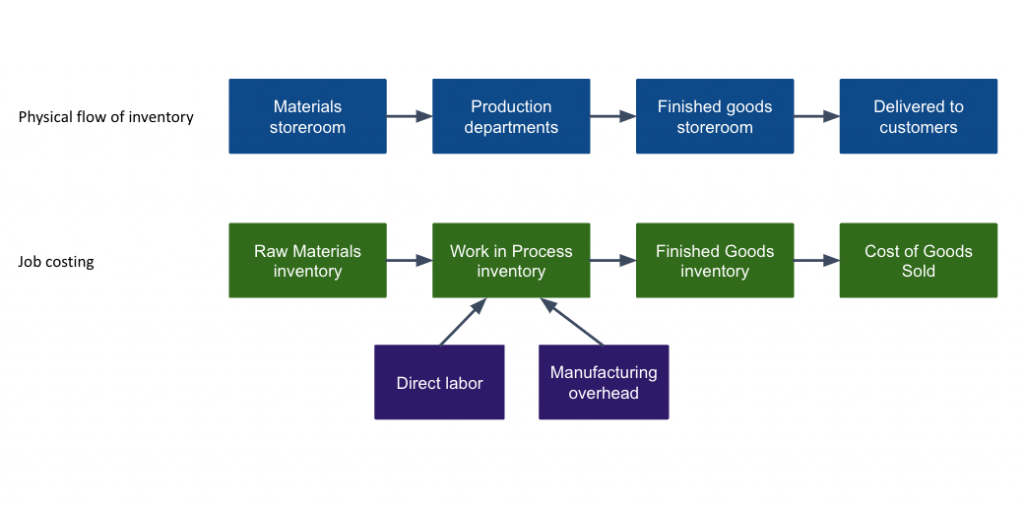
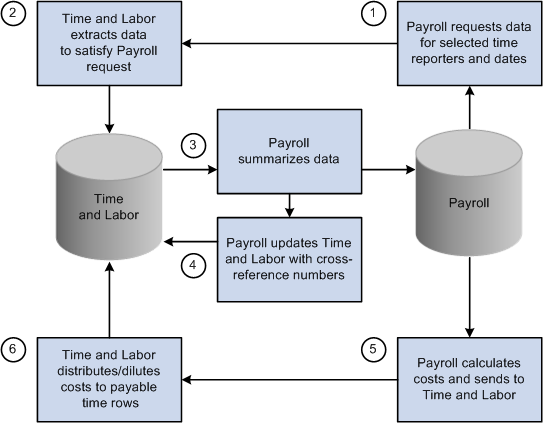
Here’s a simplified diagram of the ideal flow:
6
Flow steps:
- Time capture / time & attendance
- Employees (or contractors) log time via timesheets, clock-in/clock-out, mobile apps, job-codes, cost-codes.
- Ensure each hour is tied to the correct job code (or project, task) and cost code (labour category, role).
- Transmission to payroll / PeopleOps system
- Time data flows into payroll engine: hours, overtime, job codes, cost centres.
- Any adjustments (absences, leave, bonuses) are captured.
- Payroll processing
- Gross wages calculated, benefits/taxes applied, net pay determined.
- Meanwhile, labour cost data gets generated (gross wages + burden) tied to cost codes.
- Job costing / project-accounting allocation
- Labour costs imported (or linked) from payroll into the job costing or ERP system.
- Costs are assigned to the correct job, project, or cost-centre.
- Comparison: budget vs actual labour costs.
- Reporting & decision-making
- Project managers and finance see labour cost performance.
- Insights: Are we over budget on labour hours? Is overtime creeping? Is productivity lagging?
- Actions: adjust staffing, re-allocate resources, refine estimates for next period.
With this flow, each pay period becomes not just a payroll event, but a cost-visibility event. It strengthens the linkage between People Ops and Finance.
Typical pain points and PeopleOps impact
Let’s now dig into the common problems that derail clean labour flows and how PeopleOps can help solve them.
Pain Point 1: Time capture lacks job-code discipline
- Employees might forget to tag their hours to a job / project.
- Or time capture tools only capture generic hours (e.g., “Production”) rather than detailed task codes.
Impact: Labour costs may land in a generic bucket, making job costing meaningless.
PeopleOps fix: - Enforce mandatory job-/task-code fields in time-entry apps.
- Provide user-training: why it matters for visibility and cost control.
- Audit flagged entries (e.g., hours without job code) each pay period.
Pain Point 2: Disconnect between time system and payroll
- Time system might export data as CSV, requiring manual mapping into payroll.
- Data mismatches: hours logged vs hours paid; cost codes not transferred.
Impact: Manual reconciliation, errors in pay or mis-allocation of cost codes.
PeopleOps fix: - Prefer systems with API or direct integration between time tracking and payroll.
- Validate data flows weekly: hours entered → payroll hours → cost allocations.
- Maintain data-governance: cost-code taxonomy, mapping rules.
Pain Point 3: Payroll burden & cost centre allocation omitted
- Payroll often focuses purely on net pay for employees; cost allocation (job codes) may be omitted or treated as a later accounting exercise.
Impact: The job costing system may receive net pay data but not the true fully-burdened labour cost; or cost data comes too late.
PeopleOps fix: - Work with Finance to define burdened labour cost (wages + benefits + taxes + indirect labour).
- Configure payroll or export data so that each employee’s labour cost includes burden and carries job/project cost code.
- Ensure cost-centre or job fields are part of payroll journal export.
Pain Point 4: Delay or lack of real-time visibility
- Job costing data may be updated only monthly or quarterly, making oversight laggy.
Impact: By the time you spot cost overruns, it’s too late to take corrective action.
PeopleOps fix: - Align pay-period close with cost-data refresh to job costing/ERP.
- Automate exports immediately post-payroll run.
- Provide dashboards for PeopleOps and Project Managers: hours by job, cost variance by job, labour utilisation.
- Encourage weekly or bi‐weekly oversight, not only monthly.
Pain Point 5: Manual re-entry and spreadsheet leakage
- Multiple systems: time capture → Excel → import into payroll → Excel → import into job costing.
Impact: “Spreadsheet sprawl” increases risk of errors, lost hours, mis-codes.
PeopleOps fix: - Reduce manual hand-offs.
- Leverage integrated HCM/time/ERP solutions or middleware.
- Set up validation rules: e.g., time entries without job code trigger alerts; cost codes out of populist list get flagged.
Real-world scenario
Let’s illustrate this with a hypothetical company: BuildCo Construction Ltd (a mid-sized construction firm)
- BuildCo uses a mobile time-entry app for on-site crews: each worker clocks in/out at each site and selects the project code.
- Time data flows to the PeopleOps system, which tags it by project, trade (electrical, plumbing, carpentry), and cost-code.
- Payroll runs bi-weekly: the time entries feed directly into payroll; hours, overtime, cost-codes are mapped.
- After payroll, a job-costing export sends labour cost (wages + burden) along with project codes to the ERP system.
- Project managers view a dashboard the Monday after pay-period close: “We’ve spent 110% of our labour budget on Project X; overtime is 20% above target; we need to deploy fewer senior trades and more junior.”
- Because the flow is automated, by week 2 of the project manager can reroute resources, renegotiate subcontract coverage, or adjust schedule, rather than discovering a labour cost overrun at the end of the quarter.
In contrast, imagine a rival firm that still uses paper sheets → manual accounting; job codes often missing; payroll costs show up weeks later in job cost reports by which time cost overruns are locked in. That delay costs them margin and responsiveness.
How PeopleOps can drive this transformation
As a PeopleOps leader or practitioner, here are the levers you can pull to ensure clean labour flows:
- Select/implement integrated systems
- Choose a time & attendance system that supports project/job-codes and integrates with payroll and ERP.
- Ensure payroll export includes fields: employee, hours, cost-code/job, burdened cost, pay period.
- Check job-costing or ERP accept those fields and map appropriately.
- Define data governance and taxonomy
- Clarify cost-code/job-code taxonomy: project ID, phase, task, cost centre.
- Set time-entry rules: every entry must include a valid code; blank codes flagged.
- Define burdened labour cost (wage + benefits + tax) with Finance and include it in cost flows.
- Standardise and automate the data flow
- Align pay period close date with job-costing import schedule.
- Automate export → import; aim for near-real-time or at least “within 24 hours of payroll close”.
- Set up validation checks (e.g., total hours in time system vs total hours in payroll vs total cost imported).
- Maintain audit trail: who corrected entries, what changes.
- Enable dashboards and oversight
- Provide project managers and finance with reports: labour hours, cost by job, budget vs actual, overtime trends, utilisation.
- Create PeopleOps OKRs: e.g., <5% time entries missing job code; <2 days lag from payroll close to cost import.
- Schedule periodic review: each pay period, ensure anomalies (e.g., large cost variances) are investigated.
- Continuous improvement
- After each pay period, review and refine process: where were corrections required? Why?
- Collect feedback from time-entry users (crew, employees), payroll team, project managers.
- Maintain training for employees on correct time capture codes; update system defaults/validation as needed.
- Monitor technology trends: e.g., mobile geofencing time capture, integrations with ERP/Job Costing systems, real-time alerts.
Key metrics to track
To ensure your labour-to-payroll-to-job-cost flow is working, track these metrics:
- % of time entries with valid job/project/cost code (aim high, e.g., 98 %+)
- Time lag from pay period end → job-costing import (e.g., hours/days)
- Hours in time system vs hours paid vs hours costed (variance)
- Labour cost as % of budget per job/project
- Overtime hours as % of total hours (to catch overtime overrun)
- Number of manual corrections to time entries or payroll cost exports
- Cost allocation errors discovered post-period (ideally zero)
By proactively monitoring these, your PeopleOps team becomes a key enabler of margin protection, project oversight and operational effectiveness.
Challenges and how to overcome them
- Change-resistant workforce: Employees may skip the job-code field because it’s “extra work”.
→ Solution: simplify the time-entry interface, pre-populate common job codes, provide training, emphasise how accurate coding benefits employees (e.g., better project staffing, cost control). - Legacy systems / siloed tools: If time tracking, payroll and job costing are in separate islands, integration may be difficult.
→ Solution: develop middleware or use APIs, employ CSV automations as interim, build business case for unified system. - Complex cost-codes/many projects: For organisations running dozens of projects, with sub-tasks, cost-codes get messy.
→ Solution: rationalise cost-code taxonomy, build hierarchies, train users, limit free-form entry. - Burdened cost calculation disagreements: Finance might calculate burdens differently; PeopleOps may just track wages.
→ Solution: collaboratively define burdened cost per role (wage + benefits + taxes + indirect labour) and ensure payroll export includes this number. - Lagging project accounting: Even with a good flow, if job-costing system only updates monthly, you lose responsiveness.
→ Solution: align job-cost import schedule more frequently (bi-weekly or weekly), build dashboards to monitor cost in near-real-time.
Conclusion
For PeopleOps teams, enabling a clean labour flow from time → payroll → job costing isn’t just a nice-to-have, it’s a strategic enabler. You’re the bridge between the workforce (time capture), the payroll engine (paying people accurately) and the business’s cost-visibility systems (job costing and project accounting).
By focusing on integration, data governance, automation, and monitoring the right metrics, you help ensure every pay period becomes an opportunity for cost control, clarity, and responsiveness, not just another round of data-entry headaches.
Leave a Reply