
Introduction
In project services (construction, architecture, engineering) invoices often follow the format of the American Institute of Architects (AIA) Application for Payment and include a component of retainage (also called retention), a portion withheld until project milestones or completion. But many firms still handle this by manual spreadsheet invoices + manual journal entries in QuickBooks. That leads to errors, delays, cash-flow headaches and audit risk.
Here’s what’s changing:
- AI and automation tools are now capable of generating invoices from job/contract data automatically (e.g., quick entry, templates) via solutions like QuickBooks’ built-in AI features. QuickBooks+2Lazy Lync+2
- Retainage is increasingly being tracked via separate accounts (Retention Receivable / Payable) and workflows, rather than ad-hoc manual entries. redhammer.io+2insightfulaccountant.com+2
- Integrations between project tracking, job cost systems and accounting can auto-post the correct amounts (including retainage) into QuickBooks, reducing manual overhead. Knowify
This blog breaks it down: what AIA-style invoicing is, what retainage means, how both integrate into QuickBooks, the pain-points and how PeopleOps can help implement an end-to-end workflow.
What is an “AIA-Style” Invoice?
Definition & context
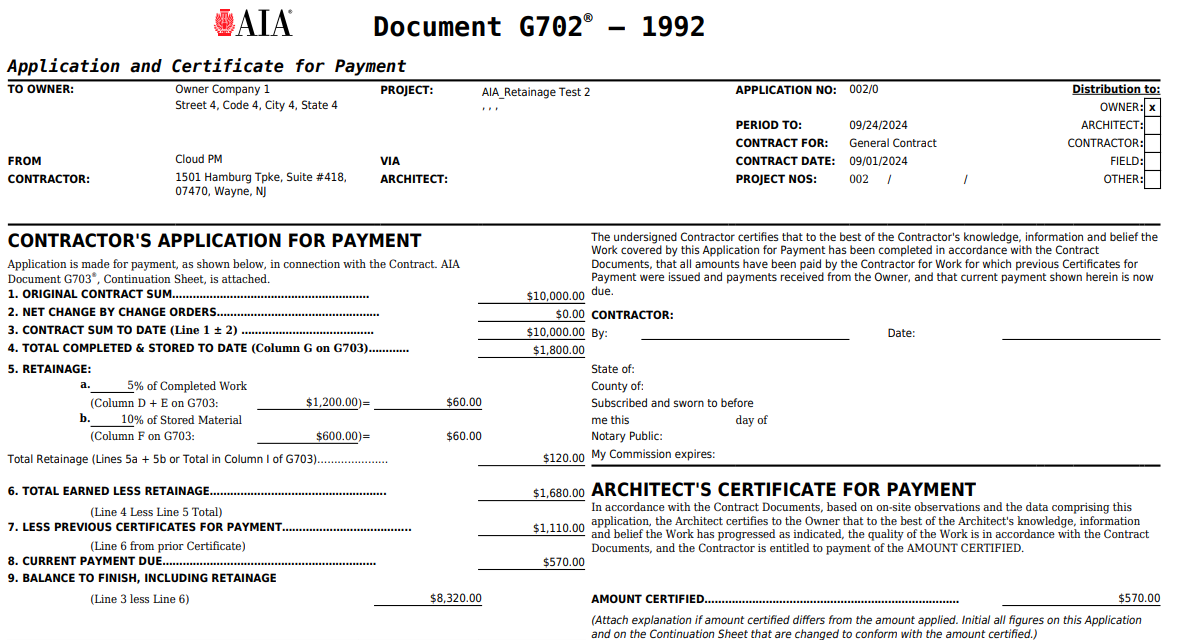
In the construction/engineering space, an AIA invoice (often called an “Application for Payment” or “pay-app”) is a structured invoice format that mirrors the contract milestone schedule, progress percentage of work performed, and the retainage withheld.
NetSuite
Key characteristics
- It tracks progress to date: e.g., “Work Completed to Date”, “Less Previous Payments”, “Net Due this Application”.
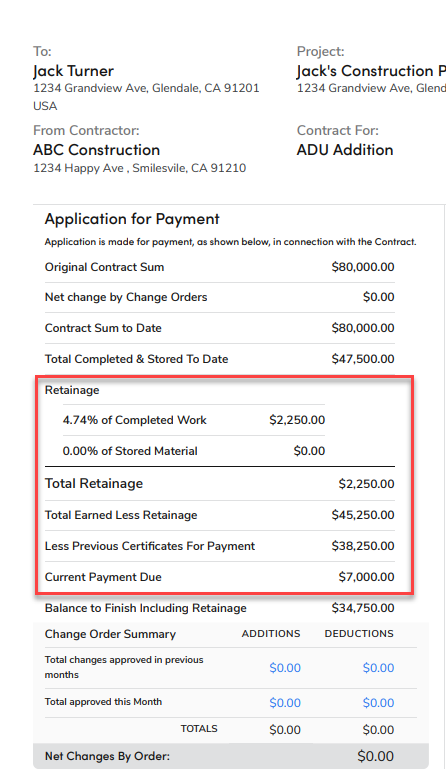
- It includes a line for retainage withheld (e.g., 10% of the amount) until completion/approval.
- It requires supporting documentation (e.g., certified payroll, lien waivers, inspections) before release of retainage.
- It aligns with contract terms and often ties to job cost codes, phases, allowances.
Why it matters for PeopleOps / finance
- Ensures transparency between field/project teams and accounting: progress reporting + billing align.
- Keeps cash-flow in check: you invoice for what you’ve earned, track what’s still withheld.
- Appropriately segments receivables (amount due now) vs amounts held in retention (asset on books) for accurate financials.
- Provides a professional standard (important when delivering to owners, GCs or external stakeholders).

What is Retainage (Retention) and Why It Is Critical
Definition & purpose
Retainage (or retention) is the portion of each progress payment that the project owner (or general contractor) withholds until certain milestones or project completion are satisfied. NetSuite+1
Typical percentages range from 5% to 10% of each billing. NetSuite+1
Purpose:
- Provides incentive for the contractor to finish the work properly.
- Gives the owner security in case of defects, incomplete work or defaults.
- Subcontractors often find themselves at the tail of this chain (they’re paid slower). Siteline
Accounting implications
- From the contractor’s perspective: Retainage you will only receive is a Receivable (asset), not just part of Accounts Receivable until it’s due. insightfulaccountant.com+1
- From the general-contractor’s perspective: Retainage you owe to subs is a Payable (liability), should not be lumped with normal Accounts Payable. insightfulaccountant.com+1
- If you invoiced the full amount but ignored the retainage withholding line, your aging reports and cash-flow forecasting become skewed. redhammer.io+1
Real-world scenario
Scenario:
A subcontractor (ElectricalCo) has a contract with a GC (BuildCorp). Contract value: USD 200,000. Retainage = 10%.
They bill progress every month. Month 1 billing: work done USD 40,000. Invoice shows USD 40,000, minus 10% retention = USD 36,000 net due now. USD 4,000 sits in Retention Receivable until completion.
If ElectricalCo fails to track the USD 4,000 separately, they may wrongly assume USD 40,000 cash incoming but actually only USD 36,000 arrives. This skews cash-flow planning.
Why Automate AIA-Style Invoices + Retainage Posting in QuickBooks
The pain-points of manual approach
- Manual invoice creation: entering details, tracking progress %, fees, retainage manually is error-prone.
- Separate spreadsheets or project-costing systems disconnected from accounting cause reconciliation issues.
- Retainage often not tracked properly, it may sit unrecorded, affecting financial statements and cash-flow visibility.
- When time comes to release the retainage (at project completion), many firms forget or delay, causing age-out or disputes. The Rollout Crew+1
- QuickBooks (and many general-purpose accounting tools) are not purpose-built for contract-level retainage, so unless configured carefully you lose visibility. Knowify+1
Automation benefits
- Generate invoices automatically when certain milestones are met (job cost system triggers invoice generation). AI tools can extract job completion notes and draft invoice entries. rapidformations.co.uk+1
- Automatically include the correct retainage deduction line and post the retained amount to a dedicated “Retention Receivable” account in QuickBooks.
- On project completion, auto-generate a retainage release invoice (receivable) or bill (payable) and apply the cash flow for the retained amount.
- Improve audit trail: because each invoice shows principal amount, retention deduction, net due and retention still outstanding.
- Better cash-flow visibility: finance team knows exactly how much is invoiced, withheld, due, collected.
- Reduce administrative burden: less manual journal entries, fewer errors, more time for strategic work.
QuickBooks capabilities relevant
- The “Free Invoice Generator” in QuickBooks supports AI-assisted invoice creation (via Intuit Assist). QuickBooks+1
- QuickBooks now includes AI agents to handle recurring invoices, task automation, and improved workflow. Firm of the Future
- Integration options (via third-party tools) exist to link project-management systems to QuickBooks for automatic posting. ConvergeHub
How to Design the Workflow (PeopleOps / Finance Collaboration)
Here’s a step-by-step workflow you can adopt. PeopleOps can play the role of process champion, coordinating between project teams, finance/accounting and the technology stack.
Step 1: Define contract terms & data capture
- Ensure every project contract captures definition of: billing milestones, retainage % (and any phase-by-phase variations), release conditions for retainage.
- Project team (PMs) capture job cost progress, percent complete, cost codes, change orders.
- Set up a job-level data sheet (in your project system) that marks when a billing milestone is reached (e.g., 30 % complete, inspection passed).
Step 2: Automate invoice generation
- When a milestone is achieved (project data updated), trigger invoice draft creation.
- The invoice template should be AIA-style: show total work done to date, less previous billings, less retainage, net due.
- The system (or AI tool) pulls client details, contract number, job cost code, description and pre-fills invoice.
- Retainage line item: automatically calculate (e.g., 10 % of amount) and apply deduction.
- Review and approve invoice (project/finance) then post/send to client.

Step 3: Posting into QuickBooks
- In QuickBooks, create dedicated Chart of Accounts entries: e.g.,
- Retention Receivable (Current Asset)
- Retention Payable (Current Liability) QuickBooks
- When the AIA invoice is posted:
- Gross amount of work (e.g., USD 100k) → Accounts Receivable.
- Deduction for retainage (-USD 10k) → Retention Receivable account.
- Net invoice amount (USD 90k) → what you expect to receive now.
- Set due date, terms, etc.
- When cash is received (USD 90k), apply payment to that invoice. The USD 10k remains in the Retention Receivable account.
- On release of the retention (upon completion/inspection): generate a Retention Release Invoice for USD 10k, which moves the amount from Retention Receivable → Accounts Receivable → when paid, becomes cash.
Step 4: For payables (if you’re the GC holding retention on subs)
- When paying a sub’s invoice with retention: you post gross work (e.g., USD 50k) → Accounts Payable. Retainage line (-USD 5k) → Retention Payable. Net payment USD 45k.
- On sub’s retention release: post a Bill or Journal Entry to move USD 5k from Retention Payable to Accounts Payable (or pay when due). redhammer.io+1
Step 5: Reporting + cash-flow review
- Finance team should run periodic reports showing:
- Retention Receivable balance (how much you’re owed but withheld).
- Retention Payable balance (how much you owe to subs).
- Aged retention: how long amounts have been comfortable or overdue.
- PeopleOps should coordinate with project teams to flag when retainage release conditions are nearing, so that finance can prepare to invoice/pay.
- Use dashboards or KPI trackers: e.g., number of projects with > 90 days retention outstanding; retention as % of contract value; average time to release.
Step 6: Best practices & governance
- Embed retention release as part of project close-out checklist (after punchlist resolution, lien waivers, inspections). The Rollout Crew
- Clearly communicate retention terms to all stakeholders (owners, GCs, subs) so expectations are aligned.
- Train accounting and project teams on retention workflows and terminology.
- Avoid treating retention as “extra profit”, it’s earned revenue/owed liability and must be tracked.
- Periodically reconcile retention accounts and audit for accuracy (especially if many jobs).
How PeopleOps Can Drive This in Your Organisation
As a PeopleOps or operations-enablement function, you’re well-positioned to lead this change because you intersect people + process + tech. Here’s how you can help:
- Process mapping and standardisation
- Map current invoice/retainage workflows (field → PM → billing → accounting).
- Identify pain-points (manual entries, spreadsheets, missing job data).
- Define standard workflow for AIA-style invoicing and retention posting.
- Technology enablement
- Evaluate tools: job cost/project systems that integrate with QuickBooks.
- Work with accounting/IT to set up QuickBooks chart accounts for retention.
- Pilot AI/automation tools for invoice generation (for example, using QuickBooks’ AI features).
- Training & change management
- Train field/PM teams on capture of milestone/job data (so invoices can be automated).
- Train finance/accounting teams on retention posting, reporting and reconciliation.
- Create job-aid documentation: how to invoice, what is retainage, how to release.
- Governance & monitoring
- Set KPI targets (e.g., “retainage < 5% of contract value still outstanding beyond 60 days after completion”).
- Schedule regular check-ins (monthly) to review retention ageing, invoice status, close-out delays.
- Ensure alignment between project operations and finance: trigger alerts for retention release events.
- Continuous improvement
- Collect feedback from users: what slows down invoice/retainage workflows?
- Adjust template, automate further (e.g., linking punch-list completion to retention release).
- Monitor emerging tools (AI OCR, automation bots) for further gains.
Challenges & Considerations
- Data quality: Automation only works if job data (percent complete, cost codes, contract terms) is accurate. Garbage-in → garbage-out.
- Complex contracts: Some contracts have variable retention rates, phased retention, or special terms; your logic must support that. Siteline
- Integration gaps: Many project systems may not seamlessly integrate with QuickBooks. Custom connectors or middleware may be required. ConvergeHub
- Cash-flow implications: Retention ties up cash. Even with automation, you still must manage the impact on working capital.
- Change management: Teams may resist new workflows; PeopleOps must facilitate buy-in, training, and ongoing support.
- Compliance/regulation: Especially in public projects, state laws may regulate retention limits and release timelines. Construction Coverage
Summary & Key Takeaways
- AIA-style invoices and retainage are standard in project-based industries. Properly handled, they give clarity to progress billing and ensure contract terms are met.
- Retainage must be tracked distinctly in the accounting system (Retention Receivable or Payable), not lumped into normal AR/AP.
- Automation (AI invoice generation, integration to QuickBooks) can dramatically reduce administrative burden, increase accuracy and improve cash-flow visibility.
- PeopleOps can be the enabler: defining processes, training teams, aligning project operations with finance, monitoring performance.
- The ultimate goal: invoices that reflect real-world progress, correct posting in QuickBooks, minimal delay in retainage release, and cleaner financials.
Leave a Reply