
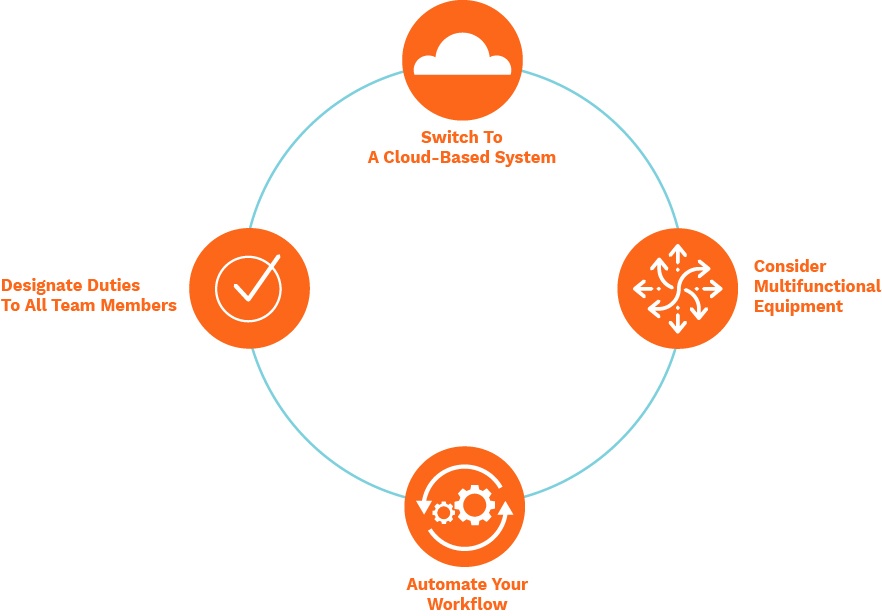


Introduction
In the world of People & Operations (PeopleOps), one of the strongest levers we have is workflow automation, turning repetitive, manual tasks into streamlined, tech-enabled operations. In this blog, I’ll walk you through how we at [your organisation] managed to automate about 50% of our internal workflows, the challenges we encountered, how we scoped and executed it, and how PeopleOps was central to this transformation. The idea is to speak both to the technical reader (process-mapping, integration, tooling) and the business reader (cost savings, employee experience, scalability).
Why automation was especially important for us
Before we started this journey, we faced many of the common pains:
- Many tasks in PeopleOps (onboarding, leave approvals, data entry, internal ticketing) were manual, forms in Google Sheets, emails back and forth, spreadsheets being updated by hand.
- Because of this, teams were spending too much of their day on “process work” instead of strategic work, e.g., measuring team health, improving culture, designing policies.
- As we scaled (hired more people, more processes), these workflows became bottlenecks. Automation is no longer optional: studies show that workflow automation can improve efficiency by 40-60% and reduce manual errors up to 90%. feathery.io+1
- From a business point of view, automation enables faster turnaround (for example onboarding faster, approvals faster), better accuracy (fewer mistakes in forms, fewer follow-ups), and better user satisfaction (internal employees rather than customers). NetSuite+1
- In PeopleOps specifically, automation creates more time to focus on high-value work: talent strategy, culture initiatives, insights.
Thus, we decided to set up a project to automate half of our internal workflows over a defined period.
What we mean by “internal workflows”
By internal workflows we refer to repeatable sequences inside HR/PeopleOps, and cross-functional with other departments, where data flows between people/tools, approvals/handoffs happen, and the process is predictable. Some examples in our scope:
- New-employee onboarding: forms + equipment assignment + access provisioning + orientation scheduling
- Leave/absence request & approval
- Expense reimbursement routing
- Internal project-request approvals (e.g., a team wants new software, budget sign-off, vendor onboarding)
- Document review and archive (policies, contracts)
- Employee off-boarding
These are not one-off projects or high-variability processes; they are well-defined and repeatable, making them good candidates for automation.
How we scoped “50% of workflows” and got buy-in
1. Inventory of workflows
First step: we conducted a workshop with PeopleOps, Ops, IT and other stakeholders to map all the workflows we handled. We created a list of ~40 workflows. For each workflow we captured:
- Frequency (how many times per month/year)
- Manual effort (FTE hours)
- Pain points/bottlenecks (delays, mistakes, complaints)
- Stakeholders involved
- Tools currently used (spreadsheets, email, form, separate systems)
- Whether the workflow was documented or ad-hoc
2. Prioritisation
We scored each workflow on criteria: volume, pain (cost of manual), feasibility of automation, strategic value (employee experience, scalability). We selected the top ~20 workflows (≈50% of total identified) to automate in the first phase, the “50% of workflows” target.
3. Business case and buy-in
We created slides showing:
- Time savings estimates: e.g., “If we automate this workflow, we save ~120 hours/year”
- Cost savings: converting hours to cost of FTEs
- Qualitative benefits: fewer errors, better speed, better experience for staff
- Risk mitigation: fewer delays, better compliance
- Timeline: how long the automation project would take
- Dependencies: IT support, data access, tool licensing
We presented this to senior leadership (HR Head, CFO, COO) and got approval for budget/time.
Our automation architecture & tooling
Tools
We selected a low-code workflow automation platform (with integration capabilities) rather than building everything from scratch. This allowed us to connect people, tools (email, Slack, HRMS, spreadsheets) with minimal custom coding. Given trends in 2025, low-code / no-code + workflow orchestration is increasingly important. psglobalconsulting.com+1
Architecture
- Trigger: a form submission, an email, or a status change in HRMS
- Workflow engine: the automation tool routes tasks, sends notifications, escalations, performs data update
- Integrations: e.g., HRMS ↔ IT access system, spreadsheets ↔ reporting dashboard
- Monitoring & dashboard: For visibility, we built dashboards to view progress, bottlenecks, metrics
- Change management: We built standard operating procedures (SOPs) and trained stakeholders
Example Diagram
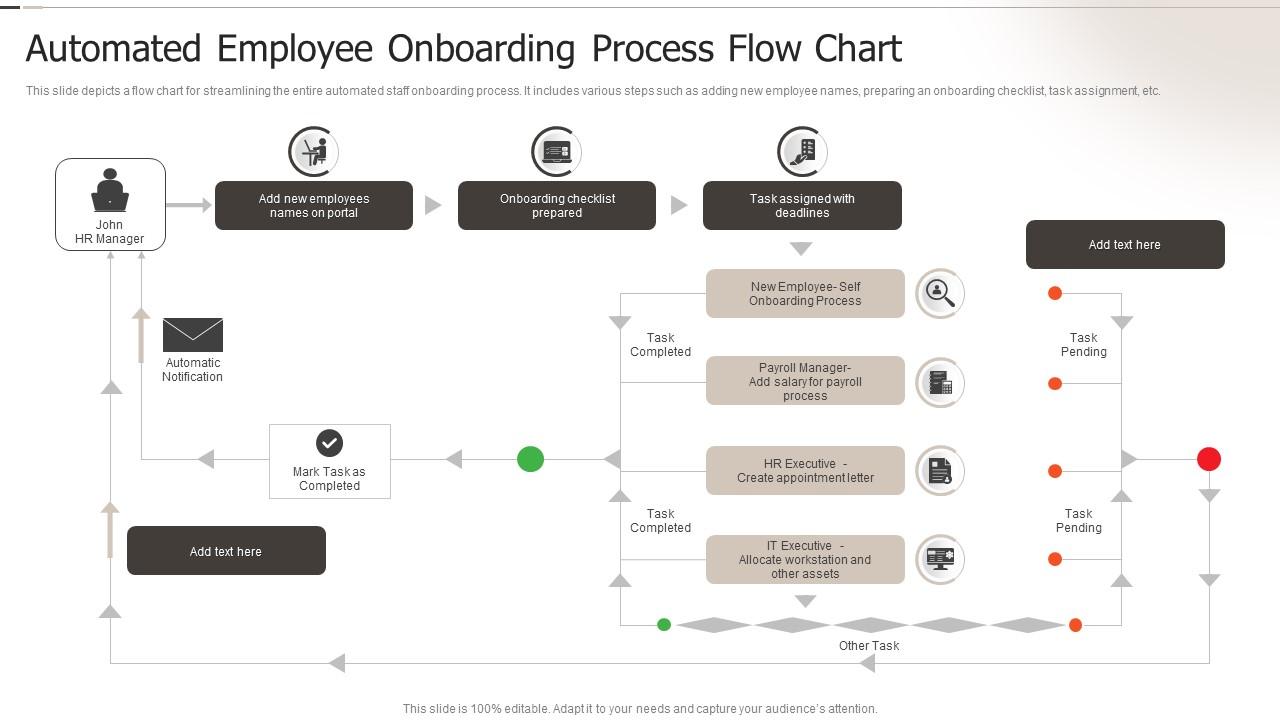
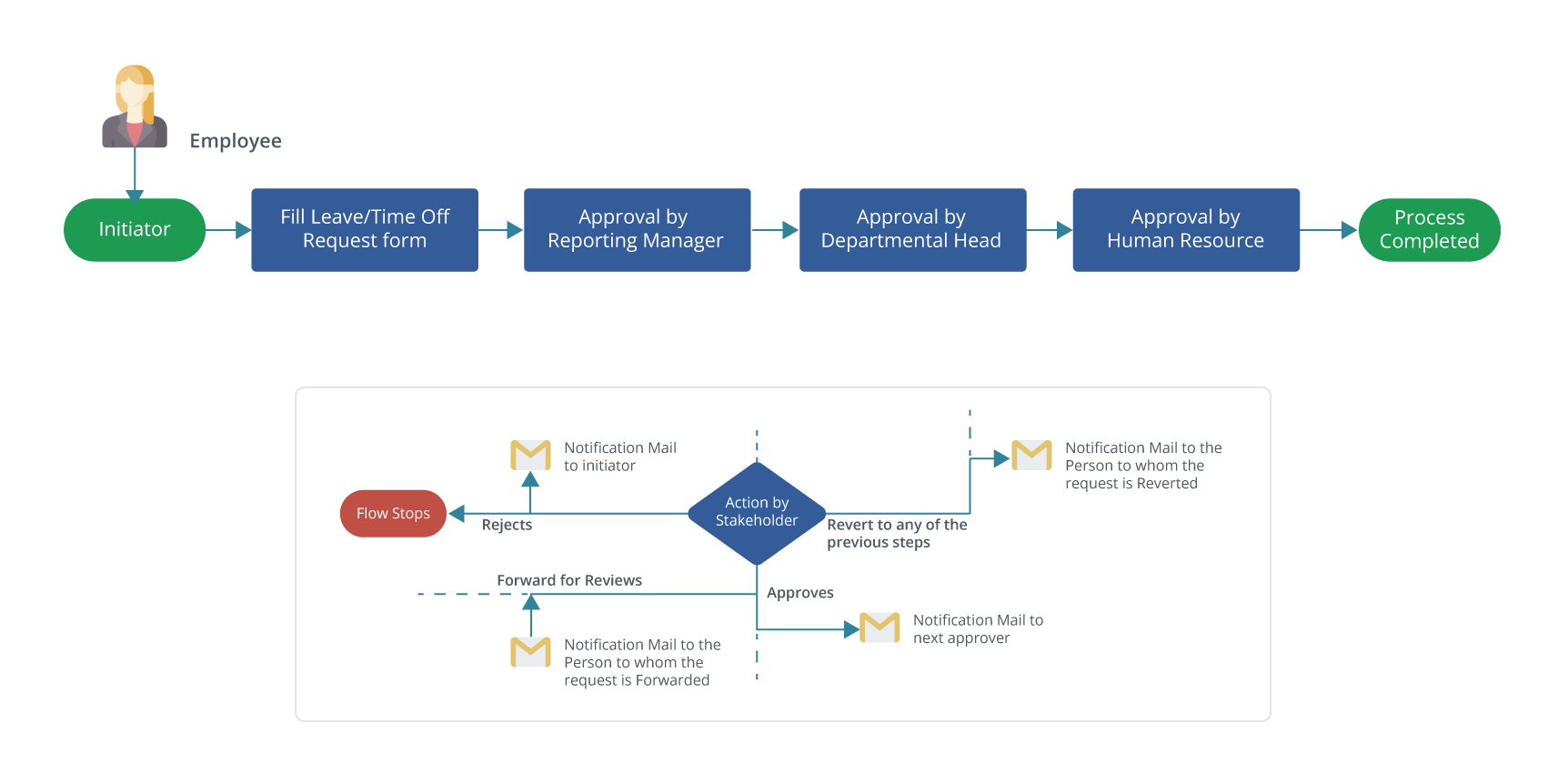
Implementation – Real-world scenario: Onboarding automation
Let’s walk through one concrete workflow: New-employee onboarding.
Before automation
- HR fills a Google Sheet with new hire info
- HR emails IT to create accounts, order equipment
- Manager circulates welcome email manually
- Training team schedules orientation manually
- HR sends welcome pack and other forms via email; manual reminders follow if forms aren’t filled
- Delays: IT setting up account often happens days late; tracking is manual, and reporting is minimal.
Pain points
- Manual coordination among HR/IT/Manager/Training → delays
- Lack of visibility: no single dashboard to track who has completed what
- Mistakes: missing forms, wrong equipment, access delay
- Employee frustration: first day not fully ready
After automation
- HR completes standard “new hire” form (trigger)
- Workflow engine kicks off:
- sends tasks to IT: create accounts, set access, schedule equipment
- sends tasks to Procurement: order / reserve equipment
- triggers welcome email to new hire + manager
- sends training scheduling workflow to Training team
- sets automated reminders every 24 hours for outstanding tasks
- updates dashboard with statuses
- Over the next few months we measured:
- Onboarding time reduced by ~40% (from ~5 days to ~3)
- First-day access fully ready in ~90% of cases (up from ~60%)
- Reduced manual emails by ~70% in the workflow
Results
This one workflow alone freed ~200 hours/year of manual work across HR/IT/Training. It improved new-hire experience and reduced risk of delays. This was one of the top workflows in our first 20.
Key results & metrics
After rolling out the first phase, we tracked KPIs:
- ~50% of selected workflows automated (≈20 workflows out of ~40)
- Total estimated manual effort removed: ~2,500 man-hours/year
- Error/latency reduction: We observed fewer missed approvals, fewer delays, qualitative reports from teams improved
- Employee satisfaction: Internal survey indicated that employees felt “processes are smoother”
- Scalability: Our PeopleOps team could handle greater volume of hiring/leaving without commensurate increase in headcount
These results align with industry data: workflow automation improves efficiency by 40-60%. feathery.io+1
Challenges & how we overcame them
No project of this scale is without bumps. Here are some of the key challenges and our responses:
- Resistance to change: Some team members were accustomed to manual steps and weren’t comfortable with the “new way”.
Solution: We ran workshops, created documentation, had early adopters champion the change. - Legacy systems & integration hurdles: Some tools didn’t have easy APIs, spreadsheets were scattered, some processes were semi-ad hoc.
Solution: We mapped dependencies carefully, worked with IT to build connectors or replace systems gradually. - Scope creep: Once stakeholders saw early wins, they wanted more workflows added, which risked delaying the project.
Solution: We maintained a backlog and pipeline for phase 2; we locked down the first 20 workflows to hit the “50%” target on time. - Maintenance of automated workflows: Automation is not “set and forget”. We found that workflows change when business rules change, tools evolve, etc. Research shows that maintenance of workflows is a hidden cost. arXiv+1
Solution: We built a governance model and assigned owners for each workflow, with periodic review of rules.
Role of PeopleOps in making this happen
Here’s how PeopleOps played a pivotal role:
- Process-owner mindset: We were not just “users” of automation tools; we mapped processes, defined SLA metrics, and owned continuous improvement.
- Cross-functional coordination: PeopleOps bridged HR, IT, Training, Procurement, we brought stakeholders together, defined roles, mapped end-to-end.
- Employee & culture focus: The automation programme wasn’t just “tech”, we framed it as “better employee experience, fewer frustrations, more time for meaningful work”.
- Measurement & storytelling: We tracked metrics and communicated wins to leadership and teams, building momentum.
- Scalability & future-proofing: We set up the structure to roll out further waves of automation, PeopleOps ensured the workflows were documented, owners assigned, and improvements tracked.
Lessons learned & tips for other PeopleOps teams
If you’re considering a similar journey, here are some practical takeaways:
- Start with high-impact workflows: Choose workflows that occur often, have high manual burden, involve multiple stakeholders. Early wins build credibility.
- Map the current state first: Don’t skip the “as-is” mapping. You need to understand handoffs, roles, tools, and pain points.
- Involve stakeholders early: Get buy-in from IT, Finance, Procurement, etc. Automation affects many teams.
- Don’t over-customise: Using low-code platforms helps you implement faster. Avoid building heavy custom code initially.
- Focus on user experience: For internal workflows, employee perception matters. If the process feels better, adoption increases.
- Governance and maintenance are crucial: Automated workflows will need updates if business rules change. Assign owners and monitor them.
- Measure & communicate: Track metrics (hours saved, error reduction, speed improvements) and share wins. That helps scale further waves.
- Expect some pain: Legacy systems, change resistance, data quality issues will surface. Plan for them.
- Plan for scale: Once you’ve automated some workflows, you’ll get requests for “what next?”. Keep a pipeline and prioritise.
Future plans: Beyond 50%
We’ve achieved ~50% of our identified workflows in the first phase. But we view this as a foundation, not the destination. Our future plans include:
- Automating more complex workflows (conditional logic, cross-department orchestration)
- Using AI/ML for semi-structured tasks (e.g., document processing, approvals) automation research indicates a move toward “intelligent automation” or “hyperautomation”. Wikipedia+1
- Extending dashboards and real-time analytics to monitor workflow health, bottlenecks, trends
- Embedding automation into the culture so that new workflows are “automation-by-default” rather than afterthought
- Scaling the PeopleOps team’s capacity by taking advantage of the freed-up bandwidth from manual work
Conclusion
Automating ~50% of our internal workflows has been one of the most impactful initiatives in our PeopleOps practice. It freed significant manual effort, improved accuracy, delivered faster turnaround for employees, and positioned our People function to be more strategic rather than operational.
For any organisation looking to take a similar step: start with mapping your workflows, pick the high-impact ones, engage stakeholders, pick the right tools, and build governance for maintenance. With intention and execution, you’ll not only improve operations, you’ll improve the experience of your employees and the business as a whole.
If you’d like to know more about how we selected tools, managed change, or measured outcomes, I’d be happy to share an in-depth case or framework.
Leave a Reply